Adobe calls firing inconsistently after onetrust implementation | Community
Skip to main content
Level 2
April 9, 2024
Solved

Adobe calls firing inconsistently after onetrust implementation

  • April 9, 2024
  • 1 reply
  • 3074 views

I recently implemented onetrust on my website. The set up is the user requires to opt in to for the cookies to be dropped and analytics calls to fire. Once the accepts all or performance cookies the Adobe analytics and ECID cookies drop, dataLayer loads but the AA calls don't fire consistently. Sometime they fire and sometimes they don't. Out of 10 page reloads it AA calls fire approx. 4 times. It's clear that the tags work but there is something prevents it from firing in certain cases. I suspect it is a timing issue. 


  • The onetrust banner fires Library load (page top) 
  • We have a data element for previous permissions 
  • And rule with the onetrust function that opts in or out based on the user intraction on the banner 
  • Onetrust group each rule belongs to


Can someone help me understand why the AA calls fire in some cases and do not in other? Do I add a banner directly to the website instead of doing it via launch? 
This post is no longer active and is closed to new replies. Need help? Start a new post to ask your question.
Best answer by Jennifer_Dungan

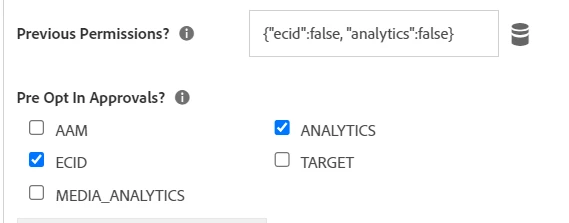
So my demo site, I didn't have anything like OneTrust, so I just pre-set my permissions to false (but obviously you would want to use your controller to remember settings between visits):


(again, remember that this was all just demo data)


Now, this would control my opt-in out settings, and this for me defaulted to "false", but this only controls the ECID, as it's part of the Visitor Service Extension.. 


But for my Analytics Rules, I still had to add conditions to allow tracking if I wanted to stop analytics from firing completely...


Something like:

if (adobe.optIn.isApproved("analytics")){ return true; }


But that is only IF I didn't want analytics to fire...  If I still want tracking, without the ECID this wouldn't be needed.


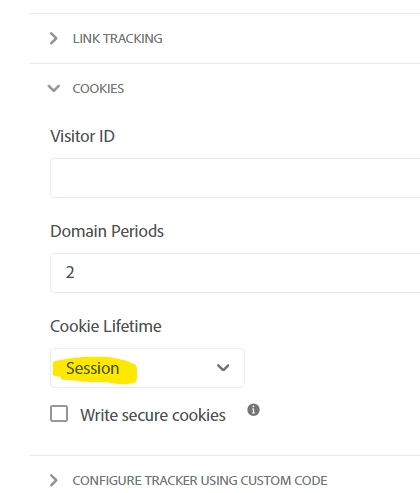
But since without the ECID, the old s_vid cookie will be set, and there seems to be no control on that one, I suggest changing the cookies in Analytics to "Session":


This should make sure that s_vid doesn't stick around as a fingerprinting cookie.


But test this, to be sure you are matching your company's policy.

1 reply

Jennifer_Dungan
Community Advisor and Adobe Champion
April 9, 2024

While I haven't actually implemented this, I have done some playing with the settings.


My first question is, the policy you are checking is only around cookies? Have you considered having tracking occur without the cookies, then setting the cookies after the user has opted in? Basically the ECID plugin has Opt-In logic available, and for the old s_vid cookie you can set that to be session level (thereby not really a fingerprinting cookie any longer). Once the user accepts cookies, the ECID can be set and should stitch into Adobe via the temp s_vid cookie, and if the user doesn't accept, you still can track traffic, but without tracking the returning user (who should be treated as new).


I suspect you are right about a timing issue, but without seeing what is happening it could be harder to help.


Would you be willing to share a URL to your website (even if it's directly in a Private Message and not posted publicly)? 

at9191Author
Level 2
April 9, 2024

Hello Jennifer! 


What type of logic will I need to use in the ECID extension to fire analytics calls without using cookies? If aa and ecid is set to false will AA calls still fire? 


Let me just confirm if that is allowed. It is not on a public website at the moment. If I can share it via a private message. Thank you! 


Thanks!

Jennifer_Dungan
Community Advisor and Adobe Champion
Jennifer_DunganCommunity Advisor and Adobe ChampionAccepted solution
Community Advisor and Adobe Champion
April 9, 2024

So my demo site, I didn't have anything like OneTrust, so I just pre-set my permissions to false (but obviously you would want to use your controller to remember settings between visits):


(again, remember that this was all just demo data)


Now, this would control my opt-in out settings, and this for me defaulted to "false", but this only controls the ECID, as it's part of the Visitor Service Extension.. 


But for my Analytics Rules, I still had to add conditions to allow tracking if I wanted to stop analytics from firing completely...


Something like:

if (adobe.optIn.isApproved("analytics")){ return true; }


But that is only IF I didn't want analytics to fire...  If I still want tracking, without the ECID this wouldn't be needed.


But since without the ECID, the old s_vid cookie will be set, and there seems to be no control on that one, I suggest changing the cookies in Analytics to "Session":


This should make sure that s_vid doesn't stick around as a fingerprinting cookie.


But test this, to be sure you are matching your company's policy.