Adobe Analytics Report Suites | Community
Skip to main content
July 16, 2018
Solved

Adobe Analytics Report Suites

  • July 16, 2018
  • 4 replies
  • 5611 views

Hello,

Seeking some advise on Adobe Analytics Report Suite configuration.

If there are 2 report suites present (One report suite for Web and the other for Mobile app), would it be best practise to create a global report suite to capture both data in one?

or is it best to keep them separate?

Curios to find out what everyone's experience/advise is.

Cheers,

This post is no longer active and is closed to new replies. Need help? Start a new post to ask your question.
Best answer by jeff_bloomer

Hello there!

The best reason for merging the two into one report suite is the ability to eventually view activity by person instead of unique devices.

https://marketing.adobe.com/resources/help/en_US/sc/implement/xdevice_visid.html

Another benefit of merging is being able to track a hybrid mobile experience, where the user starts out in your app, is linked from the app to web content and then returns to the mobile app.  Currently, two report suites will not allow you to follow the user's flow from one to the other.
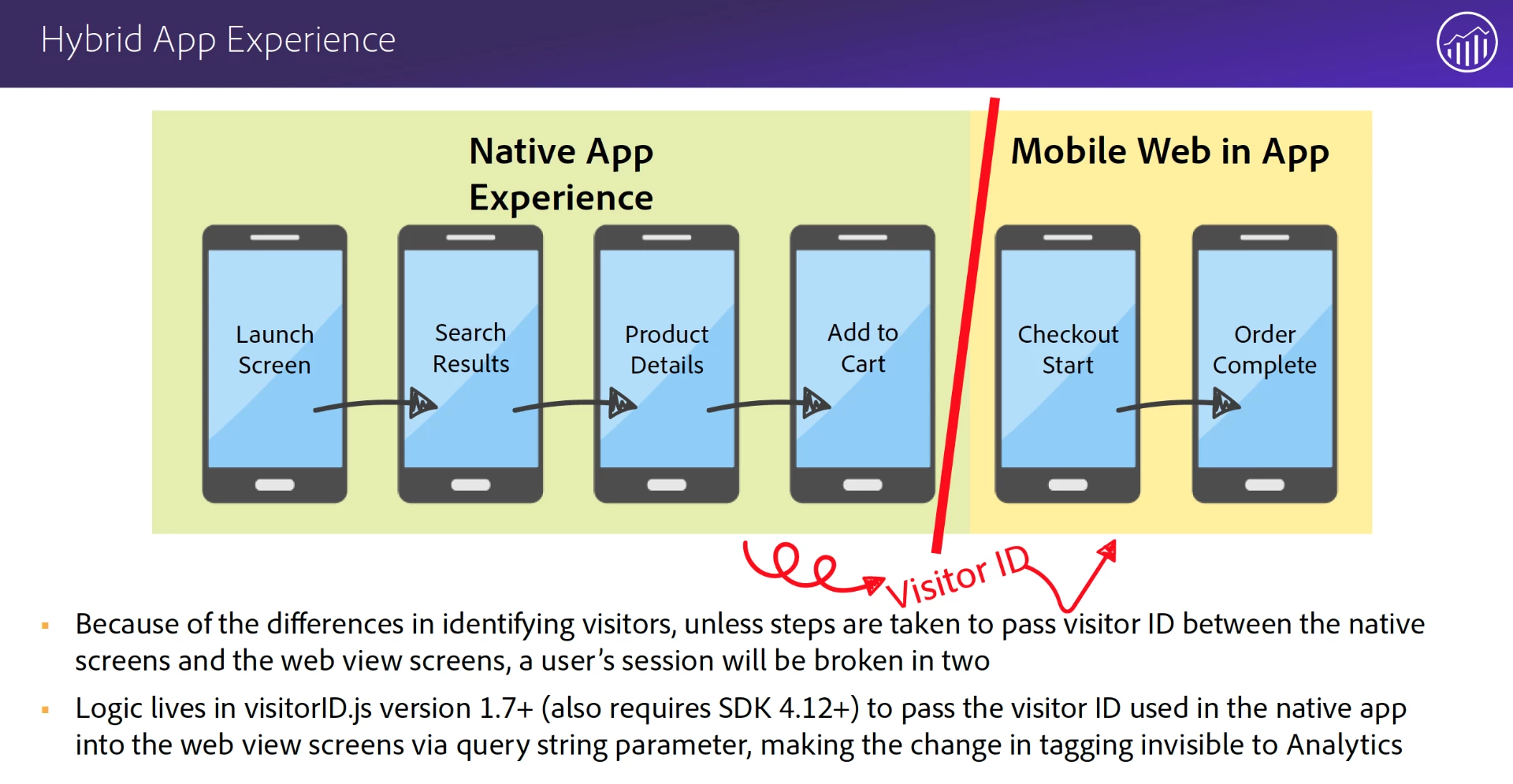
(Image credit: Adobe Consulting)

As long as you have implemented them in a similar way, it will be a lot easier.  Just make sure you have an eVar that identifies which environment the tracking calls are coming from.  Another thing to keep in mind is handling historical data.  If you decide to merge one report suite into the other, whichever suite you end up choosing, you will need to make sure it is formatted as a Mobile report suite, plus, you will want to run in parallel with the other existing suite for 13 months so you can capture year over year, then drop the other report suite.

If you end up moving both web and mobile into a brand new report suite, you will have to fire secondary calls in order to maintain a year's worth of data for both original report suites until you have enough historical data (again, 13 months).  Or, if you're not worried about historical data, you can skip that step.

The points above about creating virtual report suites are valid and can be useful to you if the business asks for it.

4 replies

July 16, 2018

generally yes - although that is with the assumption that both track information in the same ways, ie, props/eVars/events etc are consistent between report suites

July 19, 2018

Dear Winston,

It would be great if you can have a global report suite associate to capture both the data. Once you create single report suite for both the instance you can use multiple "Virtual Report Suite" based on the requirement by applying the segments to differentiate the website and mobile and other sub-directories.

If you create multiple report suite for account, please remember you can use up to "1000" report suite per account and that too will not delete the report suite once created.

Thanks,

Vijay

jeff_bloomer
Community Advisor and Adobe Champion
jeff_bloomerCommunity Advisor and Adobe ChampionAccepted solution
Community Advisor and Adobe Champion
July 19, 2018

Hello there!

The best reason for merging the two into one report suite is the ability to eventually view activity by person instead of unique devices.

https://marketing.adobe.com/resources/help/en_US/sc/implement/xdevice_visid.html

Another benefit of merging is being able to track a hybrid mobile experience, where the user starts out in your app, is linked from the app to web content and then returns to the mobile app.  Currently, two report suites will not allow you to follow the user's flow from one to the other.
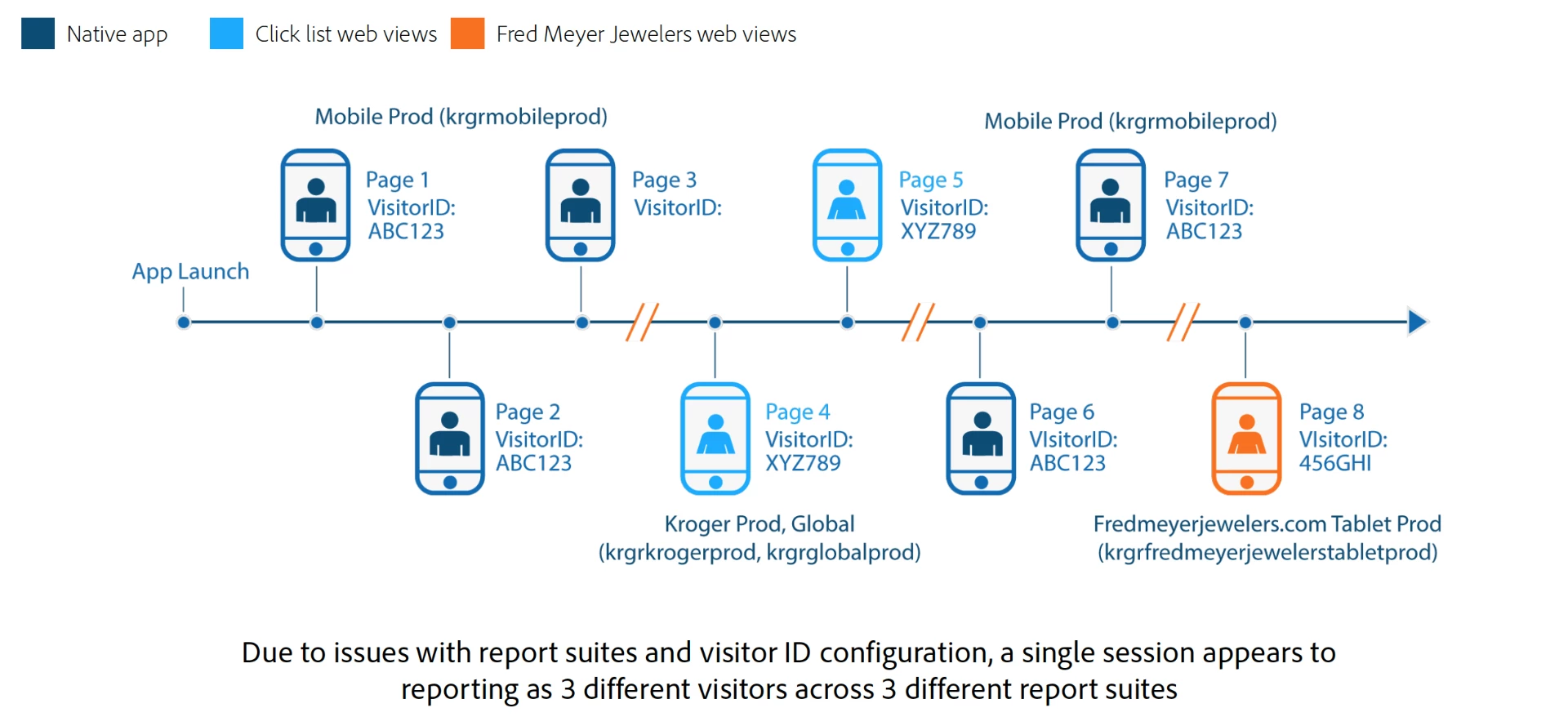
(Image credit: Adobe Consulting)

As long as you have implemented them in a similar way, it will be a lot easier.  Just make sure you have an eVar that identifies which environment the tracking calls are coming from.  Another thing to keep in mind is handling historical data.  If you decide to merge one report suite into the other, whichever suite you end up choosing, you will need to make sure it is formatted as a Mobile report suite, plus, you will want to run in parallel with the other existing suite for 13 months so you can capture year over year, then drop the other report suite.

If you end up moving both web and mobile into a brand new report suite, you will have to fire secondary calls in order to maintain a year's worth of data for both original report suites until you have enough historical data (again, 13 months).  Or, if you're not worried about historical data, you can skip that step.

The points above about creating virtual report suites are valid and can be useful to you if the business asks for it.

July 27, 2018

Thank you for the response. It's really helpful.