Adobe Analytics Dimensions and Measures missing in Power BI | Community
Skip to main content
September 30, 2020
Solved

Adobe Analytics Dimensions and Measures missing in Power BI

  • September 30, 2020
  • 1 reply
  • 2041 views

I am working in Power BI to import data from an Adobe Analytics project.


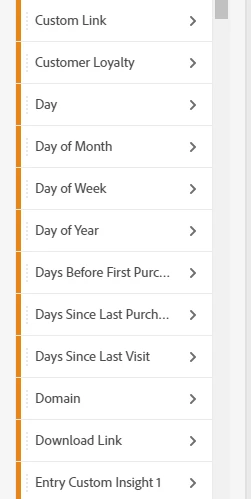
A few issues - I have a dimension called "Download Link" in adobe analytics, and it is not showing up in the power bi connector list.

Adobe Analytics : 
 

Power BI:
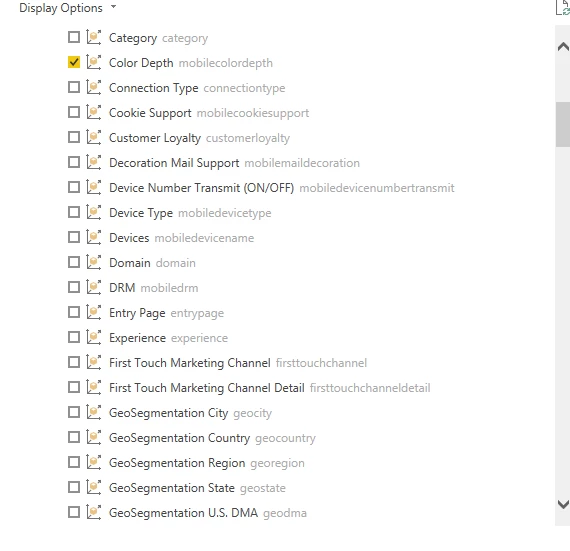
A workaround for measures was to create a new measure based off the one that was missing in power bi, but i can't simply create a new dimension.


Also somehow in another adobe analytics query i pulled for the same exact date range as adobe analytics, i am getting less "visits" (page views) in power bi than what i am seeing in Adobe Analytics... how is this possible. 


Thanks for any help.


This post is no longer active and is closed to new replies. Need help? Start a new post to ask your question.
Best answer by shesingh
Download link, custom & Exit links are not available in Power BI. As a workaround, you can create a report in report builder and publish it to power BI.

1 reply

shesinghAdobe EmployeeAccepted solution
Adobe Employee
September 30, 2020
Download link, custom & Exit links are not available in Power BI. As a workaround, you can create a report in report builder and publish it to power BI.
kkrol93Author
October 20, 2020
Report builder isn't going to work, don't have the capacity to be exporting and rerunning this report on a daily basis. Need direct data connection to Adobe Analytics. Is there no way to create a custom dimension? it seems like my organization has already created custom dimensions, i just can't figure out how. I think if i create a custom dimension based off of "Download Link" it will show up in power bi as i have done this for the metrics that are not showing up such as Download Link instances. Thanks.