Adobe analytics data is not getting populated in workspace for UK, NZ and AU domains | Community
Skip to main content
Level 2
March 10, 2023
Solved

Adobe analytics data is not getting populated in workspace for UK, NZ and AU domains

  • March 10, 2023
  • 2 replies
  • 3421 views

I have implemented adobe analytics 5 domains UK, AU, NZ, USA & CA under one property. Suddenly, adobe analytics stopped populating data for UK, AU, and NZ domains for non-mobile devices. The data is available for mobile devices for the /UK, AU, and NZ domains. And it is working fine for both mobile and non-mobile devices for USA and CA domains. It would be great if someone helps me out on this issue


PS - Network hits for those domains are 200OK also the data is shown in the cloud debugger

This post is no longer active and is closed to new replies. Need help? Start a new post to ask your question.
Best answer by yuhuisg

I strongly suggest that you set your cookie domain periods, otherwise it defaults to 2, and that won't work with domains that have 3 periods. See https://experienceleague.adobe.com/docs/analytics/implementation/vars/config-vars/cookiedomainperiods.html?lang=en

2 replies

Jennifer_Dungan
Community Advisor and Adobe Champion
March 10, 2023

It's possible that while the network calls are being made (i.e. data is being sent to Adobe), the dimension that is holding your domain name isn't properly being populated? Or maybe you are sending to the wrong suite (a dev suite? the wrong suite name? etc)


Try looking at that server call more closely.. if you aren't as familiar at reading the parameters, you can try to compare against a server call that is working so that you can compare what is the same and what is different.


If you look at your data (without the server breakdown), does the total look like its only capturing the sites that also show data, or are the values significantly higher? This would be a clue that the server dimension isn't populating properly and that is the best place to start your investigation... if the totals are still low, then dig deeper into the suite that you are sending data too....  Make sure that it is sending to the correct suite... it could be the smallest typo too...


If I take our tracking calls and add "fakesuite" to the end of our suite name... I know this doesn't exist in Adobe, but the tracking call still returns a 200 response code... basically, Adobe doesn't use that information as part of the domain resolution, they just use it to process the data to the correct client suite.... 

(so let's say my suite is "testingsuite", and when I change it to "testingsuitefakesuite" both calls "work", but only one will send data into my actual suite)

S_K_3_11Author
Level 2
March 11, 2023

Thanks, Jennifer for the reply.

The script tag implemented on all domains is the same, and we are capturing the data in a single report suite. So, the data is not going to a different report suite.y


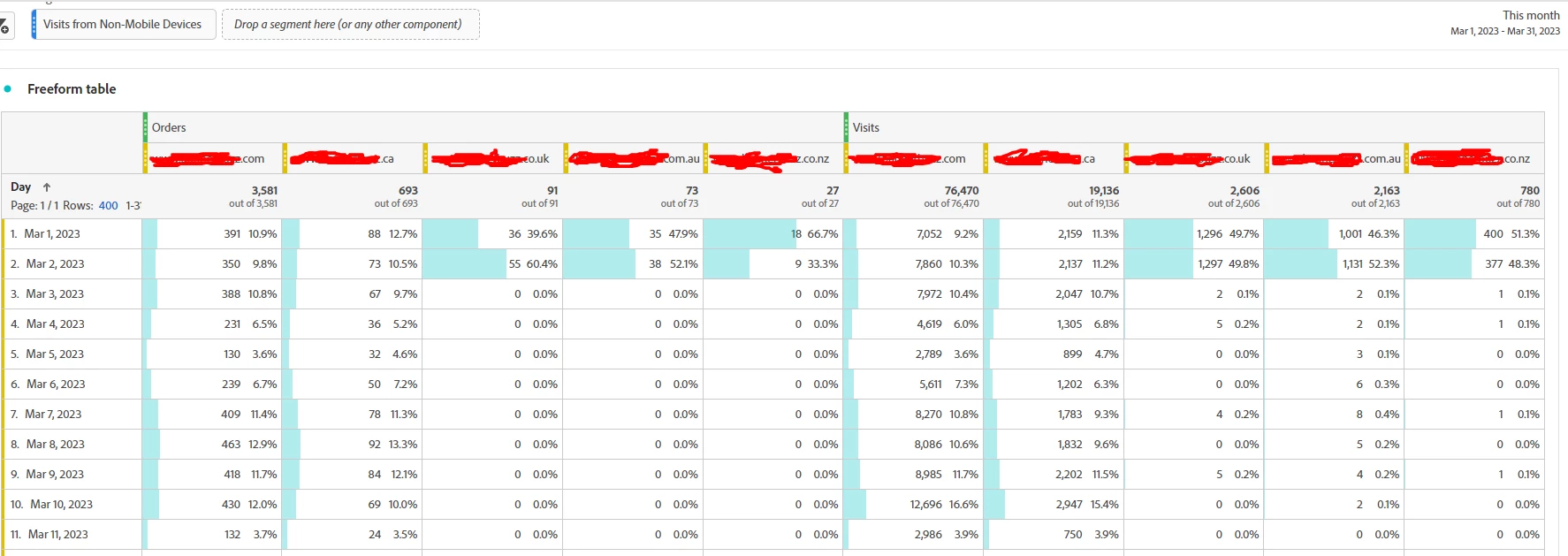
I have observed a drop in numbers for overall level data too. In addition to that I have had to monitor order details for a day. I have placed multiple orders on UK, AU, and NZ domains. Then I store screenshots for reference and check the order id present in the screenshot in adobe workspace. And found that those details are not present in the adobe workspace. I also check those order IDs with backed data.


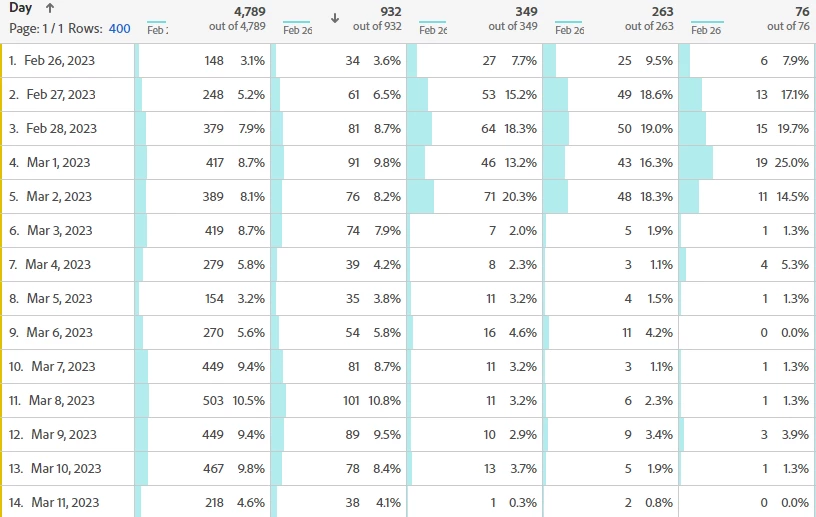
If you see the below screenshot, the numbers were captured for some days and the drop was observed from the 3rd of march because the nonmobile devices data is not getting populated.


Also, I compared server calls, the only difference between them is cookie support. and I don't thinks it could be the reason as data is being captured for mobile devices.

UK, AU, & Nz - Cookie support disabled
US, CA - Cookie support enabled


So, I am getting confused if I had not changed my setup. Network hits are passed to adobe as per the console and cloud debugger. Then why the data had stopped populating on the dashboard?

Jennifer_Dungan
Community Advisor and Adobe Champion
March 11, 2023

That is very odd.. is it just orders that are failing? Are other metrics impacted?


If other orders are impacted, would you be willing to share one working and one non-working domains with me? (PM would be fine if you don't want to share here)


Also, this is a long shot... but if you are using a PurchaseID as a Unique Recording ID on your orders, can you confirm that those sites aren't reusing codes that have been used already on the other sites...


Since some data is getting through... (albeit very small amounts), I wonder if the issue could be Adobe seeing a repeated purchaseID value and ignoring the order as a "duplicate"?? Remember, purchaseID is limited to 20 characters... it could be that you have more than that and the end is truncated, and therefore lots of purchases could be lost as they are actually different numbers that no longer look different?


https://experienceleague.adobe.com/docs/analytics/implementation/vars/page-vars/purchaseid.html?lang=en 


If you aren't near your 20 character limit, maybe try appending a letter or two to the start of the purchaseId to make it site specific?? (i.e. "us" + xxxx OR "uk" + xxx, etc) 

yuhuisg
Community Advisor
Community Advisor
March 11, 2023

Some questions from me:

  • Although you use the same implementation in all of your domains, is there anything that might have been set specifically for the AU/NZ/UK domains?
  • Is there a consent banner for the AU/NZ/UK domains and the US/CA domains? If so, is it the same consent banner tech in both sets of domains?
  • Have you set the cookie domain periods correctly? AU/NZ/UK domains normally have 3 cookie domain periods e.g. domain.com.au, domain.co.nz, domain.co.uk, whereas US normally has 2 e.g. domain.com (unlikely to be domain.com.us), and CA might have 2 as well e.g. domain.ca.
S_K_3_11Author
Level 2
March 11, 2023

Hi Yuhuisg,


  • The consent banner is present only on UK domain and not present on the AU, NZ, USA & CA domains
  • The cookie domain periods have not been configured in the launch property
yuhuisg
Community Advisor
yuhuisgCommunity AdvisorAccepted solution
Community Advisor
March 12, 2023

I strongly suggest that you set your cookie domain periods, otherwise it defaults to 2, and that won't work with domains that have 3 periods. See https://experienceleague.adobe.com/docs/analytics/implementation/vars/config-vars/cookiedomainperiods.html?lang=en

