Adobe Analytics configuration for Adobe Client Data Layer | Community
Skip to main content
Level 2
April 17, 2022
Solved

Adobe Analytics configuration for Adobe Client Data Layer

  • April 17, 2022
  • 2 replies
  • 5501 views

Hi, I am currently using the Adobe Client Data Layer to collect my page data, and I followed the setup for Analytics: Add Adobe Analytics. However, I am not able to see my data through the Adobe Experience Platform Debugger, the column "Page Name" is disappeared. My Data Element setup is like this: 
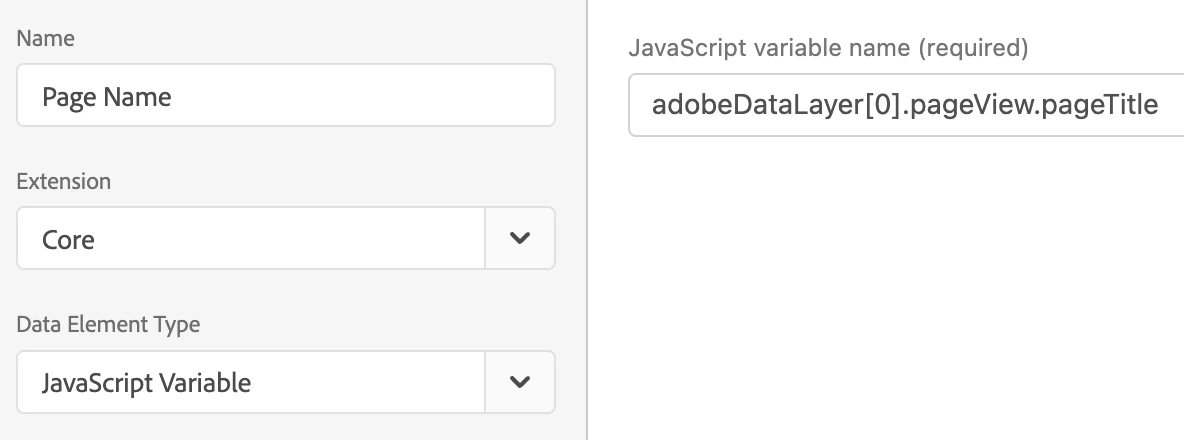


The JavaScript Variable works in my Browser Console, it always shows me the correct Page Name in the Console.


So how and what should I do to show the Page Name in the Debugger?


Any insights would be greatly appreciated!

This post is no longer active and is closed to new replies. Need help? Start a new post to ask your question.
Best answer by yuhuisg

You should use "pageView.pageTitle" as your Path.

I suggest that you read up on how ACDL works: https://github.com/adobe/adobe-client-data-layer/wiki

2 replies

Level 5
April 18, 2022

Hi @yz_j 


Simply create data element using custom code - return document.URL;


It is a simple way to capture the page URL. Let me know if this helps.


Thanks

YZ_JAuthor
Level 2
April 19, 2022

Hi Pankaj,


Thank you for helping!


Yes, that way works for page URL, but I want to get data from the 'adobeDataLayer' instead of the HTML file. For example, I have sent the following information to adobeDataLayer:


How can I get the pageName from the adobeDataLayer?


Thank you!

yuhuisg
Community Advisor
Community Advisor
April 19, 2022

Install the Adobe Client Data Layer extension in your property, then use that extension's Computed State data element to get your variable.

The JavaScript variable data element doesn't work because ACDL actually uses its own computed, internal data layer for determining values.

YZ_JAuthor
Level 2
April 20, 2022

Hi Yuhui, 


Thank you for the answer!


I have installed the Adobe Client Data Layer extension and configured the data element as followed:


However, I am still not able to see the data from the debugger, any suggestions for that?


Thank you!

YZ_JAuthor
Level 2
April 29, 2022

You can leave out the path. Notice that it's marked as "optional" in the UI.

By doing so, the entire data layer will be returned as a single key-value JavaScript object.

But personally speaking, I would take the trouble to setup all of the individual data elements. It would make the property more manageable in future, e.g. to re-use the same data element in more than one place, to change a data element's configuration, to identify where/how data elements are used in rules and extensions, etc. And it's a "one-time job", so no further effort is needed (hopefully) after the initial pain of setting up the hundreds of them.


Thanks Yuhui!