Admin console: Do not send welcome email to new user | Community
Skip to main content
Level 2
March 31, 2021
Solved

Admin console: Do not send welcome email to new user

  • March 31, 2021
  • 1 reply
  • 1239 views

Hi, recently i created a few reports which i would like to distribute within my company. In order to set the monthly delivery of them directly from Adobe Analytics in pdf format, I should add new users from the admin console. But, I do not want these new users to know they have access to the tool, the purpose is only to deliver reports in pdf format. So, I would like to create new users without sending the welcome email. I think this was possible some time ago, but I have not managed how to set this option.
This post is no longer active and is closed to new replies. Need help? Start a new post to ask your question.
Best answer by akt0m3r

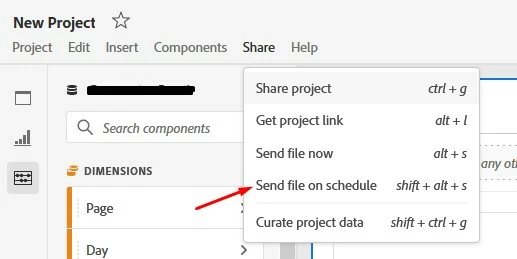
Hi @rfoalv , Workspace projects can be shared via the Share > Send File on Schedule

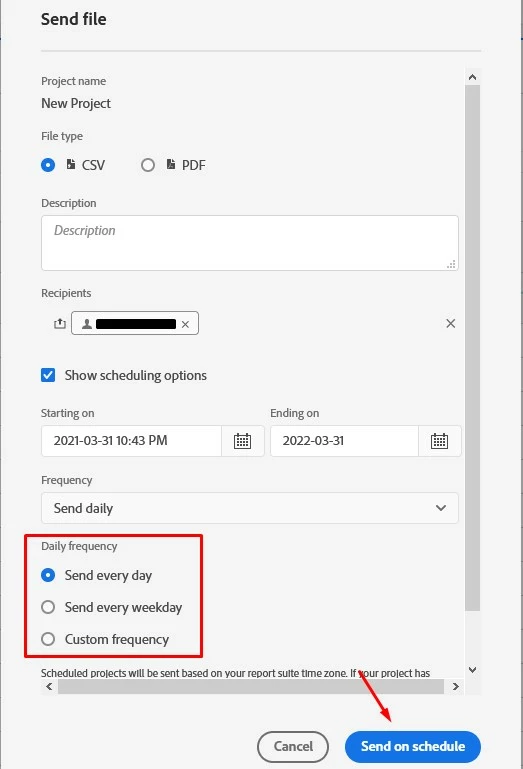
On the next screen you can pick the option CSV or PDF and add the any email address under Recipient with a desired Schedule

this will help creating a schedule for the project.

Here is a help document on the same: https://experienceleague.adobe.com/docs/analytics/analyze/analysis-workspace/curate-share/t-schedule-report.html?lang=en#send-file-on-schedule

Hope this helps!

1 reply

akt0m3r
Adobe Employee
akt0m3rAdobe EmployeeAccepted solution
Adobe Employee
April 1, 2021

Hi @rfoalv , Workspace projects can be shared via the Share > Send File on Schedule

On the next screen you can pick the option CSV or PDF and add the any email address under Recipient with a desired Schedule

this will help creating a schedule for the project.

Here is a help document on the same: https://experienceleague.adobe.com/docs/analytics/analyze/analysis-workspace/curate-share/t-schedule-report.html?lang=en#send-file-on-schedule

Hope this helps!