Adding External User to AA Report | Community
Skip to main content
May 11, 2022
Solved

Adding External User to AA Report

  • May 11, 2022
  • 1 reply
  • 1174 views

Hi,

I was trying to add an external person to the scheduled report, however, it doesn't seem to take that information and prompts the error message that a recipient needs to be added?  Do those users need to have access to AA project?
 

Thanks
 

This post is no longer active and is closed to new replies. Need help? Start a new post to ask your question.
Best answer by Jennifer_Dungan

Ah, there's a little trick to this... 


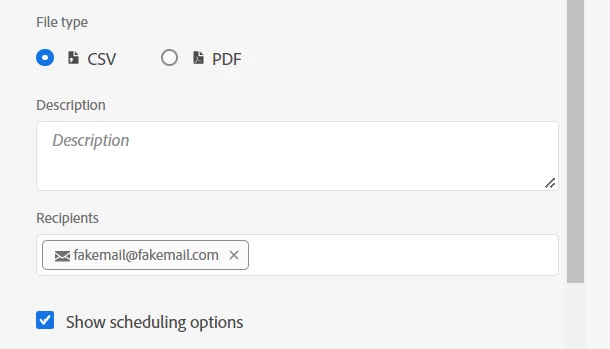
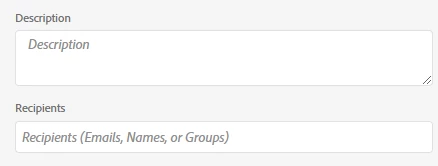
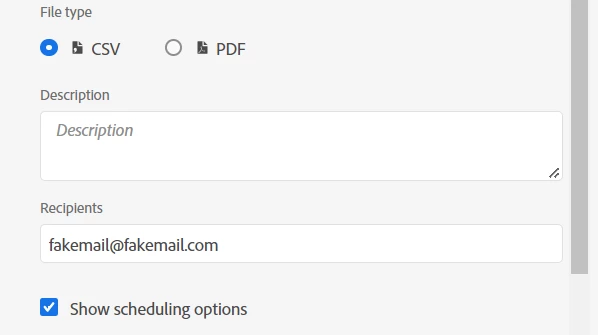
When you type in (or paste in an email) that isn't tied to an account, you have to hit enter to make it stick. The email address should get the grey bounding box and an email icon applied, then you can schedule the workspace.


Initial "non-working" state:


After hitting enter "working" state:


1 reply

Jennifer_Dungan
Community Advisor and Adobe Champion
Jennifer_DunganCommunity Advisor and Adobe ChampionAccepted solution
Community Advisor and Adobe Champion
May 11, 2022

Ah, there's a little trick to this... 


When you type in (or paste in an email) that isn't tied to an account, you have to hit enter to make it stick. The email address should get the grey bounding box and an email icon applied, then you can schedule the workspace.


Initial "non-working" state:


After hitting enter "working" state:


SCB21Author
May 12, 2022

Thanks so much.  This did the trick 🙂

Jennifer_Dungan
Community Advisor and Adobe Champion
May 12, 2022

You're welcome... it's not immediately obvious so I completely understand. Hopefully this will help other people with the same issue.