Add Paid/Natural Search to Marketing Channel Report? | Community
Skip to main content
paulc85305160
Level 2
February 7, 2018
Solved

Add Paid/Natural Search to Marketing Channel Report?

  • February 7, 2018
  • 16 replies
  • 41076 views

Hi Everyone!

All of our marketing channels have been defined and the processing rules have been created.

On the Classification Rule Builder, how can Paid/Natural search be setup so that it can be classified with everything else under our marketing channels.

Select Rule TypeEnter Match CriteriaSet ClassificationTo

Thanks!

This post is no longer active and is closed to new replies. Need help? Start a new post to ask your question.
Best answer by SarahEOwen

Hi -

Yuppers Here's how to do it.

1. Click on Admin > Reports Suites

2. Select the Report Suite that you are creating these marketing channels for

3. Hover over Edit Settings > Marketing Channels > Marketing Channel Manager

4. On this page, make sure to have a Channel named Paid Search and Organic Search (see screen shot below for a visual)
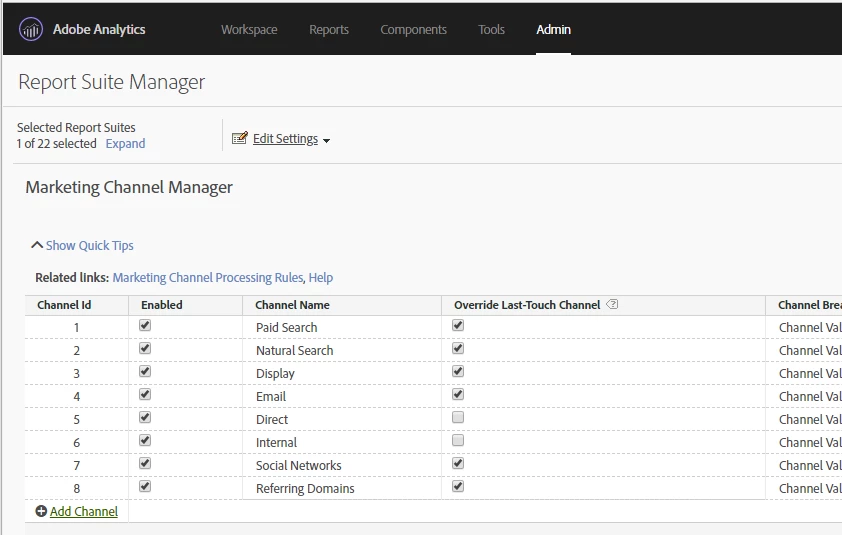
5. Now click on Marketing Channel Processing Rules (the link is beside the phase "Related links:").

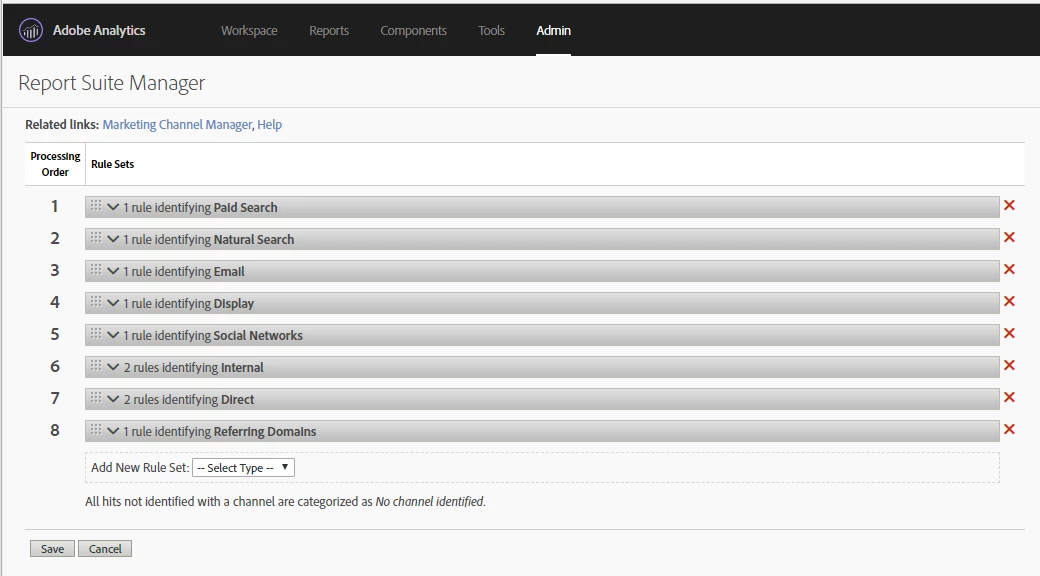
6. This page is displayed (see screen shot below)
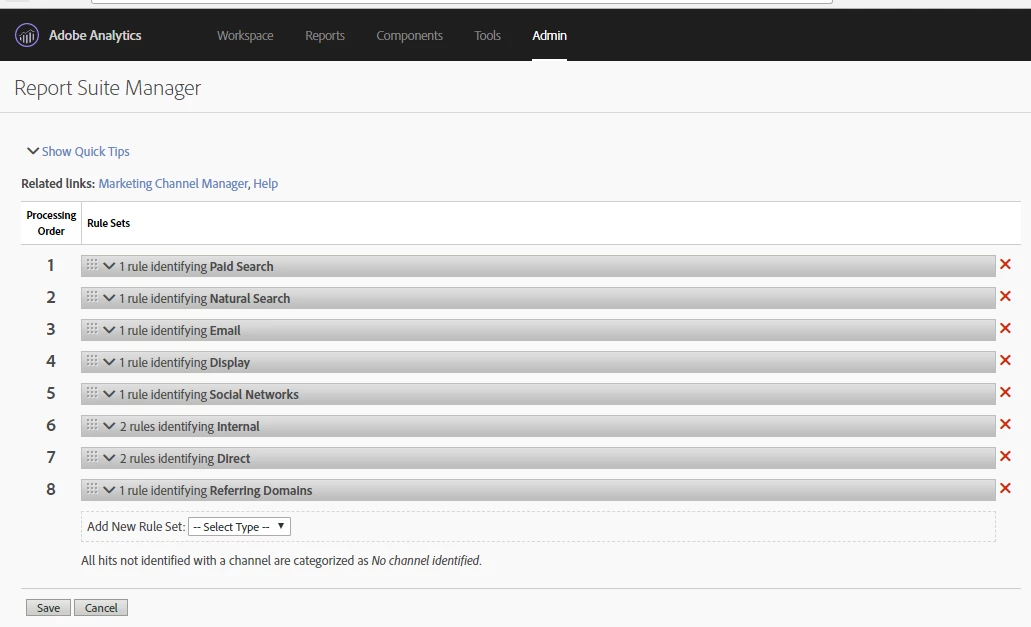
7. Clicking on the chevron on the gray bar that says "1 rule identifying Paid Search" you will see the rule (see screen shot below for a visual)
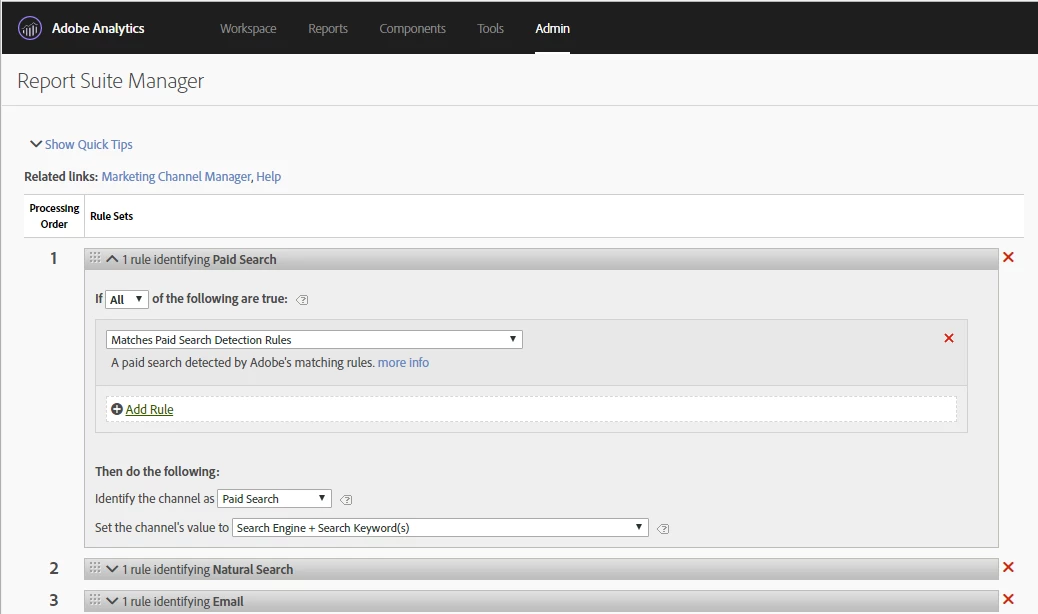
8. The default value for "Set the channel;s value to" is "Search Engine + Search Keyword(s). Given that the keywords are not usually available in analytics any more, I change this value to be "Search Engine" (see screen shot below for visual)
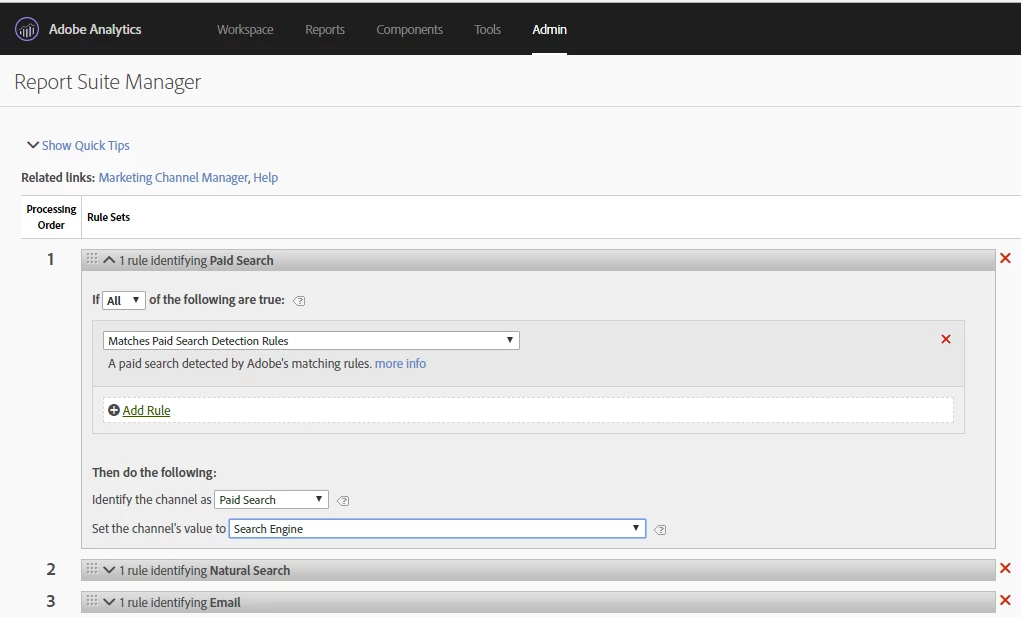
9. And then you see the next Marketing Channel processing rule is "1 rule identifying Natural Search" And when you expand it, you the rule (see screen shot below for visual)
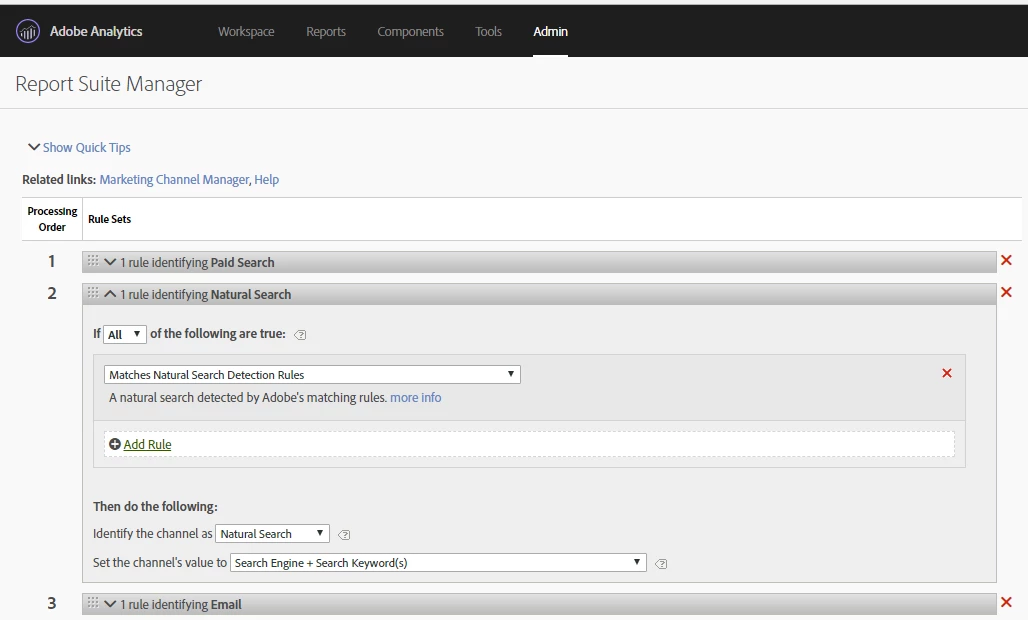
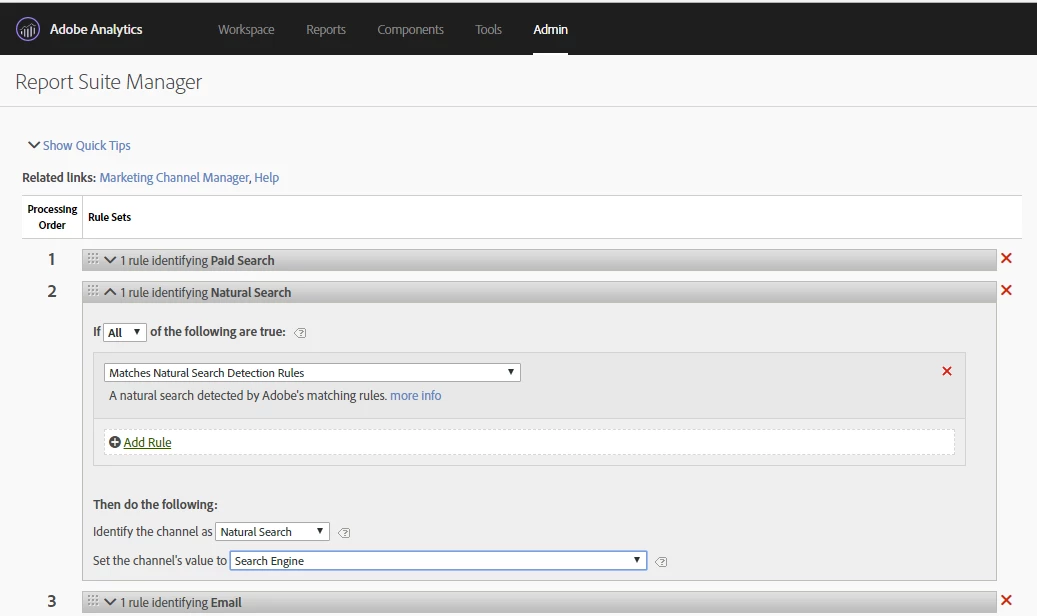
10. As with the Paid Search, I also change the "Set the channel's value to" from "Search Engine + Search Keyword(s)" to "Search Engine" (see screen shot below for visual).
11. Click the "Save" button at the bottom of the page to save your changes. And you are done!
Thanks -

Sarah

16 replies

SarahEOwen
Level 9
February 14, 2018

Hi @jayakrishnaap53766400 -

I thought of one more question for you

So here were the two questions from earlier:

1) Is the "Matches Paid Search Detection Rules" the 1st row in your Marketing Channels?

2) Is umedium only used for Paid Search or is it used for other types of campaigns (i.e. banner ads, social media posts, etc.)?

And here is the addition question:

3) You said -- "However, we see still the data shows "unspecified" on the report" -- what report are you referring too (aka what dimension and metrics are you looking at)?

Thanks!

Sarah

jayakrishnaap53
Level 3
February 15, 2018

Hi Sarah,

Please find the answers below for your three question and let me know if you still need any other information.

1) Is the "Matches Paid Search Detection Rules" the 1st row in your Marketing Channels? --> yes, it is in first row under paid search rule.    

2) Is umedium only used for Paid Search or is it used for other types of campaigns (i.e. banner ads, social media posts, etc.)? --> We have used the same parameter (umedium) for other campaign like display and email in Marketing Channel Processing Rules as shown on the screenshot below . Are we suppose to add the parameter name in paid search detection as umedium? since we are using this parameter name in different campaign for others like display and email in same report suite. will it affect with paid search keyword data? please clarify on this.

3) You said -- "However, we see still the data shows "unspecified" on the report" -- what report are you referring too (aka what dimension and metrics are you looking at)? --> We are referring on "Search Keywords - Paid Report" under Traffic Source with search and visit metrics. Please see the screenshot for your reference.

It would be really helpful and happy if I see the data flows on my report for paid search.

SarahEOwen
Level 9
February 15, 2018

Hi @@jayakrishnaap53766400 -

1) Thanks for confirming that the Paid Search Detection Rule is the 1st Marketing Channel Rule.

2) Thanks for the info about how umedium is being used! Given that umedium is being used for more than just paid search, please do not add it to the Paid Search Detection logic at this time. So for now, let's leave your Paid Search Detection as what you shared earlier (the screen shot below is what you shared earlier -- let's stay with this logic)


3) Okay, the report being used at isn't quite what you want. In fact, any of the reports under Traffic Sources that has "Keywords" in the title (Search Keywords - All, Search Keywords - Paid, and Search Keywords - Natural) will have "Keyword Unavailable" as the first result (when you use Searches as the metric. You will see "Unspecified" when you use Visits as the metric). This is because most searches are secure searches these days and they do not allow for the search term to be available. Here's an article about secured searches not providing search terms Search: Not Provided: What Remains, Keyword Data Options

But, don't worry because the reports that are affiliated to the Marketing Channel Rules you just made are found here View All Reports > Marketing Channels. Would you mind running the Last Touch Channel Report with Click Throughs as the metric to see what data is returned?

Also, here are some Adobe articles that talk about the Marketing Channel Reports:

About Marketing Channel Reports

First and Last Touch

Metrics

Thanks -

Sarah

jayakrishnaap53
Level 3
February 16, 2018

Thanks a lot for your time, this makes so sense. Wonderful!

December 18, 2018

Hi Sarah @SarahEOwen & Arun @PratheepArunRaj

I configured my Natural Search Processing Rule, but still I am getting other data in Natural Search.

Here is the Rule screenshot.

Here is the data screenshot,

Why i am getting this cpc, facebook, google_adwords in my Natural search?

Please help me as soon as possible.

Thanks,

Sushant

PratheepArunRaj
Community Advisor and Adobe Champion
December 19, 2018

Dear Sushant sushantd1375992 ,

You should not break down 'Last Touch Channel' by 'Tracking Code'. You should relate it by 'Last Touch Channel Details'.

Marketing Channel has different expiration and logic behind the screens than the Tracking Code. Break it down by 'Last Touch Channel Details' and let us know if you see any gap.

Thank You so much.

Arun

Thank You, Pratheep Arun Raj B (Arun) | Xerago | Terryn Winter Analytics