Activity Map Actions in Data Feed Clickstream? | Community
Skip to main content
April 15, 2019
Solved

Activity Map Actions in Data Feed Clickstream?

  • April 15, 2019
  • 10 replies
  • 8946 views

We are trying to capture Activity Map in our clickstream data feed export. If I use the "no longer used" columns (such as "click_action" or "click_action_type" etc.) I get data, but if I use the following columns I get absolutely nothing :

"clickmaplink"

"clickmaplinkbyregion"

"clickmappage"

"clickmapregion"

I found this post from 2 years ago and I am curious if there is any update to this between now and then:

Activity Map data in Clickstream Feed

thanks.

This post is no longer active and is closed to new replies. Need help? Start a new post to ask your question.
Best answer by Asheesh_Pandey

Hi Allen,

For a quick win, I would map activity map actions contextData in the custom variable (eVar/Prop) via Processing rule to be used in Data feed clickstream.

Context data variable references for Activity Map tracking are as below:

a.ActivityMap.link

a.ActivityMap.region

a.ActivityMap.page

Proc Rule Ex. Overwrite value for eVarX with a.ActivityMap.link.

Thanks,

Asheesh

10 replies

Gigazelle
Adobe Employee
Adobe Employee
April 22, 2019

Activity map is not yet available as columns in data feeds. This is the open idea on the topic: Activity Map Fields in Clickstream

Asheesh_Pandey
Community Advisor
Asheesh_PandeyCommunity AdvisorAccepted solution
Community Advisor
April 23, 2019

Hi Allen,

For a quick win, I would map activity map actions contextData in the custom variable (eVar/Prop) via Processing rule to be used in Data feed clickstream.

Context data variable references for Activity Map tracking are as below:

a.ActivityMap.link

a.ActivityMap.region

a.ActivityMap.page

Proc Rule Ex. Overwrite value for eVarX with a.ActivityMap.link.

Thanks,

Asheesh

Adobe Employee
April 23, 2019

asheeshp​ this is most probably would be coming in next release , keep an eye here Experience Cloud Help 

JonAl3Author
April 23, 2019

This is the route I ended up taking. Thanks for taking the time to reply!

Asheesh_Pandey
Community Advisor
Community Advisor
June 5, 2019

Hi Allen,

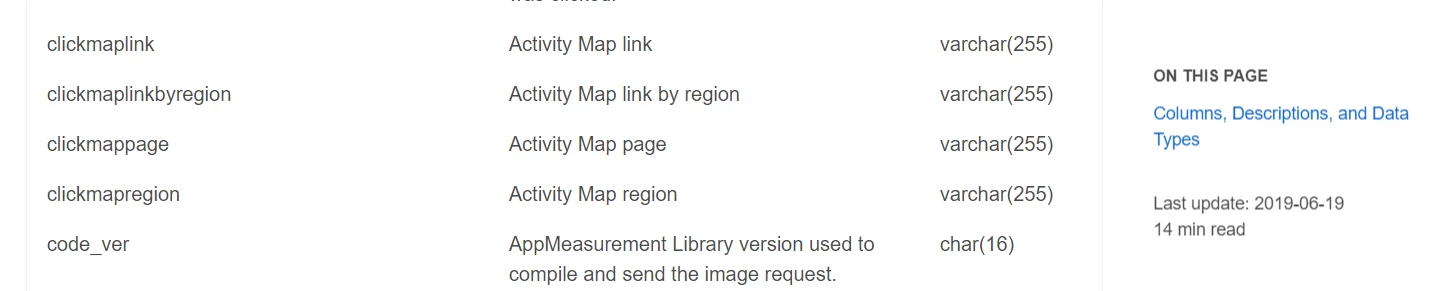
In case you missed it, activity map data is available in data feeds now    look for columns that start with clickmap.

Don't use the columns that start with click_, because those are the old clickmap columns.
Thanks,

Asheesh

jeffj18366633
July 16, 2019

Asheesh,

Can you point me to where it was published that clickmapregion attributes are now available in Adobe Analytics? I ran a datafeed with

clickmaplink, clickmaplinkbyregion, clickmappage, and clickmapregion fields and didn't get any data.

Thanks,

Jeff

Asheesh_Pandey
Community Advisor
Community Advisor
July 17, 2019

Hi Jeff,

Its here Data column reference

July 17, 2019

Hey Asheeshhp,

Do you know the date that adobe pushed clickmap data into data feed? Is it retroactive?

thanks,
Fei

Asheesh_Pandey
Community Advisor
Community Advisor
July 18, 2019

Hi Fei,

If you collecting activity map data you should be able to get it retroactively, I would contact client care to know data collection limit and contract for your account. Also it looks got pushed last month.

Thanks,

Asheesh

Gigazelle
Adobe Employee
Adobe Employee
July 19, 2019

Existing data feeds will not have activity map columns added automatically. You will need to edit the data feed settings and add the columns. From that day forward, you'll have the activity map columns.

The data should be there retroactively, at a minimum from when the columns were introduced (maybe even before that). So if you'd like to do a backfill data feed, you can include the activity map columns there.

shawncreed_baici
August 27, 2021

Hi there,

I have a client who's having the issue of their clickmap* fields being empty in the data feed, despite successfully seeing Activity Map data in their Analytics reports. I've verified that the fields have been added to the data feed setup. It's an hourly data feed, and they've never seen any data in those columns. Any idea what would be causing that?

-Shawn