ACS Cart Abandonment Trigger not working with multiple Products | Community
Skip to main content
Level 2
July 29, 2019
Solved

ACS Cart Abandonment Trigger not working with multiple Products

  • July 29, 2019
  • 4 replies
  • 3291 views

(already posted this in the Campaign board and got referred to you guys - ACS Cart Abandonment Trigger not working with multiple Products )

I am fairly new to Triggers and have a very basic question.

I've been playing around with the filter conditions and would like to set up a basic cart abandonment case where I want to make sure the user has viewed the cart with 1..n products (names taken from the analytics tracking request) but not purchased the product(s).

Sounds pretty simple, I know. However the setup below does not seem to work when I add multiple products.
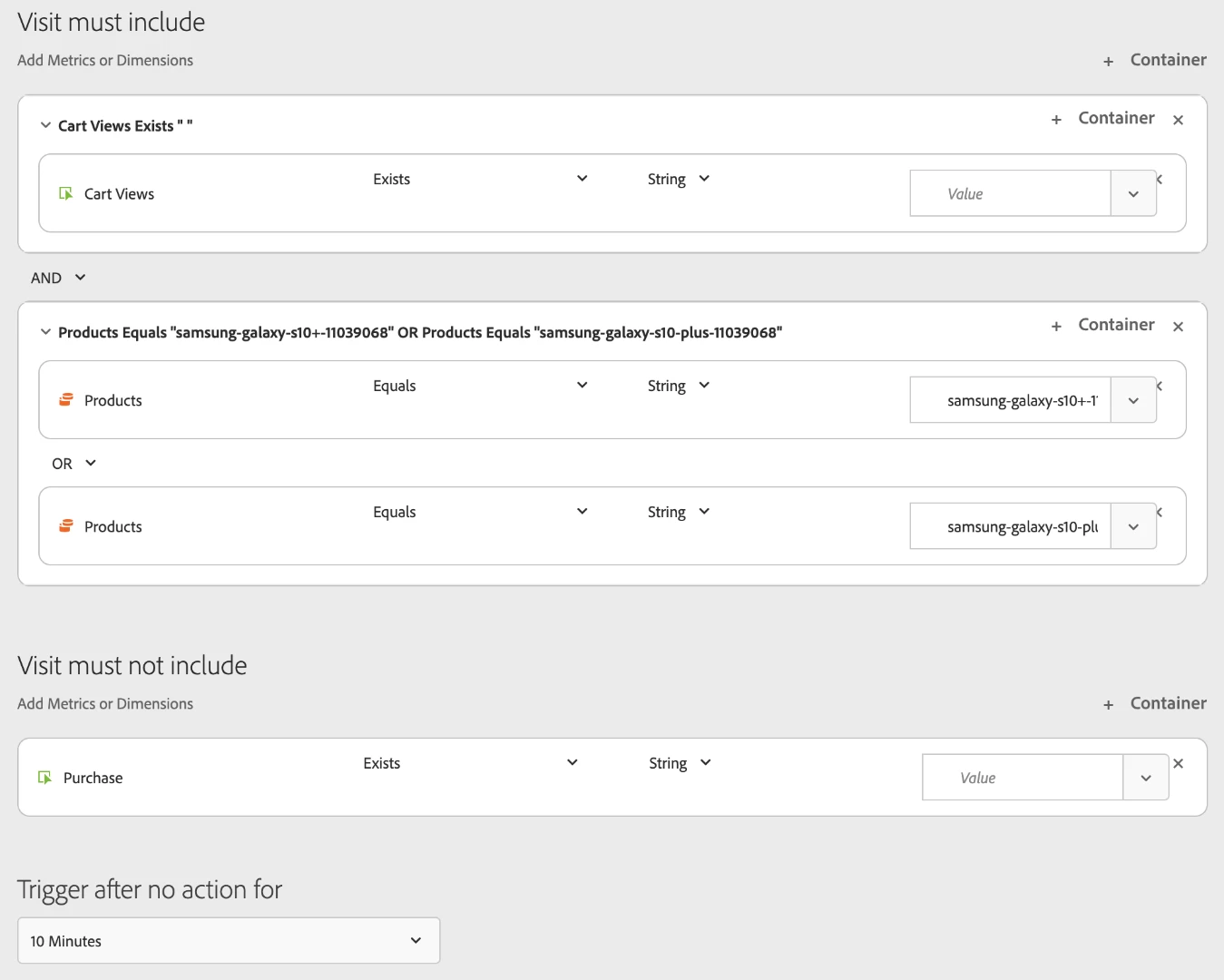
Strangely enough, if I try to just use one product triggers are fired.

So what part of the "Cart View AND (Product 1 OR Product 2)" is wrong?
Grateful for any help.

Cheers,

Bjoern

This post is no longer active and is closed to new replies. Need help? Start a new post to ask your question.
Best answer by Asheesh_Pandey

Yes! that's a correct way to do it. However it seems system is not saving your changes. I would reach out to adobe client care in this case.

4 replies

Asheesh_Pandey
Community Advisor
Community Advisor
August 4, 2019

Got you! you should use both condition in a first container "cart views Exists" instead of using two all together different container. That means in cart view exist container add another container by using below add container link

Now you can use all OR conditions in second container. combine first and second container (inside a main container) with AND

In other words You need to use two sub container with in main container for different conditions. In your case you are creating segment like following - include A and B or C or D or E  that will not look all conditions together but using them in one main container with two sub container will change this to include A and (B or C or D or E) which would first look at your entire data and identify all visits within the A, then look at all your data again, searching to see if data matches with (B or C or D or E). Both sets of data would then be applied to the trigger.

Thanks,

Asheesh

bkothAuthor
Level 2
August 5, 2019

Hi Asheesh,

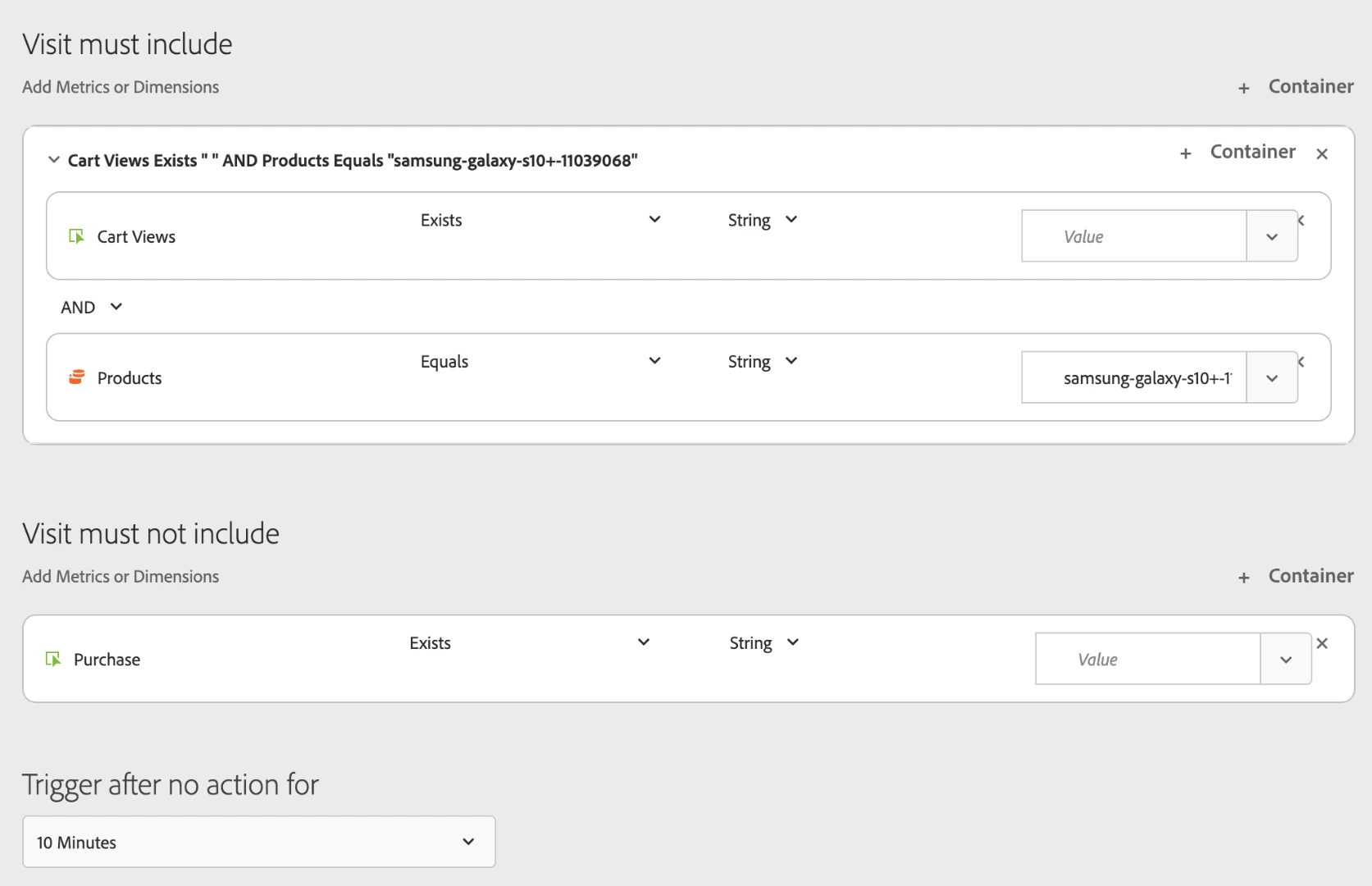
just to double-check? You mean a set up like this?

Because this doesn't seem to work either

Cheers,

Björn

Also, when reopening triggers I frequently see them not showing the previously selected configuration (product names, events, etc).

I use the latest Chrome

Asheesh_Pandey
Community Advisor
Asheesh_PandeyCommunity AdvisorAccepted solution
Community Advisor
August 5, 2019

Yes! that's a correct way to do it. However it seems system is not saving your changes. I would reach out to adobe client care in this case.

bkothAuthor
Level 2
August 5, 2019

will try to do it and seems like a bit of a challenge since the consultant I was talking to also could not point to what I was doing wrong.

He'll get back to me and I will update the ticket with what they did to fix (when they can fix it)