ACDL Console Results and Network Payload value discrepancy | Community
Skip to main content
Level 2
May 15, 2025
Solved

ACDL Console Results and Network Payload value discrepancy

  • May 15, 2025
  • 3 replies
  • 635 views

Hello Adobe Experts,
I hope everyone is doing well.


I would like to get your insights as to why the data that are passing to the Network Payload and adobeDataLayer console are showing 2 different results.


In the screenshot in Green Box, it shows that the dealers containing 5 array results. But the one in Red Box, the array value is empty [].
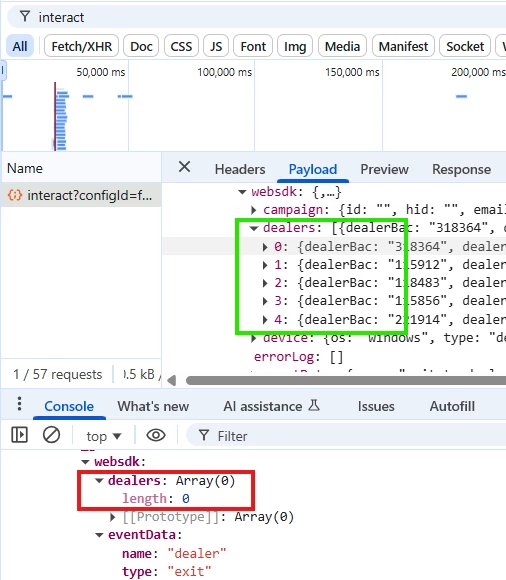
 

Do you know any possible scenarios as to why this issue is happening?

Thank you in advance.



Best answer by yuhuisg

The payload in the Network request is most likely due to the value being obtained from ACDL's computed state.

When you push arrays into ACDL, ACDL computes the final array state as the concatenation of all previous array pushes for the same key. For example:

adobeDataLayer.push({ myArr: ['foo'] }); adobeDataLayer.push({ myArr: ['bar'] }); adobeDataLayer.push({ myArr: ['baz'] }); /** * Resulting ACDL computed state: * * { * myArr: ['foo', 'bar', 'baz'] * } */

If your intention is to clear out your array, then you should push "null", i.e.:

adobeDataLayer.push({ myArr: ['foo'] }); adobeDataLayer.push({ myArr: ['bar'] }); adobeDataLayer.push({ myArr: ['baz'] }); /** * Resulting ACDL computed state: * * { * myArr: ['foo', 'bar', 'baz'] * } */ adobeDataLayer.push({ myArr: null }); /** * Resulting ACDL computed state: * * {} */

Read the doc for more info: https://github.com/adobe/adobe-client-data-layer/wiki#pushing-an-object-to-delete-data

3 replies

Harveer_SinghGi1
Community Advisor
Community Advisor
May 15, 2025

Hi @herder ,

I could think of two reasons for this to happen,

1. The data element used to populate the network payload is persisting the previously stored value

2. adobeDataLayer is getting cleared after the payload shown in network is sent

I'd suggest trying few things,

1. Console log the adobeDataLayer and Data Element values before sending the call to validate if they both have values and they match

2. Try resetting the data element before sending the call

Cheers!

yuhuisg
Community Advisor
yuhuisgCommunity AdvisorAccepted solution
Community Advisor
May 17, 2025

The payload in the Network request is most likely due to the value being obtained from ACDL's computed state.

When you push arrays into ACDL, ACDL computes the final array state as the concatenation of all previous array pushes for the same key. For example:

adobeDataLayer.push({ myArr: ['foo'] }); adobeDataLayer.push({ myArr: ['bar'] }); adobeDataLayer.push({ myArr: ['baz'] }); /** * Resulting ACDL computed state: * * { * myArr: ['foo', 'bar', 'baz'] * } */

If your intention is to clear out your array, then you should push "null", i.e.:

adobeDataLayer.push({ myArr: ['foo'] }); adobeDataLayer.push({ myArr: ['bar'] }); adobeDataLayer.push({ myArr: ['baz'] }); /** * Resulting ACDL computed state: * * { * myArr: ['foo', 'bar', 'baz'] * } */ adobeDataLayer.push({ myArr: null }); /** * Resulting ACDL computed state: * * {} */

Read the doc for more info: https://github.com/adobe/adobe-client-data-layer/wiki#pushing-an-object-to-delete-data

Sukrity_Wadhwa
Community Manager
Community Manager
May 22, 2025

Hi @herder,

Were you able to resolve this query with the help of the provided solutions, or do you still need further assistance? Please let us know. If any of the answers were helpful in moving you closer to a resolution, even partially, we encourage you to mark the one that helped the most as the 'Correct Reply.'

Thank you!

Sukrity Wadhwa

