Aborting all analytics server call | Community
Skip to main content
June 13, 2024
Solved

Aborting all analytics server call

  • June 13, 2024
  • 2 replies
  • 2006 views

Hello Analytics Experts,
I hope everyone is doing well.


I have a scenario question, is there a way to abort all server calls when a certain condition doesn't meet? I know that Adobe has s.abort(), but this option will only work in certain conditions.


I am exploring the possibility that if a user opt-out, all server calls will be aborted. I know that we have some extensions like ECID, but I am trying to avoid using any of the extensions.

Question:
Is there a way to create a condition in Launch that when the user opt-out, all server calls will be aborted, and when I opt-in, then, that is the time when the beacons start to fire again?


I don't know if there is a way to inject a Global Privacy Setting like "navigator.globalPrivacyControl" or "Sec-GPC:1", but seems like this is browser-specific only. Hoping that there is a way to implement it from the Client side (adobe).


I hope this question makes any sense.

Thank you in advance.
Best answer by Jennifer_Dungan

Thanks for the insights, @bjoern__koth and @jennifer_dungan.


I do have 1 follow-up question, does s.abort also prevent the target call or Google floodlight?


Since our rules contain a floodlight tag, I am under the impression that even if we prevent the beacons from firing, the 3rd party tag will still continue to trigger.


Have you encountered any scenarios that could also prevent the 3rd party call from firing when certain conditions are met? if yes, would you mind sharing the solutions you did?


Thanks in advance 🙂


Hi @herder,


the s.abort only affects Adobe Analytics (since it affects only the s object which is used exclusively by Analytics).


This is another reason why adding conditions to your rules is the better option. Conditions stop the entire rule from triggering.


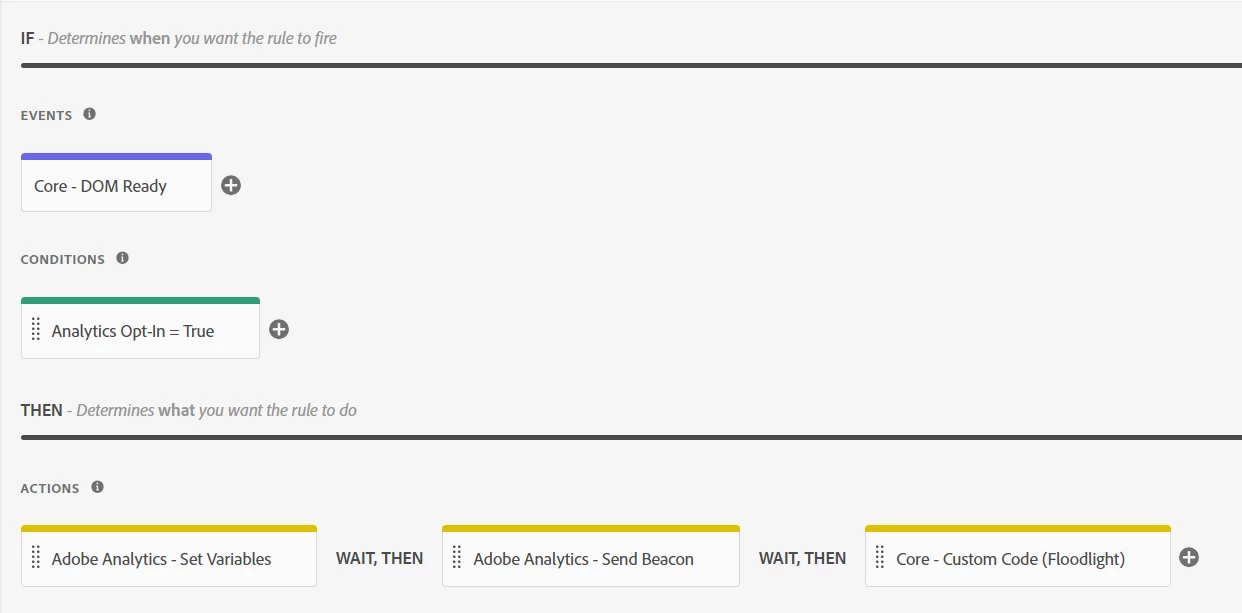
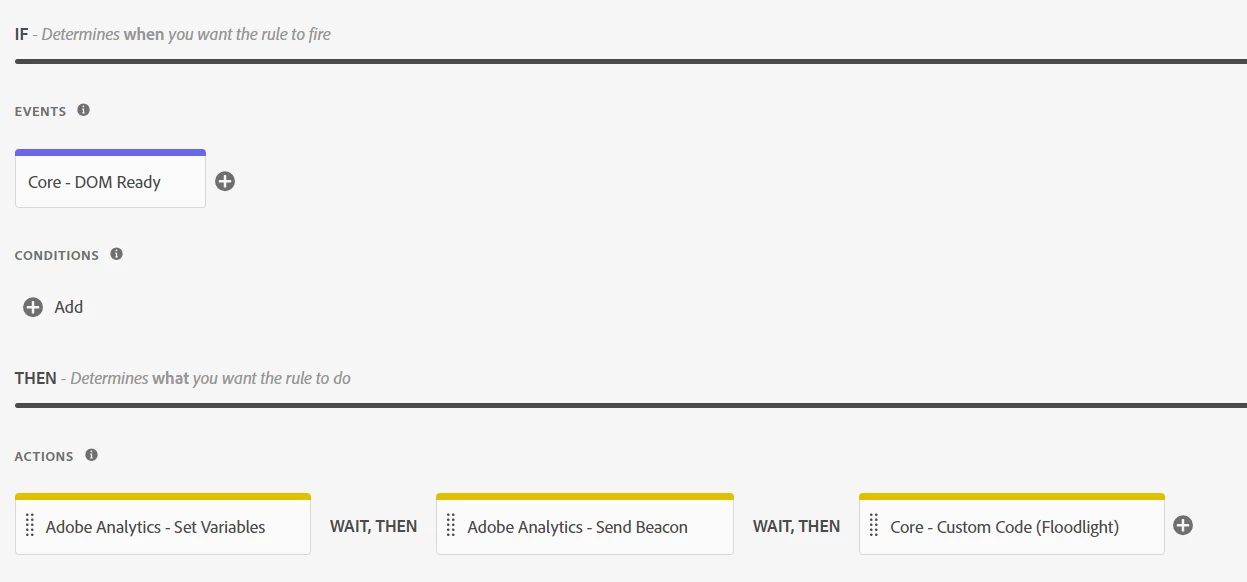
Let's say your rule looks like this:


(You have a trigger: Dom Ready; and 3 actions: Set Variables, Sent Beacon and your Floodlight code)


Right now, all of these will run when the DOM is ready.


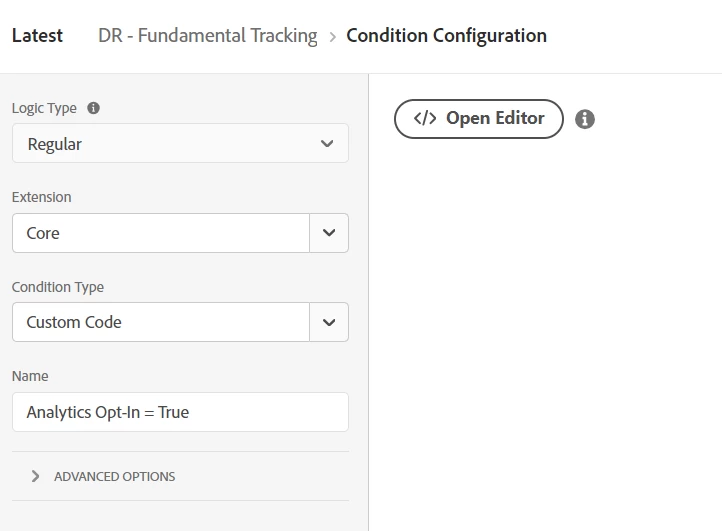
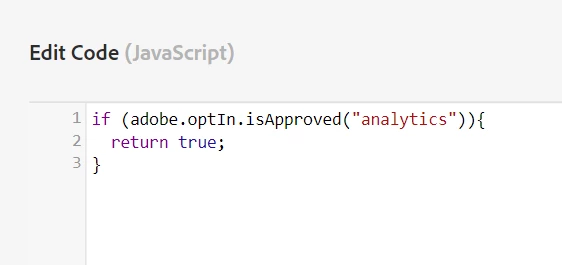
But, let's add a condition:


Now, when the DOM is ready, it must first pass my condition that analytics is opted in...


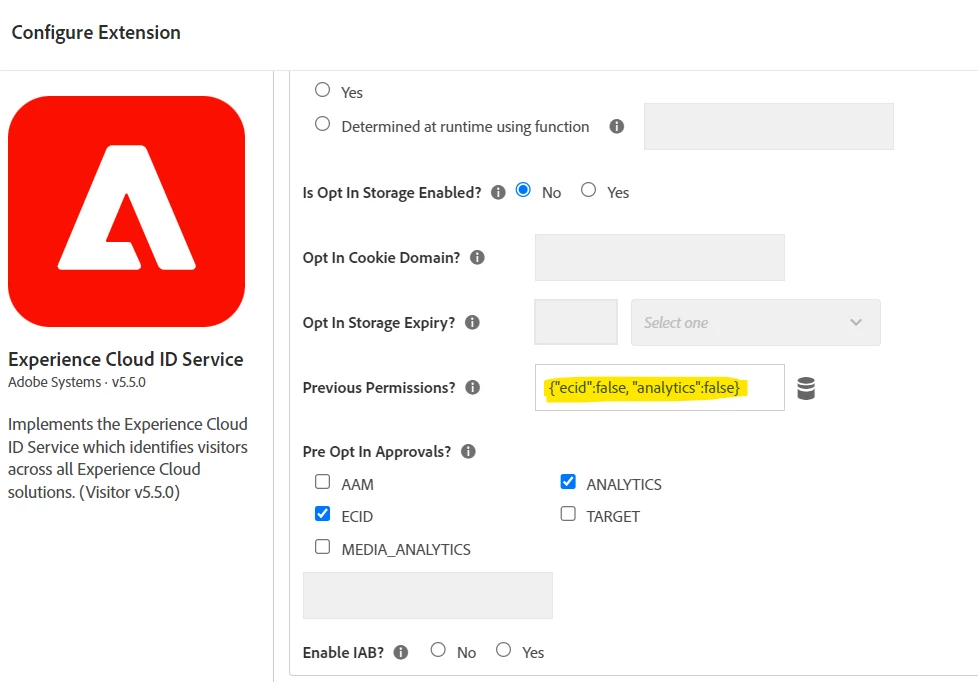
In my example, I am using the opt-in configuration I set up in my ECID extension:


Here, I explicitly set Analytics Opt-in to "false" as my previous value, but in a real scenario I would be using data elements to extract the user's chosen opt-in status based on whatever the site is using to control your opt-ins.

2 replies

bjoern__koth
Community Advisor and Adobe Champion
June 13, 2024

Maybe a combination of s.registerPreTrackCallback and s.abort if a certain condition does not apply?


https://experienceleague.adobe.com/en/docs/analytics/implementation/vars/functions/registerpretrackcallback

or in general, this seems to be the standard case for the Visitor ID service and/or Web SDK consent settings?


else, can you be more specific about your setup?

Cheers from Switzerland!
Jennifer_Dungan
Community Advisor and Adobe Champion
June 14, 2024

You can create a condition on your rules that won't even let the rule run if the user hasn't opted in.  While you do have to add that to all your rules, this would be more efficient on the site performance since you wouldn't even run the code if the user isn't opted in.

bjoern__koth
Community Advisor and Adobe Champion
June 14, 2024

But also keep in mind that the consent functionality in Visitor ID service and WebSDK have an internal queueing system that is preserving previously made calls which did not go through (on that same page) and releases them should the user give consent later.

that way you will not lose anything.

Cheers from Switzerland!
Jennifer_Dungan
Community Advisor and Adobe Champion
Jennifer_DunganCommunity Advisor and Adobe ChampionAccepted solution
Community Advisor and Adobe Champion
June 14, 2024

Thanks for the insights, @bjoern__koth and @jennifer_dungan.


I do have 1 follow-up question, does s.abort also prevent the target call or Google floodlight?


Since our rules contain a floodlight tag, I am under the impression that even if we prevent the beacons from firing, the 3rd party tag will still continue to trigger.


Have you encountered any scenarios that could also prevent the 3rd party call from firing when certain conditions are met? if yes, would you mind sharing the solutions you did?


Thanks in advance 🙂


Hi @herder,


the s.abort only affects Adobe Analytics (since it affects only the s object which is used exclusively by Analytics).


This is another reason why adding conditions to your rules is the better option. Conditions stop the entire rule from triggering.


Let's say your rule looks like this:


(You have a trigger: Dom Ready; and 3 actions: Set Variables, Sent Beacon and your Floodlight code)


Right now, all of these will run when the DOM is ready.


But, let's add a condition:


Now, when the DOM is ready, it must first pass my condition that analytics is opted in...


In my example, I am using the opt-in configuration I set up in my ECID extension:


Here, I explicitly set Analytics Opt-in to "false" as my previous value, but in a real scenario I would be using data elements to extract the user's chosen opt-in status based on whatever the site is using to control your opt-ins.