Abobe SDK for mobile - screenview | Community
Skip to main content
Level 2
July 29, 2025
Solved

Abobe SDK for mobile - screenview

  • July 29, 2025
  • 2 replies
  • 1382 views

Hello,


Does anyone know the proper way to track screenviews in a mobile sdk implementation?

We are using edge, datastreams, and schemas. We need to track screenviews and clicks in adobe analytics.

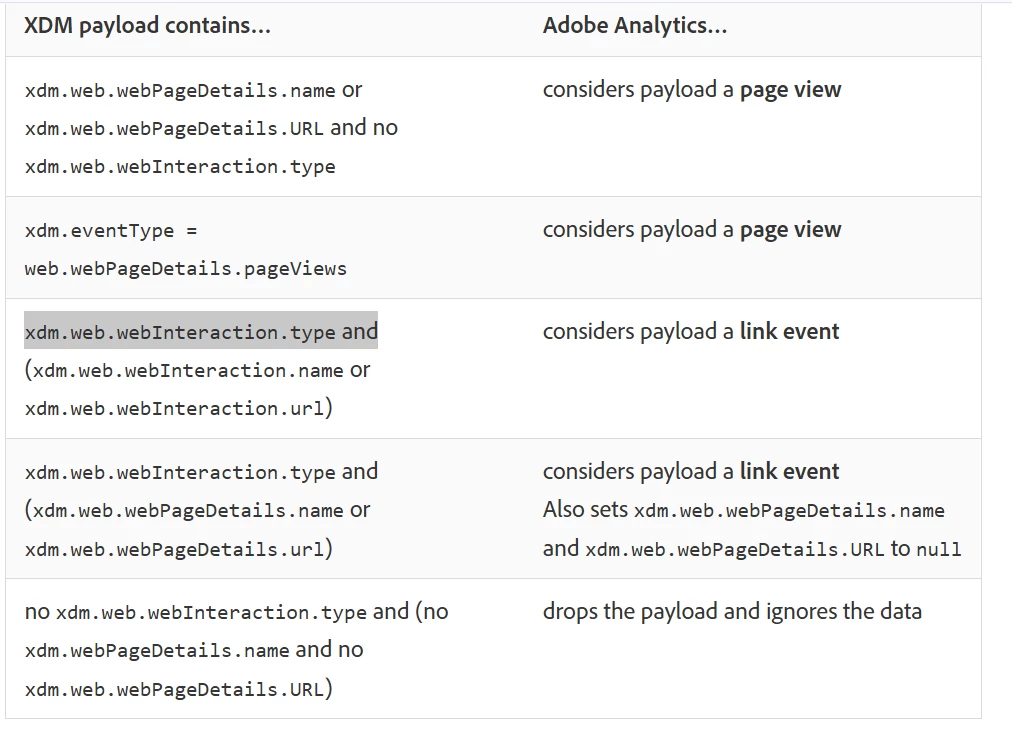
I see the recommended event types for web clicks and web pageviews in the documentation, but nothing for mobile.


We successfully see our props and eVars in the report suite, but no "visits" or "pageviews"

- Should I follow the event type recommendations for web?

- Do I have to send an event, such as event1 to get a screenview?

Best answer by Jennifer_Dungan

In Adobe Analytics, they really don't distinguish "page view" from "screen view"... the verbiage is shared for web and apps.


Your App data should look just like your Web data, with a few differences.


For one, your mobile app should be setting an "App ID" (something that doesn't exist on your website).


In our implementation, I use dimensions to help give context to the traffic.. 


  • Responsive Breakpoint - in this I track the breakpoint experience... so on web, I will track the "desktop", "tablet", "mobile" breakpoints, then I added "app|mobile" and "app|tablet" into our apps
  • Site Type - for context, we have a lot of subdomains that support extended content... so I track values like "core", "obituaries", "classifieds", etc, for our apps, I use "app"

I make sure that ALL dimensions match the data (values / formatting / etc) between web and app, so that everything properly rolls up into the same row for reporting.


Using these, I can separate our web traffic from our mobile app (I could also use the existence of "App ID").


- Should I follow the event type recommendations for web?


Yes, I can literally take our web calls and app calls and look at them side by side, and they will match (aside from obvious data differences)


- Do I have to send an event, such as event1 to get a screenview?


Only IF you are using a custom event on web in addition to standard PV metric. As in, I would match your web as close as possible.


Now, I do realize that your app and web may have slightly different features or behaviours.... such as "swipe left and right" to get to additional content, or maybe changing dark mode, font size, etc.... these are the things that you will have to create "App Only" dimensions or actions to track..  but it shouldn't be too hard to figure out the similarities and differences and determine the best way to track those differences while joining the similarities for everything else.

2 replies

Jennifer_Dungan
Community Advisor and Adobe Champion
Jennifer_DunganCommunity Advisor and Adobe ChampionAccepted solution
Community Advisor and Adobe Champion
July 29, 2025

In Adobe Analytics, they really don't distinguish "page view" from "screen view"... the verbiage is shared for web and apps.


Your App data should look just like your Web data, with a few differences.


For one, your mobile app should be setting an "App ID" (something that doesn't exist on your website).


In our implementation, I use dimensions to help give context to the traffic.. 


  • Responsive Breakpoint - in this I track the breakpoint experience... so on web, I will track the "desktop", "tablet", "mobile" breakpoints, then I added "app|mobile" and "app|tablet" into our apps
  • Site Type - for context, we have a lot of subdomains that support extended content... so I track values like "core", "obituaries", "classifieds", etc, for our apps, I use "app"

I make sure that ALL dimensions match the data (values / formatting / etc) between web and app, so that everything properly rolls up into the same row for reporting.


Using these, I can separate our web traffic from our mobile app (I could also use the existence of "App ID").


- Should I follow the event type recommendations for web?


Yes, I can literally take our web calls and app calls and look at them side by side, and they will match (aside from obvious data differences)


- Do I have to send an event, such as event1 to get a screenview?


Only IF you are using a custom event on web in addition to standard PV metric. As in, I would match your web as close as possible.


Now, I do realize that your app and web may have slightly different features or behaviours.... such as "swipe left and right" to get to additional content, or maybe changing dark mode, font size, etc.... these are the things that you will have to create "App Only" dimensions or actions to track..  but it shouldn't be too hard to figure out the similarities and differences and determine the best way to track those differences while joining the similarities for everything else.

BertBruAuthor
Level 2
July 31, 2025

Thank you so much for your response! Here's more context

Jennifer_Dungan
Community Advisor and Adobe Champion
July 31, 2025

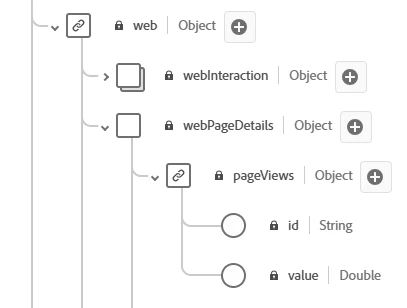
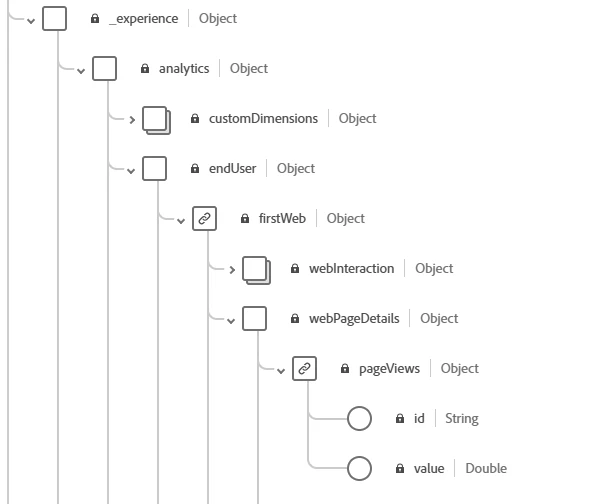
Yeah... I'm going to throw a little shade here... but I think Adobe really made the schema building and definitions way more complicated then they needed to be....


This is another reason we bypassed the schema altogether and used the Adobe Data model... obviously not something that would work if we were using CJA...


I am actually going to join you in that confusion... I don't understand why there are multiples of anything... the lack of definitions about the schema options, the additional complications of how to build a what should be a simple JSON object.... I wish I could give you more advice here... 


I think this might be why I've seen several people say "do your own custom model"... at least that way you know what is what.... I am not saying that is the way to go... I don't know your system, or what other schema you have, obviously consistency is better for managing multiple systems.... 

FarazHusain
Adobe Employee
Adobe Employee
July 29, 2025

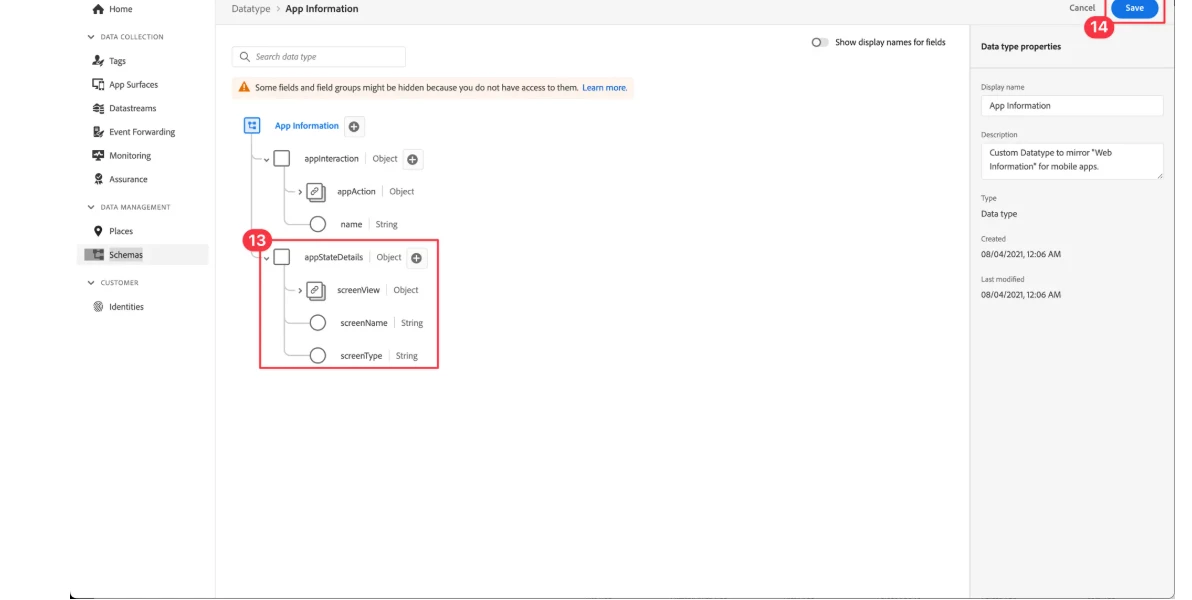
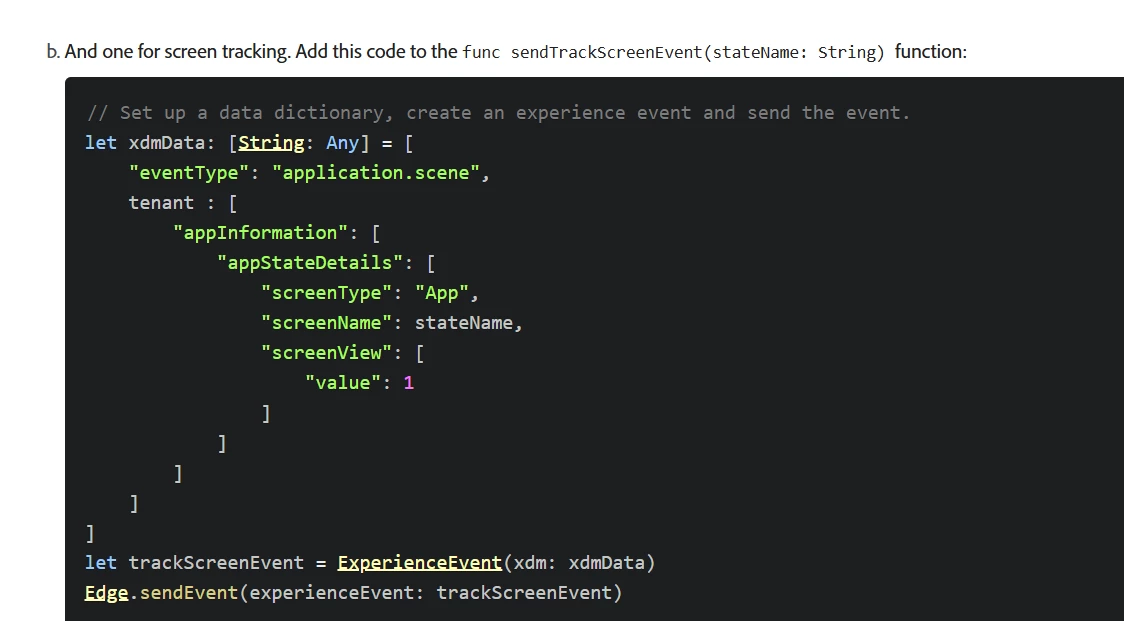
Apart from what @jennifer_dungan mentioned, you can check out this particular documentation - https://experienceleague.adobe.com/en/docs/platform-learn/implement-mobile-sdk/initial-configuration/create-schema 


Basically you have to setup a custom field group as defined above and then https://experienceleague.adobe.com/en/docs/platform-learn/implement-mobile-sdk/app-implementation/events and add something like below:


This is a good documentation for tracking screen views for Mobile SDK implementation using Edge, but this one is for iOS; a similar setup would be for Android. I have tried and tested this one, and it works.


Jennifer_Dungan
Community Advisor and Adobe Champion
July 29, 2025

Lol, I should have mentioned that we are using the data.__adobe.analytics model rather than the full XDM Schema!


Since we are not likely to have CJA anytime soon, we decided to not redesign everything and stick with our context variables and processing rules.... 


So there is no separate model in that... I don't know if using the Analytics Bridge (so that you can continue using trackState and trackAction) would also result in not having the separate app schema....  

FarazHusain
Adobe Employee
Adobe Employee
July 29, 2025

Yes, if we use Analytics Bridge/Edge Bridge, one can continue to send the data via trackState and trackAction APIs, and in the case of Edge Bridge, the schema setup is optional.