Workspace: Copy + Paste Segment Containers | Community
Skip to main content
v-tiwri
April 24, 2018
New

Workspace: Copy + Paste Segment Containers

  • April 24, 2018
  • 4 replies
  • 4653 views

Current Issue:

Users do not have the ability to copy + paste segment containers in segment builder, resulting in extra clicks needed to build segments where the same containers must be repeated throughout the segment.

Proposed Idea/Resolution:

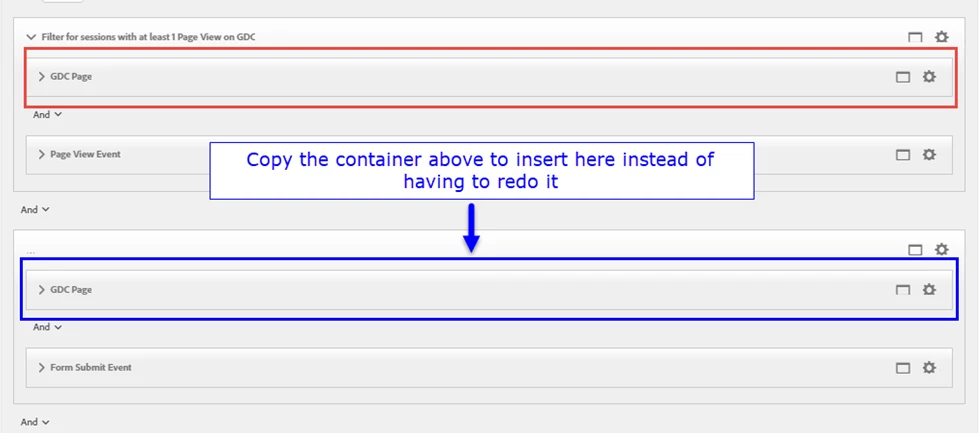
Add the ability to copy a container in Segment Builder and paste as another container within the segment you are building -- including all the logic within the container.

Benefit:

Makes it faster to build complex segments when a specific container and its logic are repeated within other containers in the segment.

See example below:
Thanks!

4 replies

apowersadobe
Adobe Employee
Adobe Employee
May 2, 2018

v-tiwri​, you can do this already. Hold the CTRL key and drag the container / criteria to the location desired.

Still like the idea, especially if you are working with a very large segment definition. In those cases, it is harder to CTRL-drag from one end to the other.

v-tiwri
v-tiwriAuthor
May 2, 2018

Nice! Didn't realize holding the CTRL key and dragging down copied the container and pasted it. Not as intuitive, but it works! Thanks Andy. Since it already exists as a feature, it would be nice if it was enhanced to be more intuitive (e.g. allowing users to right click and see a drop down menu with the option to 'copy to clipboard' similar to what's done with workspace visuals)

jantzen_b
Adobe Employee
Adobe Employee
October 27, 2020
No text available
Community Manager
October 5, 2022
No text available
