Combined line graph for filtered dimensions
We would like to have option to show "total/combined line graph” visualization for filtered dimensions.
See my example picture: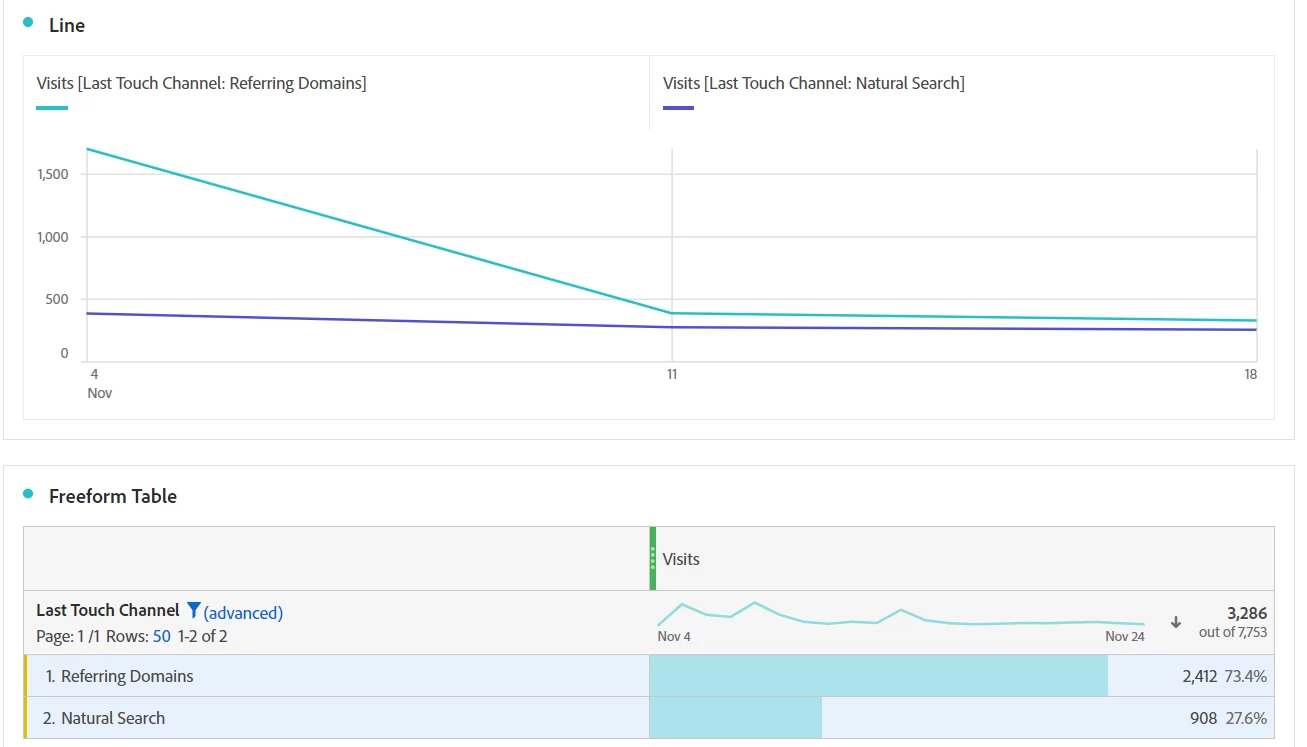
We have done freeform table with dimension X. My example is for last touch channel, but better use case would be page dimension.
Anyway, you will get the idea.
I have filtered my table to show only referring domains and natural search. I would like to see only 1 line graph that is containing total amount of visits
for only these two filtered dimensions. I can "uncheck" both dimensions and that way I will get only 1 line graph, but that is always for total visits and not for my 2 filtered dimensions. I have tried all the settings including unchecking “show grand total”, but that is only affecting to table and not the line graph.
I could easily do a segment or calculated metrics for these dimensions and get the result I want, however, too time-consuming and maybe the biggest issue for us is that there will be too many segments just for this kind of matter that shouldn’t be worth to segment – So hopefully in the future we could get new option into line graph settings to choose total visits or “filtered visits”. Makes sense? Any de-tours available without segmentation?