
Wrong column sum/total on a freeform | Community
Skip to main content
Aymane
September 4, 2019

Wrong column sum/total on a freeform

  • September 4, 2019
  • 3 replies
  • 8739 views

Hello,

I recently discovered something weird. My total column is wrong. When I do an extract in csv and sum all my lines I have the right total amount but in my freeform the total is quite different.

As you can see in the screenshot attached, I have an Annual Pass total of booking of 2687 when I should have 2774... This is even weirder when the revenue total is right.
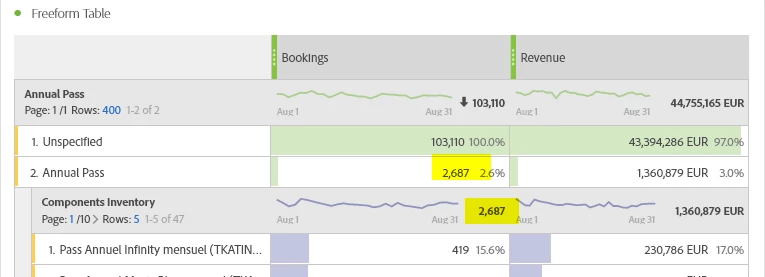
Is anyone has an idea on how I can I resolve this ?

Kind regards,

Aymane

This post is no longer active and is closed to new replies. Need help? Start a new post to ask your question.

3 replies

Andrey_Osadchuk
September 4, 2019

Hi Aymane,

Could you explain where 2774 comes from. Is it the number you can see in another report/ table? If yes, can you please share a screenshot?

Aymane
AymaneAuthor
September 4, 2019

Hello Andrey,

Thank you for your quick answer !

Indeed I should give more details.

The 3 numbers highlighted in yellow are supposed to be equals (2774). You can see there is absolutely the same amount of lines (47) and the revenue is the same. (of course the product selected are the same and so are the time period).

As I said in my first message, when I extract those 2 freeform, and I sum all the 47 respective lines, I have the same right amount of bookings (2774).

My question is : why does the first freeform isn't giving me the right sum ?

It is the first time ever that something like that happens to me.

Thank you for your time,

Aymane

Andrey_Osadchuk
September 4, 2019

Aymane, I presume you see a higher number in the right table because not all 2774 Bookings are linked to Annual Pass value, there may be bookings related to the other Annual Pass dimensions values.

To check that consider one of the following:

1) add another Booking column to the right table, then add Annual Pass dimension value under it as a filter. Then compare Bookings and Filtered Bookings values line by line

2) break down all 47 lines in the right table by Annual Pass dimension

3) create a segment from 47 values, add it to the table as a dimension, break it down by Annual Pass dimensions

Alexis_Cazes_
September 5, 2019

Do you have 1 to 1 relatioship between Annual Pass and Component inventory ?

It could be that the line 2 Annual pass has the deduplicated value and the break down has the non deduplicated value if the relatioshiop is 1 to N.

Is Bookings an event or the default orders metric ?

What are the dimentions that you are using ? eVars ? props ? classification ?

Aymane
AymaneAuthor
September 6, 2019

Hello Andrey Osadchuk​ and Alexis Cazes,

Thanks for your answers and advices. I have find the solution to my problem.

It is just that Adobe deduplicated the amount of booking...

Thanks,

Aymane

