Click-Through Rates in Adobe Analytics
One of the more advanced things you can do with Adobe Analytics is to track click-through rates of elements on your web pages. Adobe Analytics doesn’t do this out of the box, but if you know how to use the tool, there are some creative ways that you can add click-through rate tracking to your implementation. In this post, I will share a few different ways to track click-throughs for both products and non-product items.
Product Click-through Rates
If you sell physical products, you may have pages that show a bunch of products and want to see how often each product is viewed, clicked and the click-through rate. In my Adobe Analytics book, I show an example of a product listing page like this:
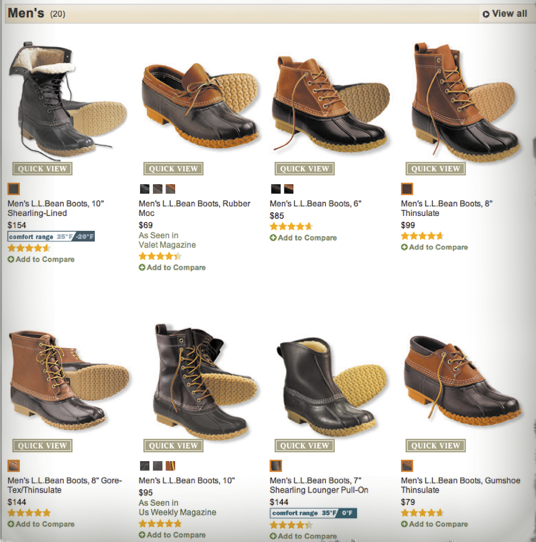
If you worked for this company, you might want to know how often each product is shown and clicked, keeping in mind that this could be dynamic due to tests you are running or personalization tools. Luckily, this is pretty easy to do in Adobe Analytics because the Products variable allows you to capture multiple products concurrently. In this case, you would simply set a “Product Impressions” success event and then list out all of the products visible on the page via the Products variable like this:
s.events=”event20″;
s.products=”;11345,;11367,;12456,;11426,;11626,;15522,;17881,;18651″;
Then, if a visitor clicks on one of the products, on the next page, you would set a “Product Clicks” success event and capture the specific product that was clicked in the Products variable:
s.events=”event21″;
s.products=”;11345″;
Read the rest on analyticsdemystified.com