Page then within/after Page | Community
Skip to main content
Level 2
October 1, 2025
Question

Page then within/after Page

  • October 1, 2025
  • 1 reply
  • 460 views

Hi,


I'm creating a segment to identify cases where there are no visits after a specific page
But as I was testing it, something strange came up.

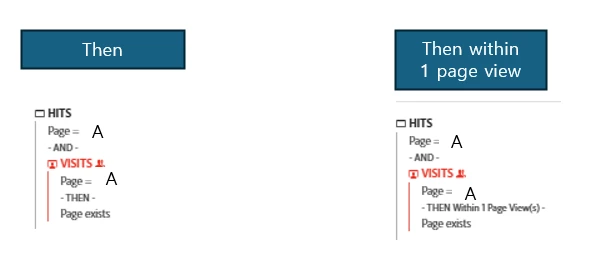
Here are the conditions I tried:


1.
Page A
Then
exclude(Page exists)


2.
Page A
Then within 1 page view
exclude(Page exists)


3.
Page A
Then within 2 page views
exclude(Page exists)


The results for all three cases above are exactly the same.
The data should all be different, so I don't understand why they're the same.


Shouldn't the data for ' after 1 page view' and 'within 1 page view' be the same?
Page A
Then after 1 page view
exclude(Page exists)


I would greatly appreciate it if you could help me.


1 reply

Jennifer_Dungan
Community Advisor and Adobe Champion
October 1, 2025

Hi,


The best way I have to explain the difference between "within" and "after" is within includes the check, whereas after has to be explicitly after... 


This is easier to explain using Visits...

X THEN Within 1 Visit Y

vs

X THEN After 1 Visit Y


The first example means that Y has to happen within the same Visit... and the second would have to happen in the next Visit (X happens in Visit 1, and Y happens in the next Visit)


If the Within or After is 2 or more... then the Within includes the current visit, and the After will look at the visits not including the current.


So, now when we look at your segments looking at PVs, I think a similar logic applies... but since you likely aren't looking at same PV using within or after logic, I don't think the current PV would be included... but I think that within will look at the next immediate PV, whereas After has a PV buffer?  After 1 PV, I believe means that it's looking for Page A, then some page, then Page Exists... so it's actually a 3 page scenario, as opposed to within which would be a 2 page scenario... 


I also want to note, that your segments are all VISIT scope, but your exclusions are only excluding the HITS... I think this is probably not the logic you likely want... 


I would think you might want to look at segments that look more like:


HIT [

    Page equals a

    AND

    Exclude VISIT container [

        Page equals a

        THEN

        Page exists

    ]

]


Basically, get back the Hits to your Page A, and exclude the Visits that have Pages that follow that page...  This will get you a more accurate "Visit" count... as you will be excluding the Visits that match this scenario (not just excluding some of the pages)


HyunjiLeeAuthor
Level 2
October 14, 2025

Hi Jennifer,

Thank you always for your help—it's you again!
Sorry for the late reply; the long holiday just ended, and I’m getting back to this now.


I feel like I don't fully understand the difference between excluding “Page Exists” at the hit level versus the visit level. Could you please give me an example to illustrate the difference?
I’m looking at the metrics on a visit.

One more thing I’m curious about:
When I create a segment using the method you explained and add a “within 1 page view” condition, why does the data look the same as when I don’t include that condition?

For example, I want to capture only scenario #2 below:

  1. A > B > Exit

  2. A > Exit

Thanks so much for your help! 🙂

HyunjiLeeAuthor
Level 2
October 14, 2025

I have one more question!
For the case of page A > page B > Exit, which segments would you recommend? 🙂