


Woken up at 3am by false hourly alerts? - here's how to get a good nights sleep
False alerts are bad news. Apart from being very annoying, they can cause you to lose trust in your alerts, leading you to ignore real problems. Out of the box Adobe does not offer a way to turn off hourly alerts overnight. This can lead to false alerts being sent as volumes drop and the data becomes more volatile. However, there is an easy method to disable hourly alerts during specific hours...
Imagine a scenario where you wanted to create an alert when 'orders' are below or equal to 1000, but you didn't want this alert to operate between 1:00am and 6:59am.
Set up:
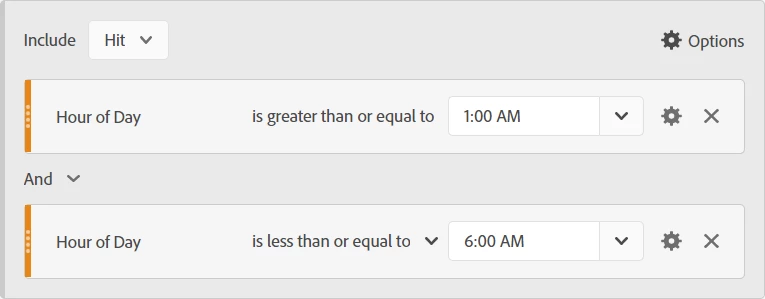
1) Create a 'hit' level segment called 'non-core hours' where 'hour of day' is greater than or equal to '1:00am' AND 'hour of day' is less than or equal to '6:00am'
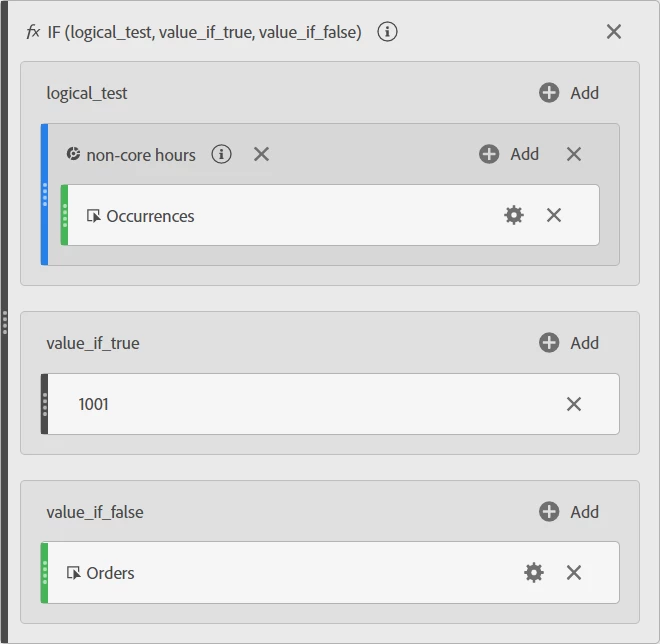
2) Create a calculated metric called 'Metric for core hours order alert' using an 'if' function:
- Within 'logic_test' place your 'non-core hours' segment with the 'occurrences' metric nested inside it
- Within 'value_if_true' add a 'Static Number' with a value of '1001' (Note: this needs to be any value which would not trigger an alert, in this case any number greater than 1000)
- within 'value_if_false' add the 'Orders' metric (Note: this needs to be the metric you want to alert on during core hours, in this case 'orders')
3) Create an hourly granularity Alert called 'core hours order alert' where the calculated metric called 'Metric for core hours order alert' is below or equal to 1000

How the alert works:
During 1:00am to 6:59am, as long as you get at least 1 occurrence in each hour, the value will always be 1001 so the alert won't trigger. During the rest of the day it will trigger if orders is equal or below 1000.
NOTE: this method also works for the 'anomaly' based alerting options. As the calculated metrics returns a static value at the same time every night, anomaly detection does not see it as an anomaly (because it is the same every night!).