Workfront Bulk Assignments in Workload Balancer ceased working | Community
Skip to main content
Level 1
June 11, 2026
Solved

Workfront Bulk Assignments in Workload Balancer ceased working

  • June 11, 2026
  • 5 replies
  • 68 views

The Bulk Assignments function in Workload Balancer ceased working for two users (one is a System Admin and the other a Group Admin). The functionality remains in tact for the other two System Admins and Group Admin who use it. 

Key info to note:

  • Nothing was modified in the system setup or configuration
  • The System Admin (myself) who has lost the functionality can’t assign any role in any project.
  • The Group Admin who lost functionality only experiences with specific job roles. 
  • All of the System Admins and Group Admins use company provided Mac computers and everyone has installed the most recent Mac system update. (I hoped that may have been the differentiating factor, but no.)

Anyone experienced this before? Any advice on solving or troubleshooting the problem?
Best answer by ConnorO2

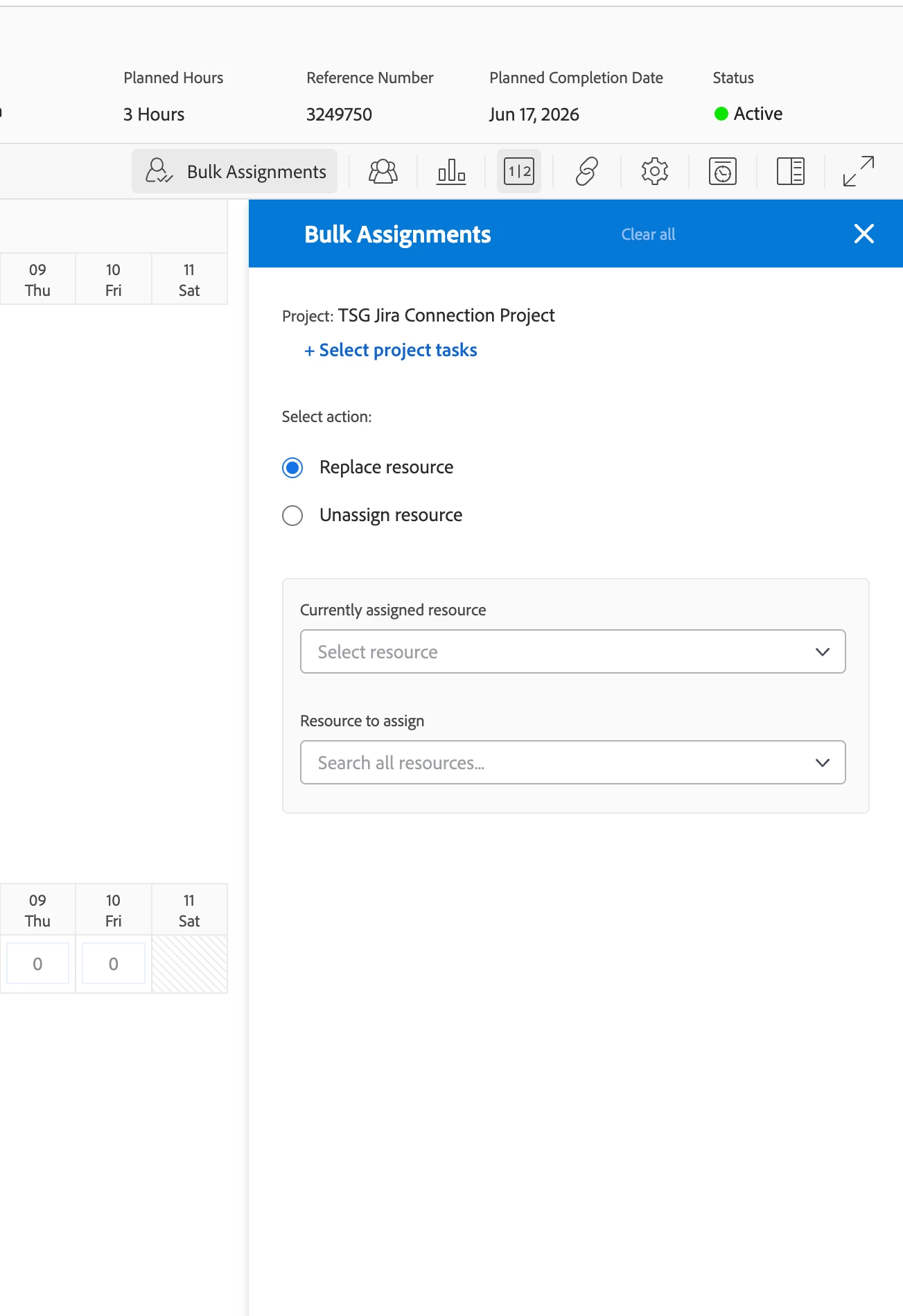
@Leigh_Hasty ​@ErinKi3 I just received a response from Support, you can mark this as resolved now. I really don’t understand why Adobe is so slow with pushing out this context. If your going to make a change make sure the community is aware first before pushing it out. Especially a big feature within the system. 


Development has let us know that the removal of 'Assign user' is intentional here. They have said that you should now be able to select "Replace Resource" and make changes to the assignments as before. There is no update to the Experience League article at this time, but they are working on those changes. I hope this helps. 


5 replies

Level 2
June 11, 2026

Sounds silly, but has everyone tried clearing their cache to see if the problem still exists?

Adobe Support
June 14, 2026

Hi ​@ErinKi3 , this sounds like it could be related to a known WLB bulk assignment bug that surfaced in late May 2026 where engineering confirmed it was fixed at the time, but if the affected users haven't cleared their browser cache since then, that's the first thing worth trying.

For the Group Admin who is only seeing the issue with specific job roles, it's also worth checking whether those tasks have open predecessors, there's a separate behavior being investigated where bulk self-assignment is blocked when a task has an incomplete predecessor dependency.

If neither of those applies, I'd recommend opening a support case so we can look at the specific user configurations, especially since it's affecting some admins but not others with no apparent system changes.

ConnorO2
Level 4
June 19, 2026

Putting in a support ticket this morning because we are experiencing this same issue. ​@ErinKi3 

Level 3
June 19, 2026

Submitting a support ticket for that today too.  Users are starting to see it missing, I assume after they have cleared their cache, because I no longer see it after clearing mine.  

ConnorO2
ConnorO2Accepted solution
Level 4
June 19, 2026

@Leigh_Hasty ​@ErinKi3 I just received a response from Support, you can mark this as resolved now. I really don’t understand why Adobe is so slow with pushing out this context. If your going to make a change make sure the community is aware first before pushing it out. Especially a big feature within the system. 


Development has let us know that the removal of 'Assign user' is intentional here. They have said that you should now be able to select "Replace Resource" and make changes to the assignments as before. There is no update to the Experience League article at this time, but they are working on those changes. I hope this helps. 


Level 3
June 19, 2026

Thanks Connor.  After I posted that above we did further functionality testing and realized that’s what they did, combined Assign with Replace without telling anyone.  So now we’ll have to socialize that change out to 1000 users.  

ErinKi3Author
Level 1
June 20, 2026

Thank you Connor. After clearing my cache, I now see the change you noted above. I’ll pass the info along to my team. Appreciate all the help.