Email Preference Center Setup | Community
Skip to main content
Jennifer_Bisho1
Level 4
August 10, 2018
Solved

Email Preference Center Setup

  • August 10, 2018
  • 1 reply
  • 8572 views

My company is in the process of brainstorming categories and processes for an email preference center, because right now we only have a one-click unsubscribe option.  Few questions that I was hoping someone could help me out with:

-If an email has 3 tags (let's say newsletter, promotion, and cloud technology), but the person only opted in to receive newsletters, will they still receive this email?  Or do they need to be subscribed to all 3 categories/tags to get it?

-We want to subscribe people to our vendor's emails, but feel it would be overwhelming to include 20+ options to select what vendor emails they'd like to receive.  As a workaround, would it make sense to have triggered campaigns setup in the background that could add them to vendor lists to receive certain emails?  Meaning if we have the person select what technologies they are interested in, can we tie a triggered campaign to their selection?  For example, if a person selects that they are interested in cloud/carrier services, can we add them to Cisco email sends?

Thanks!
This post is no longer active and is closed to new replies. Need help? Start a new post to ask your question.
Best answer by Dan_Stevens_
-If an email has 3 tags (let's say newsletter, promotion, and cloud technology), but the person only opted in to receive newsletters, will they still receive this email?  Or do they need to be subscribed to all 3 categories/tags to get it?

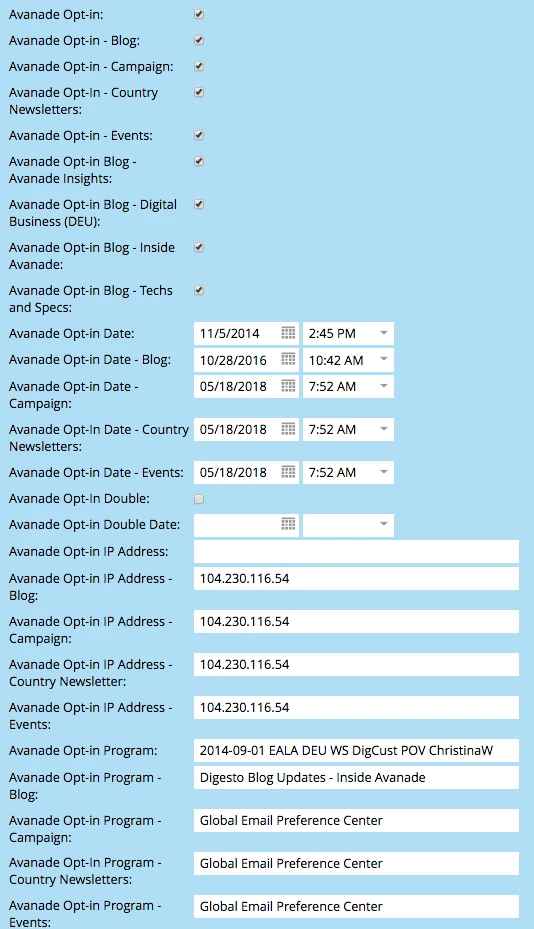
You cannot rely on "tags" to define user preferences.  This is a current Marketo limitation - vote here: .  Instead, you need to create custom consent fields like this (this is just a subset of our consent fields):

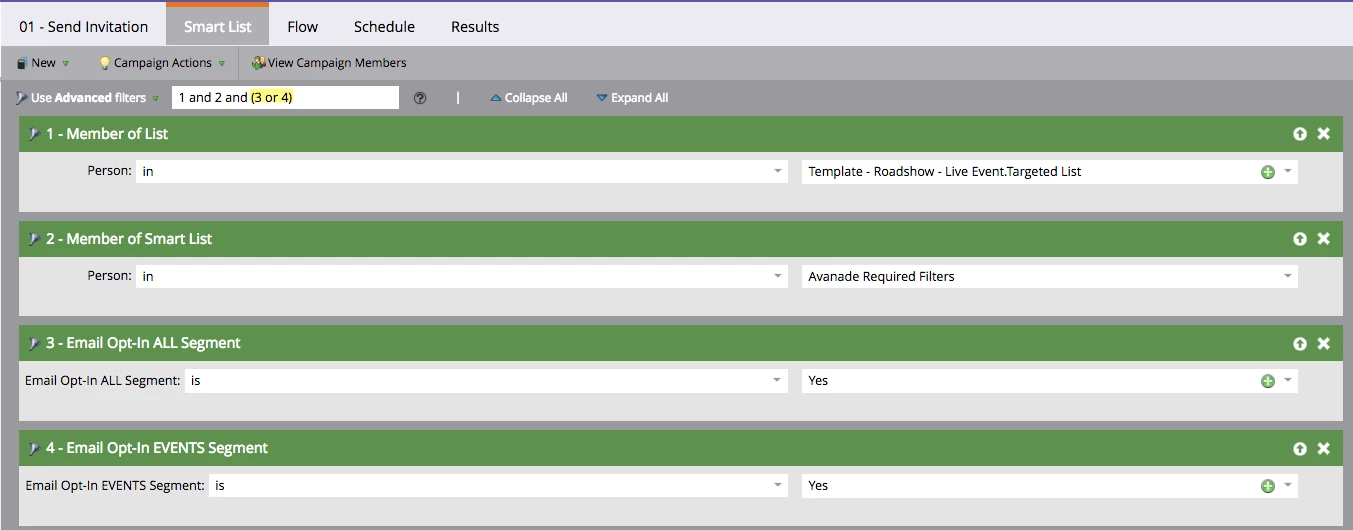
You will then need to include specific consent filters (we create segmentations for ours - based on the appropriate opt-in field) for every email send (this is an example of an event invitation):

Here's our preference center - for you to view as an example: Avanade - Email Preference Center

1 reply

Dan_Stevens_
Dan_Stevens_Accepted solution
Level 10
August 10, 2018
-If an email has 3 tags (let's say newsletter, promotion, and cloud technology), but the person only opted in to receive newsletters, will they still receive this email?  Or do they need to be subscribed to all 3 categories/tags to get it?

You cannot rely on "tags" to define user preferences.  This is a current Marketo limitation - vote here: .  Instead, you need to create custom consent fields like this (this is just a subset of our consent fields):

You will then need to include specific consent filters (we create segmentations for ours - based on the appropriate opt-in field) for every email send (this is an example of an event invitation):

Here's our preference center - for you to view as an example: Avanade - Email Preference Center

Jennifer_Bisho1
Level 4
August 10, 2018

Hey Dan - gotcha.  We're going to get Marketo consulting hours to help us build this out the right way, so I'm not familiar with how this works yet.  But before we sign the quote, we want to make sure we have these answers so we can get the categories and our strategy in place so we don't waste the hours and are ready to go.

Let's use your preference center for example.  Let's say the email going out is a newsletter and also includes the techs and specs category.  If a person only opted in to receive newsletters, and not techs and specs, can you still send the email to them?  Or do they need to opt into both categories in order to receive it?

Dan_Stevens_
Level 10
August 10, 2018

Hey Jennifer - in our preference center example, "Techs and Specs" is the name of one of our blogs.  It's not a content-type (or category).  So in this case, as long as "opt-in newsletters" is true, the person will receive that newsletter.  Don't mix topics and content-types - that gets ultra confusing.  Keep it simple - especially since you now will need to include the appropriate filters in all of your smart campaigns where an email is sent.