New limitation? 'This comment can't be saved because it's formatted content is too large' | Community
Skip to main content
Level 3
May 28, 2026

New limitation? 'This comment can't be saved because it's formatted content is too large'

  • May 28, 2026
  • 3 replies
  • 70 views

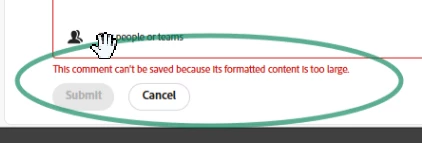
Yesterday we started seeing a new message when making comments/updates in requests and projects.  The message we’re getting is ‘This comment can’t be saved because it’s formatted content is too large’.  

Is anyone else getting this message?


We know this is new because we use the same script with some clients, and the script used to be able to be pasted in full.  Now we have to break it into two chunks.


Why are they adding random limitations like this off-schedule?  We’re just trying to work, and this doesn’t help at all.  


3 replies

Lyndsy-Denk
Community Advisor
Community Advisor
May 29, 2026

This looks like a great question for Workfront support. I recommend you submit a ticket.

skyehansen
Community Advisor and Adobe Champion
June 1, 2026

Just adding that I saw this error message today. The listed limit for Comments is 15,000 characters and the error message is coming in around 2600-2700 characters. Hopefully you entered a Support ticket for this. I’m not seeing it listed in https://experienceleague.adobe.com/en/docs/workfront-known-issues/issues/new-workfront-experience/newworkfrontexperience

skyehansen
Community Advisor and Adobe Champion
June 1, 2026

edit to add it’s definitely the formatting. Straight text will get me closer to 15000 but adding tables and bullets has drastically reduced the limit.

Ross_Barton
Adobe Champion
Adobe Champion
June 2, 2026

Having the same issue. Support ticket submitted. I’ll follow up with any learnings.

user01245Author
Level 3
June 2, 2026

I submitted a ticket as well, support confirmed this is a bug and are working on a fix!