
What is the difference between Shotcuts and explorer tab in Query activity? | Community
Skip to main content
ASNeelima
Level 2
April 15, 2025
Solved

What is the difference between Shotcuts and explorer tab in Query activity?
  • April 15, 2025
  • 2 replies
  • 795 views


What is the difference between Shotcuts and explorer tab in Query activity?please explain

This post is no longer active and is closed to new replies. Need help? Start a new post to ask your question.
Best answer by Craig_Thonis

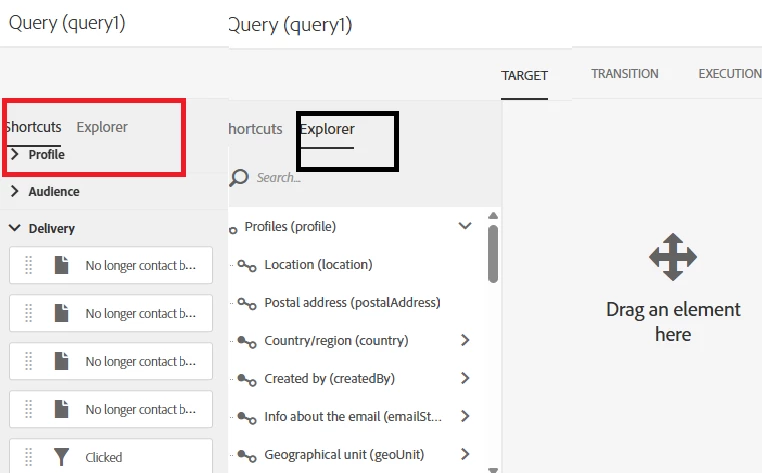
Hi, ASNeelima. The Shortcuts and Explorer tabs are very similar. The only real difference is that Shortcuts are curated (commonly used fields, predefined filters, etc.), while the Explorer shows all fields available (based on access) within the resource.

In general, if you are comfortable with the Explorer tab, you'll probably never need the Shortcuts tab, however, if you prefer Shortcuts, there may be some instances where you will have to use the Explorer tab to locate something specific within a resource.


Regards,

Craig

2 replies

Craig_Thonis
Adobe Employee
Craig_ThonisAdobe EmployeeAccepted solution
Adobe Employee
April 15, 2025

Hi, ASNeelima. The Shortcuts and Explorer tabs are very similar. The only real difference is that Shortcuts are curated (commonly used fields, predefined filters, etc.), while the Explorer shows all fields available (based on access) within the resource.

In general, if you are comfortable with the Explorer tab, you'll probably never need the Shortcuts tab, however, if you prefer Shortcuts, there may be some instances where you will have to use the Explorer tab to locate something specific within a resource.


Regards,

Craig

SatheeskannaK
Community Advisor
Community Advisor
April 15, 2025

@asneelima 

Palette

The palette, located on the left-hand side of the editor, is divided into two tabs, which contain elements divided into thematic blocks. These tabs are:

  • The Shortcuts, available by default, or created by the instance administrator. Here you will find fields, nodes, groupings, 1-1 links, 1-N links and other predefined filters.
  • The Explorer which allows you to access all available fields in the target resource: nodes, grouping elements, links (1-1 and 1-N).

https://experienceleague.adobe.com/en/docs/campaign-standard/using/managing-processes-and-data/filtering-data/editing-queries#about-query-editor

Thanks, Sathees
