Setting a control cell using javascript | Community
Skip to main content
chrisr17787094
Level 2
March 27, 2018
Solved

Setting a control cell using javascript

  • March 27, 2018
  • 6 replies
  • 3716 views

Hi there

I have recently started using javascript within a delivery to dynamically set certain fields and prevent the need for duplicating email templates (eg delivery.label = "Label for segment 1";)

I now have a desire to set options for a control cell in this way too, and was wondering if this was possible?

This post is no longer active and is closed to new replies. Need help? Start a new post to ask your question.
Best answer by Marcel_Szimonisz

Hello Chris,

1. set you template as you like

2. Edit -> Edit XML source
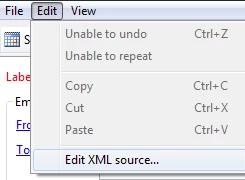
Find what you are looking for and set it in JS

In your case:

<delivery ....>

<execution broadEndDate="" broadStartDate="" maxRetry="5" nextPassDate="" passStartDate=""

             retry="0" retryPeriod="3600">

    <controlGroup activeOrder="0" enabled="true" fixed="10" percentage="10" schema="nms:recipient"

                  type="1">

      <where filteringSchema=""/>

      <humanConfig>Random sampling with size limited to 10 %</humanConfig>

    </controlGroup>

  </execution>

....

</deliver>

In JS of delivery activity set control group:

delivery.execution.controlGroup.type = 1;

delivery.execution.controlGroup.percentage= 50;

delivery.execution.controlGroup.fixed= 10;

delivery.execution.controlGroup.schema="nms:recipient";

In workflow
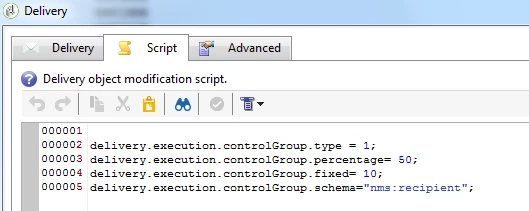
result:

50% control gruop

Marcel

6 replies

florentlb
Level 10
April 18, 2018

Hi Chris,

I'm not sure of what you mean by "control cell". Can you give more details?

Florent

florentlb
Level 10
May 9, 2018

Hello,

Any update on this issue?

Florent

chrisr17787094
Level 2
May 10, 2018

Hi there

I'm referring to when you set a control group within a delivery:

Marcel_Szimonisz
Community Advisor
Marcel_SzimoniszCommunity AdvisorAccepted solution
Community Advisor
May 10, 2018

Hello Chris,

1. set you template as you like

2. Edit -> Edit XML source

Find what you are looking for and set it in JS

In your case:

<delivery ....>

<execution broadEndDate="" broadStartDate="" maxRetry="5" nextPassDate="" passStartDate=""

             retry="0" retryPeriod="3600">

    <controlGroup activeOrder="0" enabled="true" fixed="10" percentage="10" schema="nms:recipient"

                  type="1">

      <where filteringSchema=""/>

      <humanConfig>Random sampling with size limited to 10 %</humanConfig>

    </controlGroup>

  </execution>

....

</deliver>

In JS of delivery activity set control group:

delivery.execution.controlGroup.type = 1;

delivery.execution.controlGroup.percentage= 50;

delivery.execution.controlGroup.fixed= 10;

delivery.execution.controlGroup.schema="nms:recipient";

In workflow

result:

50% control gruop

Marcel

chrisr17787094
Level 2
May 10, 2018

Thanks Marcel that's really helpful, for this problem and for other problems too.

Marcel_Szimonisz
Community Advisor
Community Advisor
May 10, 2018

yes I use this everywhere