Salesforce Connector error: JST-310000 Error while compiling script '/crm/connectorDataMgt.js' line 4879: out of memory | Community
Skip to main content
salvdangelo
Level 5
November 30, 2017
Solved

Salesforce Connector error: JST-310000 Error while compiling script '/crm/connectorDataMgt.js' line 4879: out of memory

  • November 30, 2017
  • 7 replies
  • 5706 views

Hi,

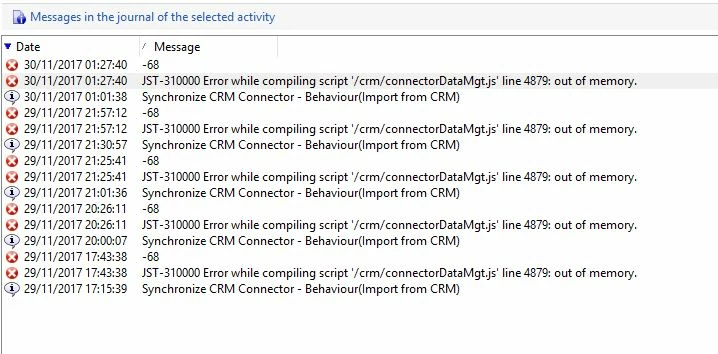
I recently get this error only with a specific Salesforce connector:

JST-310000 Error while compiling script '/crm/connectorDataMgt.js' line 4879: out of memory

Someone has an idea on how to solve this issue??
Amy_Wong

kirti.rawat

florentlb

@Vipul Ragav

Adhiyan

@Jean-Serge Biron

Adobe Campaign

This post is no longer active and is closed to new replies. Need help? Start a new post to ask your question.
Best answer by Adhiyan

Hi Sal,

You need to increase the memory assigned to the javascript node of the serverconf.xml file .

The maxMB parameter needs to be updated

Refer :

<!-- Configuring the JavaScript interpreter

         maxMB :  Maximum size in megabytes before running the garbage collector Default: 64

         stackSizeKB :  Size of each stack chunk in kilo octets Default: 8 -->

    <javaScript maxMB="64" stackSizeKB="8"/>

Regards,
Adhiyan

7 replies

Adhiyan
Adobe Employee
AdhiyanAdobe EmployeeAccepted solution
Adobe Employee
November 30, 2017

Hi Sal,

You need to increase the memory assigned to the javascript node of the serverconf.xml file .

The maxMB parameter needs to be updated

Refer :

<!-- Configuring the JavaScript interpreter

         maxMB :  Maximum size in megabytes before running the garbage collector Default: 64

         stackSizeKB :  Size of each stack chunk in kilo octets Default: 8 -->

    <javaScript maxMB="64" stackSizeKB="8"/>

Regards,
Adhiyan

salvdangelo
Level 5
November 30, 2017

Hi Adhiyan,

Can you tell me where can I find the serverconf.xml file in Adobe Campaign v6  ?

Thank you!

Salvatore

david--garcia
Level 10
November 30, 2017

Depends on your installation but usually under

salvdangelo
Level 5
November 30, 2017

I have no configuration folder

My version is 6.1.1 build 8857 and these are the main folders

Adhiyan
Adobe Employee
Adobe Employee
November 30, 2017

Hi Sal,

Probably you have a instance hosted with Adobe and hence the serverconf.xml files will be present on the adobe hosted server.

David shared the location from the campaign server directory and you are looking at the campaign client installation directory .

Regards,
Adhiyan

florentlb
Level 10
December 4, 2017

If your instance is hosted by Adobe, you can ask support to help you for such configuration scenarios (like checking/modifying the server configuration file).

Florent

October 10, 2018

Hi Adhiyan​ - I too have faced similar problem and wanted to know, is there any way we can identify how much more memory needs to be assigned to javascript interpreter and what can be impact of it on our server etc., what parameters should be checked before increasing the value ?

Regards,

Ankit