Reports | Community
Skip to main content
Level 9
October 31, 2020
Solved

Reports

  • October 31, 2020
  • 3 replies
  • 3491 views

Hi Community,


I am seeing some issue with the ACS inbuilt report.

I have a transactional message set up in the UI.

using our monitoring tool, we run 5 API tests and each test runs every sec.

in one sec, we have 5 API calls.

hence, in 60 sec/ one minute we trigger 300 API calls.


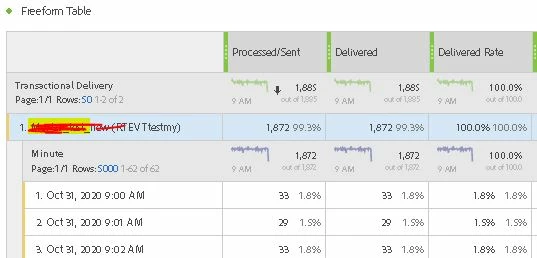
however, when I look at the reports I am seeing appx 30 calls per min.

I have attached image for reference.


my tests are running fine without any errors, can someone let me know why in reports the number is less and not accurate.


This post is no longer active and is closed to new replies. Need help? Start a new post to ask your question.
Best answer by shelly-goel

Hello @mmbb110 

I have noticed that the data shown in the dynamic reports does not match with the actual numbers. Transactional messages are like custom resource and not a delivery resource otherwise you could find out the delivered/ processed count from delivery dashboard itself. There could be two ways to find out the kpis for transactional messages:

1. Go to your event configuration in ACS and click on "Latest Transactional Events" under the summary on left. This defaults to maximum 25 records (and the count is not coming always under count element in json response) so you can manipulate the URL to get just the count.

Actual endpoint: https://<ACS endpoint>/rest/head/<your  EVT Id>.json?_order=created%20desc&__securitytoken=<security token value> 

Altered endpoint to get the count: https://<ACS endpoint>/rest/head/<your  EVT Id>//_count?__securitytoken=<security token value>  This gives the number of transactional messages sent for that event

2. Another way could be to create a workflow with a query. In properties, select the resource as your EVT name/ ID. You can filter on Real Time Events > Created or Status fields. Here you would be able to preview the count based on Status(Sent, Pending, Pending Delivery, Delivery Error) or capture the count in Advanced tab (new element). If the purpose is just to validate the numbers, it can be done with the preview itself but in case you need to get a report then you can use Extract File activity in the workflow.


Hope this helps.

//Shelly
3 replies

mmbb110Author
Level 9
November 4, 2020
Hi Community, any help on this please.
shelly-goel
Adobe Employee
shelly-goelAdobe EmployeeAccepted solution
Adobe Employee
November 8, 2020

Hello @mmbb110 

I have noticed that the data shown in the dynamic reports does not match with the actual numbers. Transactional messages are like custom resource and not a delivery resource otherwise you could find out the delivered/ processed count from delivery dashboard itself. There could be two ways to find out the kpis for transactional messages:

1. Go to your event configuration in ACS and click on "Latest Transactional Events" under the summary on left. This defaults to maximum 25 records (and the count is not coming always under count element in json response) so you can manipulate the URL to get just the count.

Actual endpoint: https://<ACS endpoint>/rest/head/<your  EVT Id>.json?_order=created%20desc&__securitytoken=<security token value> 

Altered endpoint to get the count: https://<ACS endpoint>/rest/head/<your  EVT Id>//_count?__securitytoken=<security token value>  This gives the number of transactional messages sent for that event

2. Another way could be to create a workflow with a query. In properties, select the resource as your EVT name/ ID. You can filter on Real Time Events > Created or Status fields. Here you would be able to preview the count based on Status(Sent, Pending, Pending Delivery, Delivery Error) or capture the count in Advanced tab (new element). If the purpose is just to validate the numbers, it can be done with the preview itself but in case you need to get a report then you can use Extract File activity in the workflow.


Hope this helps.

//Shelly

mmbb110Author
Level 9
November 14, 2020

@shelly-goel, I am doing a GET call is that correct? I get an error though. I think my URL is not right, is there any documentation available around this? would be great if you can pass the link, this is how my call URL looks


https://mc.adobe.io/<instance_name>/campaign/mc<instance_name>/rest/head/EVTtestmy//_count?_securitytoken=<@securitytoken>

Sukrity_Wadhwa
Community Manager
Community Manager
December 1, 2020

Hi @mmbb110,

Can you let us know if you were able to resolve this with the given solution or not? 

Thanks!

Sukrity Wadhwa