Remove logo from web survey pages in Adobe campaign | Community
Skip to main content
Level 4
September 14, 2017
Solved

Remove logo from web survey pages in Adobe campaign

  • September 14, 2017
  • 2 replies
  • 2893 views

Hi ,

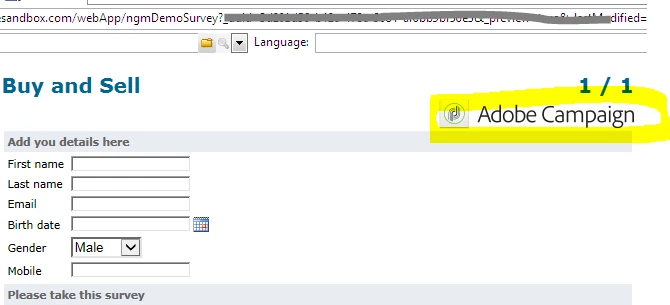
I was working with Web functionalities, Online Survey in Adobe Campaign. I created a survey and published it. However, there is a Adobe campaign logo which is appearing in all survey pages. how can I remove it from the survey page?
Regards,

Senthil

This post is no longer active and is closed to new replies. Need help? Start a new post to ask your question.
Best answer by Adhiyan

Hi Senthil,

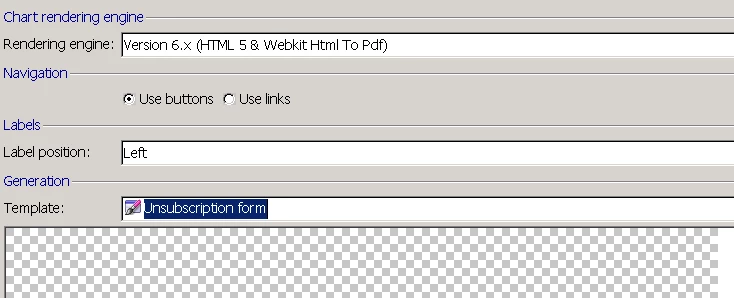
The background image is controlled by the form rendering template given in the properties of the survey like here :

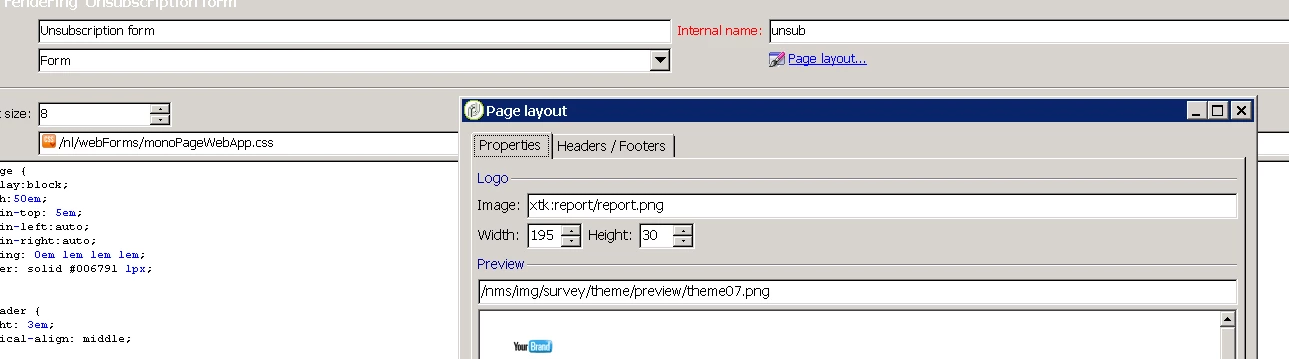
So you need to navigate to this template here under Administration>configuration>Form rendering. Here, click on page layout and change the image . Upon publishing the survey , you should get the new image updated.

For my example this path is present in the server <directory>\datakit\xtk\fra\img\report folder and the image is present in the xtk:images schema.

Regards,

Adhiyan

2 replies

Adhiyan
Adobe Employee
AdhiyanAdobe EmployeeAccepted solution
Adobe Employee
September 14, 2017

Hi Senthil,

The background image is controlled by the form rendering template given in the properties of the survey like here :

So you need to navigate to this template here under Administration>configuration>Form rendering. Here, click on page layout and change the image . Upon publishing the survey , you should get the new image updated.

For my example this path is present in the server <directory>\datakit\xtk\fra\img\report folder and the image is present in the xtk:images schema.

Regards,

Adhiyan

Senthil24Author
Level 4
September 14, 2017

Thanks a ton Adhiyan. It worked.

Regards

Senthil