Query with Custom Resources in ACS | Community
Skip to main content
alicep47308254
Level 3
January 24, 2018
Solved

Query with Custom Resources in ACS

  • January 24, 2018
  • 3 replies
  • 2704 views

Hello,

I created a Custom Resources DB in Adobe Campaign.

I don't know why I can't find all my new Custom Fields in the Shortcut Menu (or in the Explorer Menu)?
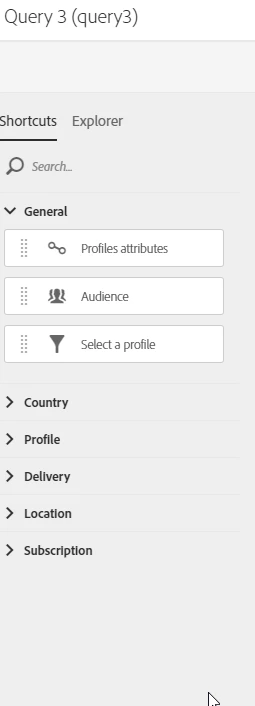
All the resources are already published and all the data are already in Adobe Campaign.

Can someone help me with that?

regards

Alice

This post is no longer active and is closed to new replies. Need help? Start a new post to ask your question.
Best answer by ShrawanSaxena-1

From the explore section you can see the resourcce which are linked with existing table(profile etc).

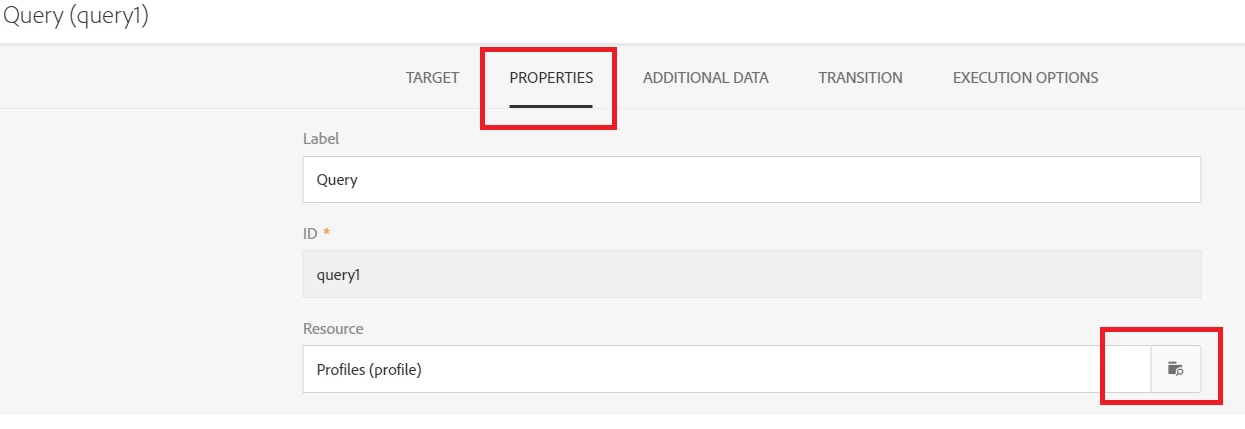
To see a resource which are not linked , you can select resource from the properties section of query activity

3 replies

ShrawanSaxena-1
Adobe Employee
Adobe Employee
January 25, 2018

Hi Alice,

You should be able to see in explore section after publishing the resource if you have created and linked resource correctly.

Regards

Shrawan

ShrawanSaxena-1
Adobe Employee
ShrawanSaxena-1Adobe EmployeeAccepted solution
Adobe Employee
January 25, 2018

From the explore section you can see the resourcce which are linked with existing table(profile etc).

To see a resource which are not linked , you can select resource from the properties section of query activity

alicep47308254
Level 3
January 25, 2018

Thank you shrawans31530030

This is very helpful for me. Have a nice day!