Preference Center | Community
Skip to main content
February 25, 2021
Solved

Preference Center

  • February 25, 2021
  • 3 replies
  • 3758 views

What's the best way to build an email preference center in ACS?


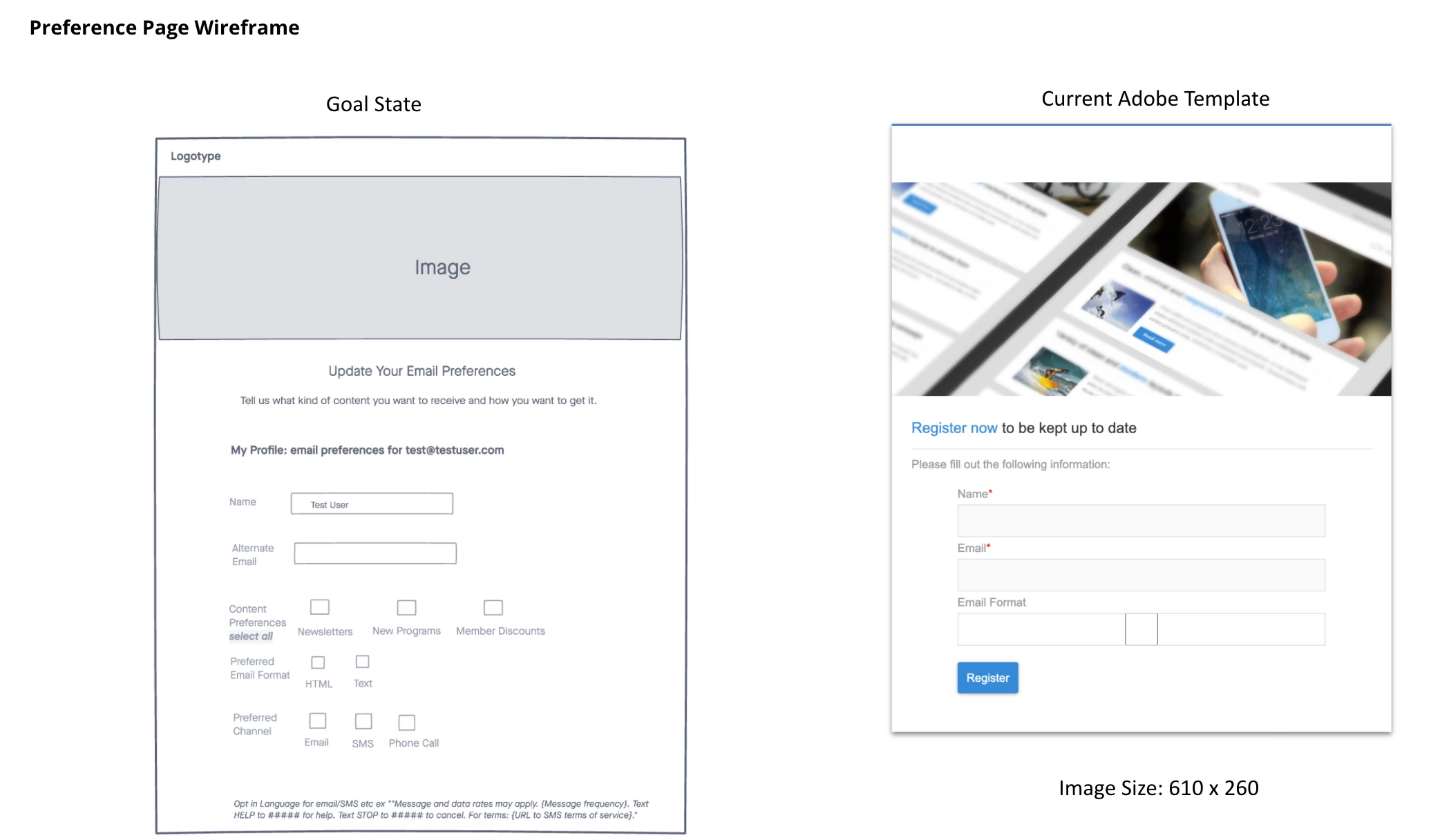
In the image below you'll see I'm trying to create a page with checkboxes, fields like email frequency, etc. Is this doable via a landing page template (see current template in image) or do you have to custom code it elsewhere and import it into adobe?


I've searched help docs and community questions, but so far I haven't seen any way to build anything like what's in the goal state image so any advice would be greatly appreciated.  Thanks in advance!


This post is no longer active and is closed to new replies. Need help? Start a new post to ask your question.
Best answer by JohnWi12

Yes it is possible to build a preference center, but you have to fool the landing page a bit.  Create a service call ____Preference_Center.  In the landing page select options check preload visitor data, reconcile by email, filter email, update strategy "Update", then click specific service and enter your preference center service you created above.  Then copy the html into your landing page.  That should get you started.


<form name="Preference" class="form" method="POST" autocomplete="off" data-nl-format="datetime">
<div><label class="stacked required" id="HtmlPage_htmlPage.email" style="text-align: left;">Email</label> <input class="stacked nl-dce-done" type="email" id="email" name="email" data-nl-ismandatory="true" data-nl-label="Email" data-nl-xpath="/context/profile/email" data-nl-type="string" readonly="readonly" data-nl-bindto="xpath" data-nl-checkboxbehavior="subscription" style="position: static; width: 448px; height: 25px; left: 0px; top: 0px; border-color: #555555; border-width: 0px; border-style: none; background-color: #fafafa; background-position: left top; background-repeat: repeat;" /></div>
<!-- List1 -->
<p> </p>
<div style="position: static; width: 448px; height: 21px; left: 0px; top: 0px; border-color: #999999; border-width: 0px; border-style: none; background-color: rgba(0, 0, 0, 0); background-position: left top; background-repeat: repeat;" data-nl-format="datetime"><input type="checkbox" id="ch1" class="nl-dce-done" data-nl-checkboxbehavior="subscription" data-nl-bindto="service" onclick="Box1Function()" data-nl-servicename="SVC*****" data-nl-servicelabel="Your Service Name" /> <span style="color: #0d0c0c;"><span style="color: #0d0c0c;">Newsletter<br style="font-size: 17px;" /></span></span></div>
<!-- List2 -->
<div style="position: static; width: 448px; height: 21px; left: 0px; top: 0px; border-color: #999999; border-width: 0px; border-style: none; background-color: rgba(0, 0, 0, 0); background-position: left top; background-repeat: repeat;" data-nl-format="datetime"><input type="checkbox" id="ch2" class="nl-dce-done" data-nl-checkboxbehavior="subscription" data-nl-bindto="service" onclick="Box2Function()" data-nl-servicename="SVC***" data-nl-servicelabel="Your Service Name 2" /> <span style="color: #0d0c0c;"><span style="color: #0d0c0c;">Blog<br style="font-size: 17px;" /></span></span></div>
<!-- List# -->
<div class="button"><a href="#" data-nl-type="action" data-nl-format="datetime" style="position: static; width: 100px; height: 50px; left: 0px; top: 0px; border-color: #ffffff; border-width: 0px; border-style: none; background-color: rgba(0, 0, 0, 0); background-position: left top; background-repeat: repeat;" data-nl-action="next">Update Preferences</a></div>
3 replies

JohnWi12Accepted solution
Level 5
February 26, 2021

Yes it is possible to build a preference center, but you have to fool the landing page a bit.  Create a service call ____Preference_Center.  In the landing page select options check preload visitor data, reconcile by email, filter email, update strategy "Update", then click specific service and enter your preference center service you created above.  Then copy the html into your landing page.  That should get you started.


<form name="Preference" class="form" method="POST" autocomplete="off" data-nl-format="datetime">
<div><label class="stacked required" id="HtmlPage_htmlPage.email" style="text-align: left;">Email</label> <input class="stacked nl-dce-done" type="email" id="email" name="email" data-nl-ismandatory="true" data-nl-label="Email" data-nl-xpath="/context/profile/email" data-nl-type="string" readonly="readonly" data-nl-bindto="xpath" data-nl-checkboxbehavior="subscription" style="position: static; width: 448px; height: 25px; left: 0px; top: 0px; border-color: #555555; border-width: 0px; border-style: none; background-color: #fafafa; background-position: left top; background-repeat: repeat;" /></div>
<!-- List1 -->
<p> </p>
<div style="position: static; width: 448px; height: 21px; left: 0px; top: 0px; border-color: #999999; border-width: 0px; border-style: none; background-color: rgba(0, 0, 0, 0); background-position: left top; background-repeat: repeat;" data-nl-format="datetime"><input type="checkbox" id="ch1" class="nl-dce-done" data-nl-checkboxbehavior="subscription" data-nl-bindto="service" onclick="Box1Function()" data-nl-servicename="SVC*****" data-nl-servicelabel="Your Service Name" /> <span style="color: #0d0c0c;"><span style="color: #0d0c0c;">Newsletter<br style="font-size: 17px;" /></span></span></div>
<!-- List2 -->
<div style="position: static; width: 448px; height: 21px; left: 0px; top: 0px; border-color: #999999; border-width: 0px; border-style: none; background-color: rgba(0, 0, 0, 0); background-position: left top; background-repeat: repeat;" data-nl-format="datetime"><input type="checkbox" id="ch2" class="nl-dce-done" data-nl-checkboxbehavior="subscription" data-nl-bindto="service" onclick="Box2Function()" data-nl-servicename="SVC***" data-nl-servicelabel="Your Service Name 2" /> <span style="color: #0d0c0c;"><span style="color: #0d0c0c;">Blog<br style="font-size: 17px;" /></span></span></div>
<!-- List# -->
<div class="button"><a href="#" data-nl-type="action" data-nl-format="datetime" style="position: static; width: 100px; height: 50px; left: 0px; top: 0px; border-color: #ffffff; border-width: 0px; border-style: none; background-color: rgba(0, 0, 0, 0); background-position: left top; background-repeat: repeat;" data-nl-action="next">Update Preferences</a></div>

El_Loco
Level 5
March 3, 2021

Hi Julie,


It's certainly possible to build a preference center which allows individuals to directly edit their personal information, and any subscriptions.


Below is an example of the preference center I built within ACS. Happy to share more details or discuss if you think it would be useful.


February 24, 2023

Hello there Bobby_JS - I know this was from a few years ago but I am looking to add a preference center to Adobe Campaign Standard to manage our preferences but cannot get the HTML to cooperate. Looking to see if you can help provide us any guidance on how you were able to execute and get to work.

El_Loco
Level 5
March 31, 2023

HI jreed2 - Sorry only just seen this. Ping me a message if this is still something you need some help with.

Sukrity_Wadhwa
Community Manager
Community Manager
March 10, 2021

Hi @juliemarks,

Were you able to resolve this query with any of the given solutions or do you still need more help here? Do let us know.

Thanks!

Sukrity Wadhwa