Pound sign arriving as # in SMS recurring delivery | Community
Skip to main content
Level 2
July 12, 2018
Solved

Pound sign arriving as # in SMS recurring delivery

  • July 12, 2018
  • 6 replies
  • 4457 views

We are attempting to visualise an SMS which would arrive to the user stating: “the price for policy number ABC123 is £100.00” and in order to do that we tried the following code in the Text content section of the SMS recurring delivery workflow item:

However, when the SMS arrived at the mobile number it looked like this: “the price for policy number ABC123 is #100.00”. This is the case on both Apple and Android devices.

We have also tried passing the symbol through as a variable, to no avail:
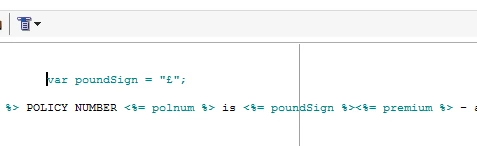
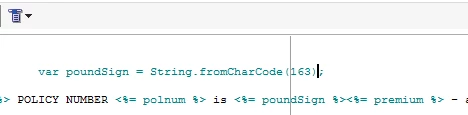
We have tried collecting the symbol using code in javascript:
We have tried forcing the encoding under the Typology tab of the Properties menu:

There are 6 character encoding options, we have tried all 6 and not forcing the encoding and all of them return the pound symbol as a hashtag in the message upon arrival.

We have also tried sending a hashtag to see if the hashtag and the pound sign characters have been mixed up somehow and that returned a hashtag too.

Please let us know if there is a fix to this.

Thanks,

Andy

This post is no longer active and is closed to new replies. Need help? Start a new post to ask your question.
Best answer by andysayers909

Hi there,

It was to do with the mapping of encodings.

On our system, this is located in the following place:

Administration > Platform > External Accounts > Outbound SMS > Then the Mobile Tab > Mapping of Encodings Tab.

Leaving this blank was the way we got round this, removing the default settings.

Hope this helps, we did also liaise with our SMS provider who checked encodings on their side.

Andy

6 replies

vraghav
Adobe Employee
Adobe Employee
July 14, 2018

Hi Andy,

The mismatch is because of the encoding at play here. It is not just the encoding what Campaign can force, but also the encoding that SMSc supports.

First step is contact your SMS vendor to see what are they receiving from us that they are then translating to #.

Is your instance Adobe hosted or On-prem? If Adobe hosted, please reach out to support and they can get a tcpdump initiated from our side to SMS vendor and shpw you what is it that we are sending. Either it will be 0x2 for GSM7 or 0x24 for LATIN1 encoding.

If we are sending the right character then problem is coming from SMS vendor who are unable to understand the code or are running their services in a different encoding.

Hope this helps. Once your issue gets resolved, please do share the resolution here so that others can benefit.

Regards,
Vipul

vraghav
Adobe Employee
Adobe Employee
August 28, 2018

Hi andysayers909,

Did you happen to find the resolution for this issue?

Regards,
Vipul

Level 2
August 28, 2018

Yes we did, thanks Vipul

nishantha838012
November 27, 2019

Hi @andysayers909

Would it be possible for you to share the solution that you settled on. We are also facing a similar issue. Your response would help us a lot.

Thanks

andysayers909AuthorAccepted solution
Level 2
November 27, 2019

Hi there,

It was to do with the mapping of encodings.

On our system, this is located in the following place:

Administration > Platform > External Accounts > Outbound SMS > Then the Mobile Tab > Mapping of Encodings Tab.

Leaving this blank was the way we got round this, removing the default settings.

Hope this helps, we did also liaise with our SMS provider who checked encodings on their side.

Andy

nishantha838012
November 28, 2019

Thanks Andy!