Padding an ID in workflow | Community
Skip to main content
2DF-MSD
May 4, 2018
Solved

Padding an ID in workflow

  • May 4, 2018
  • 1 reply
  • 1505 views

Hi,

I have a workflow that I am running in campaign that is reading values from a file and putting them in a temp table. The data I am reading has a customer ID, is there a way to pad this customer ID with zeros within the workflow? Like running a javascript, or what will be the best way to achieve this?

Thanks!

This post is no longer active and is closed to new replies. Need help? Start a new post to ask your question.
Best answer by vraghav

Hi 2DF-MSD,

You can certainly achieve that with the help of an enrichment activity on a workflow.

You can use the formula

LPad(<‘attribute that needs padding’>, <Number of characters in the final string after padding is applied>, <‘Character to use for padding at the BEGINNING if input text is smaller in length as compared to final output you want’>)

Or use

RPad(<‘attribute that needs padding’>, <Number of characters in the final string after padding is applied>, <‘Character to use for padding at the END if input text is smaller in length as compared to final output you want’>)

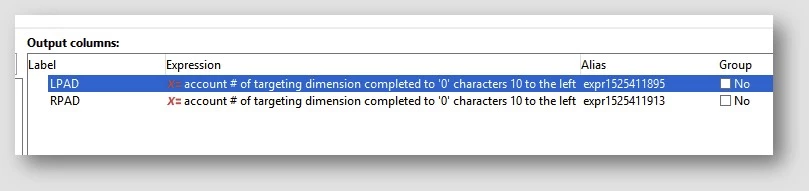
So in my test workflow I used

  • LPad([target/@account], 10, '0')
  • RPad([target/@account], 10, '0')

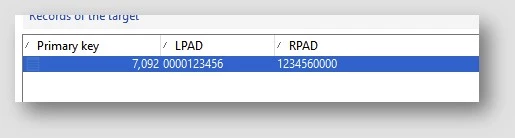
And here is the output
Regards,
Vipul

1 reply

vraghav
Adobe Employee
vraghavAdobe EmployeeAccepted solution
Adobe Employee
May 4, 2018

Hi 2DF-MSD,

You can certainly achieve that with the help of an enrichment activity on a workflow.

You can use the formula

LPad(<‘attribute that needs padding’>, <Number of characters in the final string after padding is applied>, <‘Character to use for padding at the BEGINNING if input text is smaller in length as compared to final output you want’>)

Or use

RPad(<‘attribute that needs padding’>, <Number of characters in the final string after padding is applied>, <‘Character to use for padding at the END if input text is smaller in length as compared to final output you want’>)

So in my test workflow I used

  • LPad([target/@account], 10, '0')
  • RPad([target/@account], 10, '0')

And here is the output

Regards,
Vipul