Open an external URL on a Push Notification | Community
Skip to main content
romulocostacurt
Level 2
September 23, 2019
Solved

Open an external URL on a Push Notification

  • September 23, 2019
  • 1 reply
  • 2503 views

Hi! I'm trying to make people land on a URL (https://viaverdeestacionar.onelink.me/GsYC/vvestacionar) after tapping on a Push Notification sent via ACS. I'm

including this URL on the deeplink field. However, when I click in the push that I received, it opens the URL https://www.viaverde.pt//r/?id=d4805d,5faaa8,5faaaa​.

Does anybody knows how can I do it?

This post is no longer active and is closed to new replies. Need help? Start a new post to ask your question.
Best answer by kpottsadb

Hi,

The URL you are landing on looks like and Adobe Campaign redirect link.

ACS is using a redirect to track the 'click-through' of the link and write that value to the tracking log table and dynamic reporting.  Typically the link would redirect and land on the correct URL that was included but in your case it doesn't. 

To troubleshoot:

- check the brand configuration of the delivery

- navigate to Administration > Instance Settings > Brand Configuration

- review the external URLs, the url for the tracking server should be something like: http://t.yoursubdomain.pt

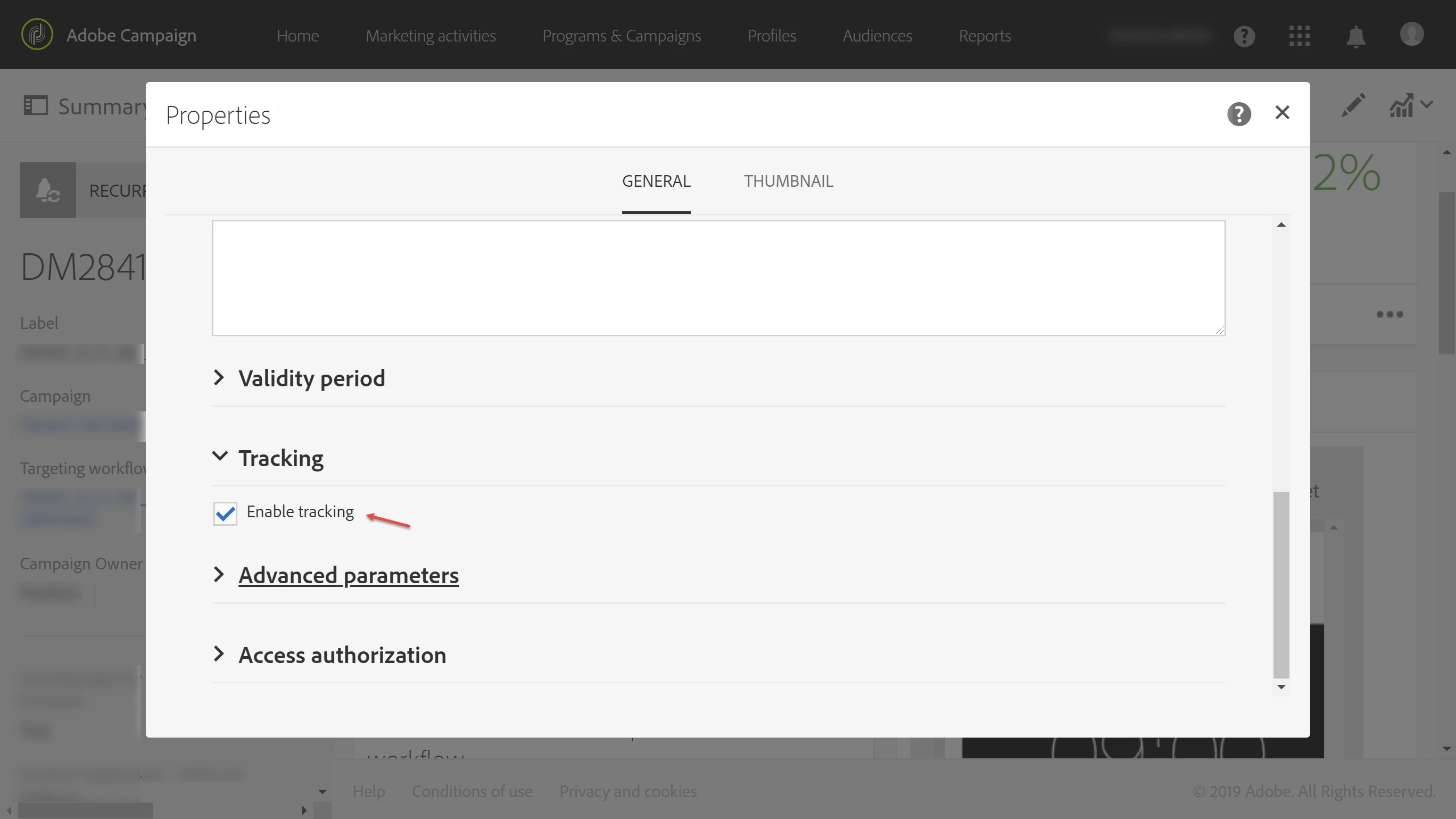
It is possible to disable tracking and therefore turn off the link redirect entirely.  You do this through the delivery properties.  That should solve the problem as well.  Screenshot below:

1 reply

kpottsadbAdobe EmployeeAccepted solution
Adobe Employee
October 1, 2019

Hi,

The URL you are landing on looks like and Adobe Campaign redirect link.

ACS is using a redirect to track the 'click-through' of the link and write that value to the tracking log table and dynamic reporting.  Typically the link would redirect and land on the correct URL that was included but in your case it doesn't. 

To troubleshoot:

- check the brand configuration of the delivery

- navigate to Administration > Instance Settings > Brand Configuration

- review the external URLs, the url for the tracking server should be something like: http://t.yoursubdomain.pt

It is possible to disable tracking and therefore turn off the link redirect entirely.  You do this through the delivery properties.  That should solve the problem as well.  Screenshot below: