Not Able to integrate IIS with Adobe Campaign | Community
Skip to main content
jyotiyadav3
Level 2
December 30, 2017
Solved

Not Able to integrate IIS with Adobe Campaign

  • December 30, 2017
  • 8 replies
  • 6950 views

I am trying to install Adobe Campaign version 6.1.1 build 8594. I am facing issue while integrating IIS with Adobe Campaign. Methods which I have done are:

1. Enabled ISAPI filters and ISAPI extentions in control panel.

2. Created new site in IIS manager.

3. Run the iis_neolane_setup.vbs as administrator.

However, I was not able to integrate it. I am getting error as:
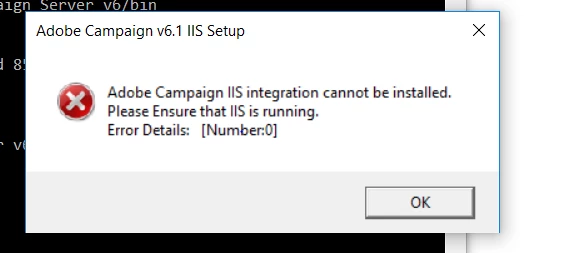
When I run nlserver pdump on command prompt, I do not get webmdl@default as integration failed.

I am running this script on windows 10 and IIS version is 10. As per my understanding, VB script is designed only for IIS7 and IIS8.

Please suggest what can be done to resolve this issue.

Thanks,

Jyoti Yadav

This post is no longer active and is closed to new replies. Need help? Start a new post to ask your question.
Best answer by david--garcia

I believe AC so far is only compatible with the following IIS versions.

Microsoft IIS
  • 7.0 on Windows Server 2008 and Windows Vista
  • 7.5 on Windows Server 2008 R2 and Windows Seven
  • 8.0 on Windows Server 2012 and Windows 8
  • 8.5 on Windows Server 2012 R2

(Adobe Campaign Classic Compatibility Matrix )

8 replies

david--garcia
david--garciaAccepted solution
Level 10
December 30, 2017

I believe AC so far is only compatible with the following IIS versions.

Microsoft IIS
  • 7.0 on Windows Server 2008 and Windows Vista
  • 7.5 on Windows Server 2008 R2 and Windows Seven
  • 8.0 on Windows Server 2012 and Windows 8
  • 8.5 on Windows Server 2012 R2

(Adobe Campaign Classic Compatibility Matrix )

florentlb
Level 10
January 2, 2018

Hi Jyoti,

As David mentioned, the versions you are trying to use are not yet officially supported. Still, I'll double check with the teams to see if that's planned or have already been achieved somehow.

In the meantime, are you able to try that with another version of IIS/Windows?

Florent

florentlb
Level 10
January 15, 2018

Hi,

While the answer to your initial question has been provided by David, were you able to try with supported versions?

Let me know,

Florent

jyotiyadav3
Level 2
January 30, 2018

Hi Florent,

Did Adobe Campaign does not support Windows 10 with any version of IIS.

I tried Windows 10 with IIS 8.5, it still didn't work.

Is changing the OS version last option to run redirection filter?

Thanks,

Jyoti

david--garcia
Level 10
January 30, 2018

@jyoti you require a Windows Server OS not a standard desktop OS

This brand includes the following operating systems:[3]

jyotiyadav3
Level 2
February 6, 2018

Thanks David.

I was able to integrate with Windows 7. It was helpful.

February 7, 2018

How did you do it? Please assist

jyotiyadav3
Level 2
February 8, 2018

I use Windows 7 and then followed the steps of installation. I didn't face any issue with Windows 7. Are you facing any issue during installation or you need to know about steps to install it?