Move a file on SFTP from a folder to another in Adobe Campaign Standard | Community
Skip to main content
Level 2
January 12, 2021
Solved

Move a file on SFTP from a folder to another in Adobe Campaign Standard

  • January 12, 2021
  • 1 reply
  • 1742 views

Hi all, 
I'm using an SFTP server on which CSV files containing user data are loaded. Once the file is loaded by ACS, i need to move it from the main folder to another one called "Loaded". I already done a similar configuration in Adobe Campaign Classic, using the "initialization script" option inside a Test step, but, unfortunately, I'm not able to replicate this kind of configuration as the test step in ACS doesn't contain the "initialization script" option. In addition to this, I'm not able at all to find a Javascript step to be inserted into my import workflow, in ACS. How can I solve this problem?
Thank you in advance for your precious help

Simone
This post is no longer active and is closed to new replies. Need help? Start a new post to ask your question.
Best answer by DavidKangni

Hi, 

you can achieve it by this work around

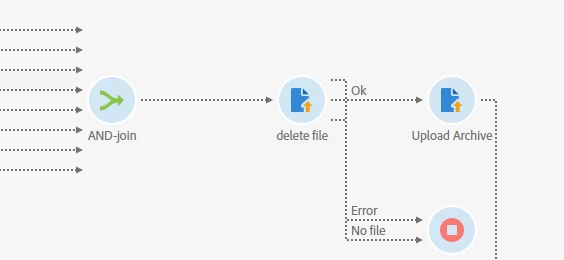
  • add a fork after your initial load activity 
  • add a and join after your data update or last activity in your import process
  • add two load activity on to download the file and second to move it to your history (loaded) folder

Thanks,

David

1 reply

DavidKangni
Community Advisor
DavidKangniCommunity AdvisorAccepted solution
Community Advisor
January 12, 2021

Hi, 

you can achieve it by this work around

  • add a fork after your initial load activity 
  • add a and join after your data update or last activity in your import process
  • add two load activity on to download the file and second to move it to your history (loaded) folder

Thanks,

David

David Kangni