Issue in configuring external account- Share KPI with Adobe Analytics | Community
Skip to main content
Level 2
April 9, 2019
Solved

Issue in configuring external account- Share KPI with Adobe Analytics

  • April 9, 2019
  • 4 replies
  • 4402 views

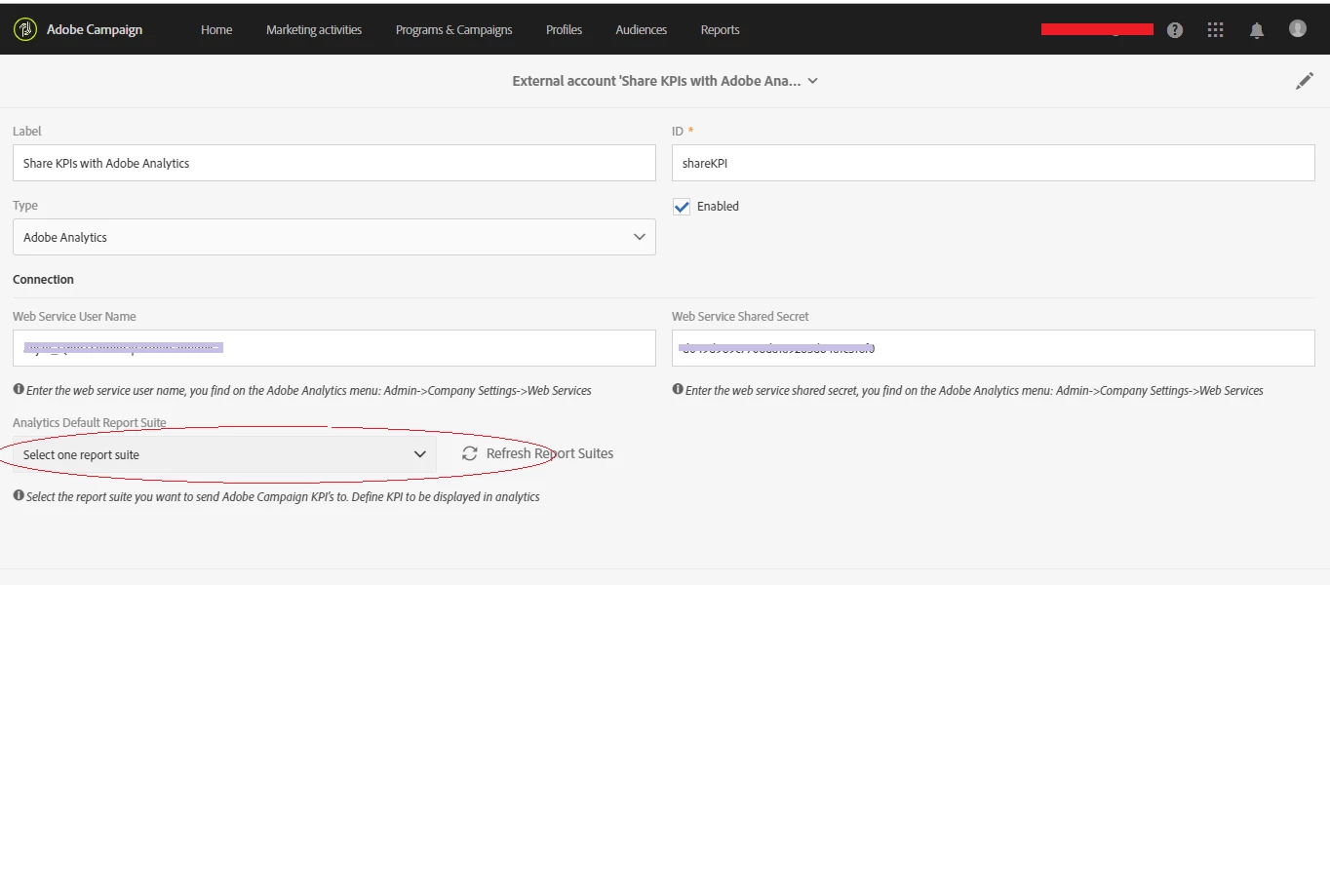
While trying to configure the external accounts for Share KPI with Adobe Analytics, I cannot see any analytics report suites in the drop down. Infact, it is read only.

I took the webservice user name and shared secret key from Admin->Company Settings->Web Services for my username.

Anything I am missing? Please help.

Thanks!
This post is no longer active and is closed to new replies. Need help? Start a new post to ask your question.
Best answer by aneetarora

Hi anjalis9208738

The dropdown by default is greyed out and becomes selectable upon successful connection to Analytics. Basically, once you enter the details for Web Service User Name and Shared Secret, hit save and then clicking the "Refresh Report Suites" should populate the dropdown. The web request when you hit the "Refresh Report Suites" button should look like [1] in your browser and it's response brings back a list of Report Suites. See if this request is throwing any errors.

I believe the issue is likely with the Analytics User permissions.

Can you please check the permissions assigned to the Analytics User you're enlisting in this configuration?

Thank you,

Aneet

[1] https://Testinstanceaneet.campaign.adobe.com/rest/head/extAccount/@z8zxijWTEuLWzX0Y4Fi-00ZrQ1tjaYnRRJ15Gm9fUYZHcjkElygCcc9YF-vHwUHoLwDX-TJUPIcrzfImxHG9-DWfdi4/reportSuite?username=test@test.com:Test&sharedSecret=9092s9a261815e12b2385hdhw894842ffdz8zxijWTEuLWzX0Y4Fi-00ZrQ1tjaYnRRJ15Gm9fUYZHcjkElygCcc9YF-vHwUHoLwDX-TJUPIcrzfImxHG9-DWfdi4/reportSuite?username=test@test.com:Test&sharedSecret=9092s9a261815e12b2385hdhw894842ffd

4 replies

Adobe Employee
April 9, 2019

anjalis9208738

The first thing to check is if the Analytics connection details are accurate. The common mistake is while entering the Web Service User Name. It's typically in the form <username>:<TenantID>, Can you confirm this?

Moreover, when you click the button for "Refresh Report Suites", it's supposed to fire a REST call. Can you see what the response to the request is ? It should contain query parameters such as username=&sharedSecret=.

Thank you,

Aneet Arora

Level 2
April 12, 2019

Thank you for your response.

Yes, the username format is correct. Although when I click refresh report suites, no analytics report suites gets populated and the dropdown "Analytics Default Report Suite" is read only for me. Any thoughts?

aneetaroraAdobe EmployeeAccepted solution
Adobe Employee
April 12, 2019

Hi anjalis9208738

The dropdown by default is greyed out and becomes selectable upon successful connection to Analytics. Basically, once you enter the details for Web Service User Name and Shared Secret, hit save and then clicking the "Refresh Report Suites" should populate the dropdown. The web request when you hit the "Refresh Report Suites" button should look like [1] in your browser and it's response brings back a list of Report Suites. See if this request is throwing any errors.

I believe the issue is likely with the Analytics User permissions.

Can you please check the permissions assigned to the Analytics User you're enlisting in this configuration?

Thank you,

Aneet

[1] https://Testinstanceaneet.campaign.adobe.com/rest/head/extAccount/@z8zxijWTEuLWzX0Y4Fi-00ZrQ1tjaYnRRJ15Gm9fUYZHcjkElygCcc9YF-vHwUHoLwDX-TJUPIcrzfImxHG9-DWfdi4/reportSuite?username=test@test.com:Test&sharedSecret=9092s9a261815e12b2385hdhw894842ffdz8zxijWTEuLWzX0Y4Fi-00ZrQ1tjaYnRRJ15Gm9fUYZHcjkElygCcc9YF-vHwUHoLwDX-TJUPIcrzfImxHG9-DWfdi4/reportSuite?username=test@test.com:Test&sharedSecret=9092s9a261815e12b2385hdhw894842ffd

Level 2
April 25, 2019

Thank you, the issue is fixed.

We then reached out adobe helpdesk team and they were able to fix the issue.