mohammada451459
Level 2
Mar 8, 2018 9:41 AM UTC

How to stop a workflow through javascript command

Hi All,

I am trying to join two tables

Table 1 : Contains few workflow columns

Table 2 : workflow table

after taking out desired columns (status ==13(Paused)) I need to stop these paused workflows through some external command.

below is the screenshot of my workflow.
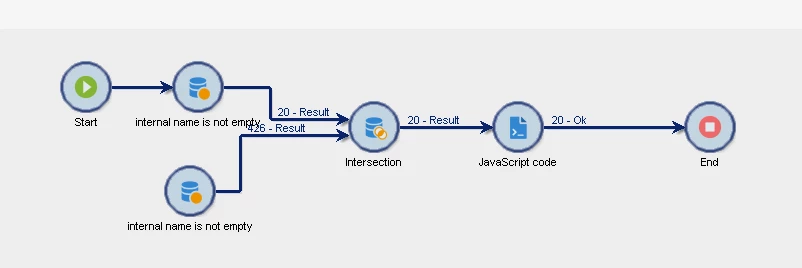
after joining both the tables I am taking desired columns in javascript and trying to stop the workflow on the criteria, below is the javascript.
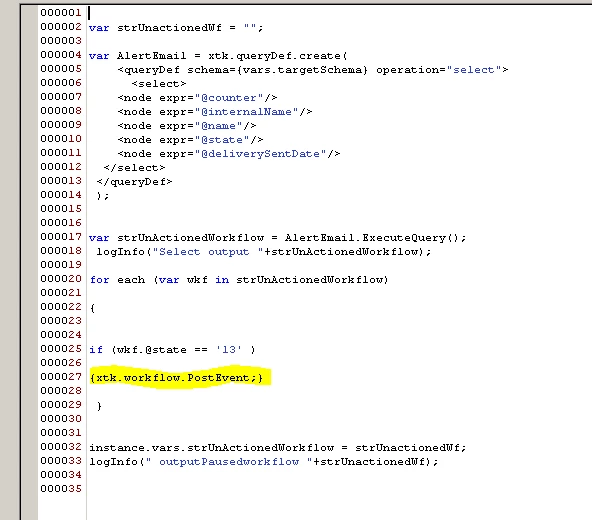
also writing the code below.

{

var strUnactionedWf = "";

var AlertEmail = xtk.queryDef.create(

    <queryDef schema={vars.targetSchema} operation="select">

      <select>

    <node expr="@counter"/>

    <node expr="@internalName"/>

    <node expr="@name"/>

    <node expr="@state"/>

    <node expr="@deliverySentDate"/>    

  </select>

</queryDef>

);

var strUnActionedWorkflow = AlertEmail.ExecuteQuery();

logInfo("Select output "+strUnActionedWorkflow);

for each (var wkf in strUnActionedWorkflow)

{

if (wkf.@state == '13' )

{xtk.workflow.PostEvent;}

}

instance.vars.strUnActionedWorkflow = strUnactionedWf;

logInfo(" outputPausedworkflow "+strUnactionedWf);

}

This post is no longer active and is closed to new replies. Need help? Start a new post to ask your question.

4 replies

Amit_Kumar
Level 10
Mar 9, 2018 2:26 PM UTC

Hi,

First get @id of workflows that you want to stop in the query and then you need to use the Stop method to stop the workflows.

xtk.workflow.Stop(WorkFlowId)

Regards,

Amit

Translate
mohammada451459
Level 2
Mar 12, 2018 8:29 AM UTC

Hi Amit, Thanks for the response , but I am trying to put a for loop to get all the workflow to stop instead of one individual one.

I have taken all the worflow details in one java variable , now I need to call that variable in the stop syntax.

This is what I am trying to do.

xtk.workflow.Stop(for each(var in XYZ))

Note : xyz is my vraible which contains all the data of multiple workflows which needs to be stopped.

Thanks

Arif

Translate
Amit_Kumar
Level 10
Mar 12, 2018 1:33 PM UTC

Hi Arif,

It's not how you use a for each loop!

Use something like below

var AlertEmail = xtk.queryDef.create(

    <queryDef schema={vars.targetSchema} operation="select">

      <select>

  <node expr="@id"/>

<node expr="@state"/>

  </select>

</queryDef>);

var strUnActionedWorkflow = AlertEmail.ExecuteQuery();

for each (var wkf in strUnActionedWorkflow) {

if (wkf.@state == '13' ) {

xtk.workflow.Stop(parseInt(wkf.@id)) ;

}

}

Translate
mohammada451459
Level 2
Mar 14, 2018 7:05 AM UTC

Hi Amit, Thank you so much, it worked

Thanks

Arif

Translate