How to Query Has opened at least 1 email in adobe campaign? | Community
Skip to main content
Level 2
June 12, 2017
Solved

How to Query Has opened at least 1 email in adobe campaign?

  • June 12, 2017
  • 2 replies
  • 1954 views

Hi,

  How to Query Has opened at least 1 email in adobe campaign?please any one help me.

Thanks,

jameel.sk

This post is no longer active and is closed to new replies. Need help? Start a new post to ask your question.
Best answer by vraghav

Hi Jameel,

You can have a setup like this.

  1. Drop a Query activity on workflow canvas.
  2. Double click on it to configure it.
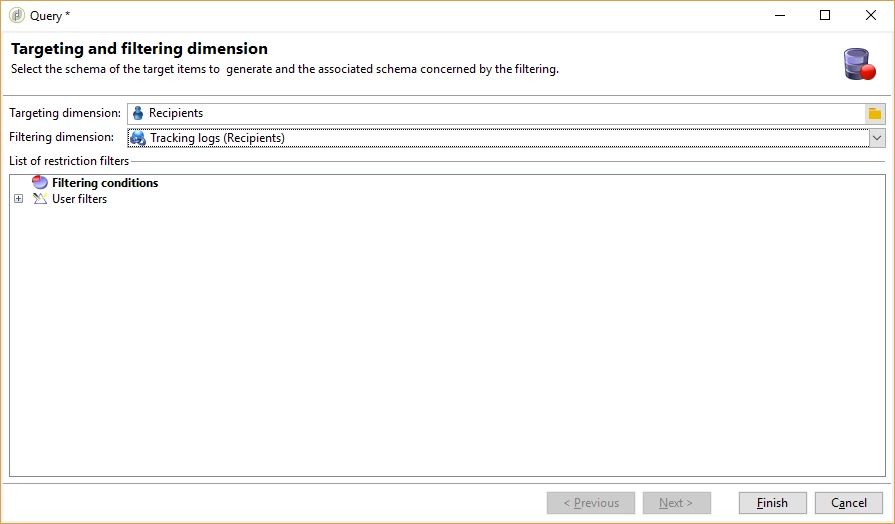
  3. On the first window select Recipients as the targeting dimension and Tracking logs (Recipients) as the filtering dimension.
  4. Select Filtering conditions and move to next screen.
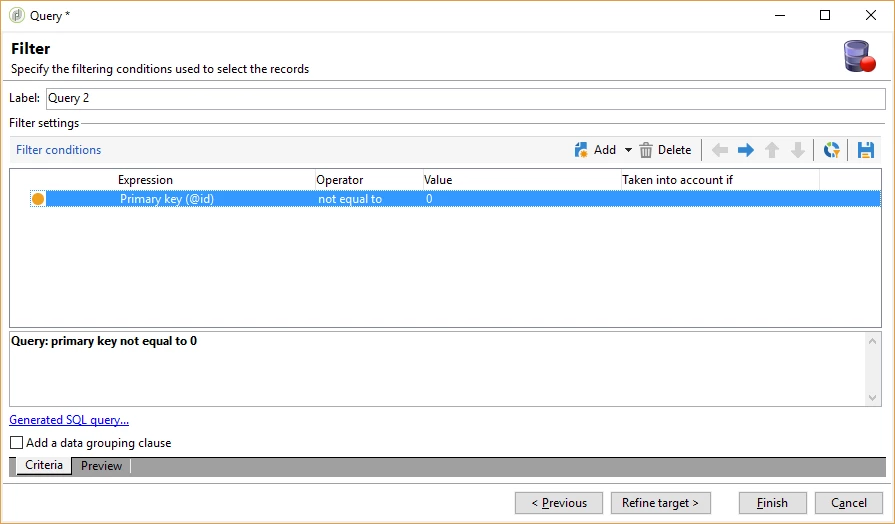
  5. Set the condition as Primary Key (@id) is not equal to 0.
  6. This will give you recipients that will have atleast one tracking log entry which corresponds to email being opened.

Hope this helps.

Regards,

Vipul

2 replies

vraghav
Adobe Employee
vraghavAdobe EmployeeAccepted solution
Adobe Employee
June 13, 2017

Hi Jameel,

You can have a setup like this.

  1. Drop a Query activity on workflow canvas.
  2. Double click on it to configure it.
  3. On the first window select Recipients as the targeting dimension and Tracking logs (Recipients) as the filtering dimension.
  4. Select Filtering conditions and move to next screen.
  5. Set the condition as Primary Key (@id) is not equal to 0.
  6. This will give you recipients that will have atleast one tracking log entry which corresponds to email being opened.

Hope this helps.

Regards,

Vipul

Marcel_Szimonisz
Community Advisor
Community Advisor
June 13, 2017

Hello Jameel,

you can also do it without filtering dimension by checking if tracking log exists where message was successfully sent and  with user action not equal to opt out.

BR,

Marcel