How can I create behavior filter (See screenshot)? | Community
Skip to main content
Level 3
June 27, 2017
Solved

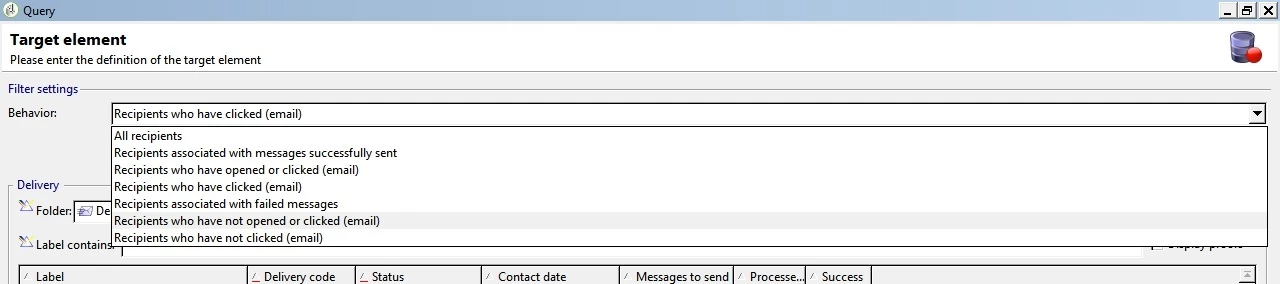
How can I create behavior filter (See screenshot)?

  • June 27, 2017
  • 2 replies
  • 1929 views

How can I create behavior filter (See screenshot)? I want to create a filter such as ' Recipients who have opened the email'
   

This post is no longer active and is closed to new replies. Need help? Start a new post to ask your question.
Best answer by ckumari12

Hi Florent,

Thanks for the reply!

I understand that we can create our own filters. But I am unable to find the filters showing in the drop-down (please refer screenshot) in the predefined filters.

Are we trying to say that the filter option in the behaviour are the pre-defined filters? This option I get in query & split activity.

I want to save behaviour Recipients who have opened the email for a delivery and across the application.

Thanks,

Chandni

2 replies

florentlb
Level 10
July 3, 2017

Hi,

Have you seen this page: Creating filters  ?

To create your filter, you'd need to query the nms:recipients table and finetune it with your own criteria based on the data of the tracking log table related to the recipients.

Let me know if you want to achieve specific filters and share the steps you took so we can walk through it together.

Florent.

ckumari12AuthorAccepted solution
Level 3
July 6, 2017

Hi Florent,

Thanks for the reply!

I understand that we can create our own filters. But I am unable to find the filters showing in the drop-down (please refer screenshot) in the predefined filters.

Are we trying to say that the filter option in the behaviour are the pre-defined filters? This option I get in query & split activity.

I want to save behaviour Recipients who have opened the email for a delivery and across the application.

Thanks,

Chandni