How can i add a pre-fix to recur on each internal name of email deliveries? | Community
Skip to main content
Level 2
January 29, 2018
Solved

How can i add a pre-fix to recur on each internal name of email deliveries?

  • January 29, 2018
  • 4 replies
  • 2810 views

Hi there,

We'd like to group the deliveries of our recurring automated emails, so that reporting is streamlined. We'd like to execute this by rather than having a seperate 'DM' number for each delivery, we'd like each type of delivery to have a pre-fix before the DM number.

Bizarrely, one of our deliveries has this pre-fix configured (No idea who did this, or how this was done). I'd like to add it to the rest, but i cannot see any difference in the set-up of each delivery or how to configure this for all the others.

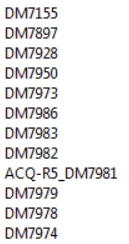
As you can see from the below image, we have the 'ACQ-R5' deliveries containing the prefix, however the others don't have this.

Where is the prefix pulled from? @
This post is no longer active and is closed to new replies. Need help? Start a new post to ask your question.
Best answer by arouillard44

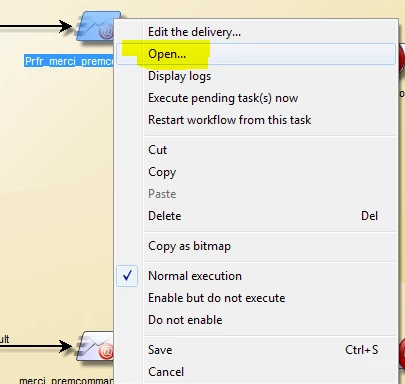
You can find this window by "right clicking" on the delivery object and Open the activity :

And you will find the Script editor.

Regards,

4 replies

arouillard44
Level 4
January 29, 2018

Hello,

First of all, which version of Campaign are you using ?

I'm not sure that I understood your request, but if you want to change the automatic internal name of a delivery, you can use this code in the "Delivery object modification script" :

delivery.internalName = "ACQ-R5_" + delivery.internalName;

It's an idea,

Regards,

Level 2
January 29, 2018

Version 6.1

Thanks very much - this looks just what i need!

However, i'm struggling to find the screenshot "Delivery object modification script".

Please advise.

Andy

arouillard44
arouillard44Accepted solution
Level 4
January 29, 2018

You can find this window by "right clicking" on the delivery object and Open the activity :

And you will find the Script editor.

Regards,

Level 2
January 29, 2018

Fantastic! Thanks very much!