global unsub / opt out in adobe campaign | Community
Skip to main content
Level 2
June 18, 2017
Solved

global unsub / opt out in adobe campaign

  • June 18, 2017
  • 2 replies
  • 2800 views

Do we have a global unsub / global opt out concept (subscribers who don't want to receive any communication at all)  in adobe campaign ? If yes, how and where we can access to these data? It's different to the Services and subscriptions function

Thanks and Regards.

This post is no longer active and is closed to new replies. Need help? Start a new post to ask your question.
Best answer by vraghav

Hi binhr47192046 ,

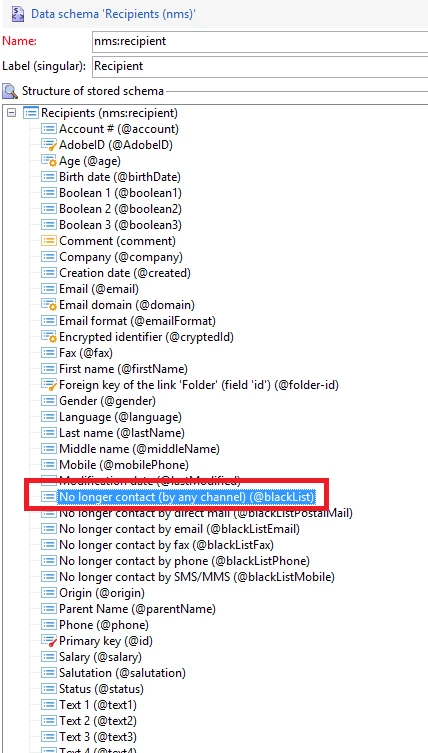
There is an attribute in nms:recipient schema named @blacklist which can be set to true or Yes if you wish that the recipient is never sent a communication, even by mistake.
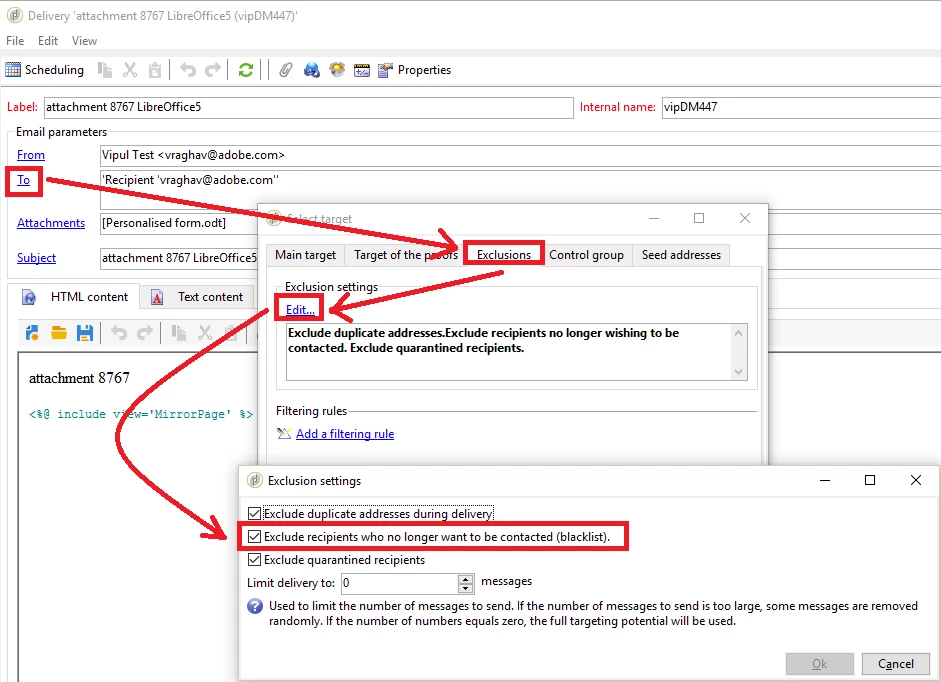
Delivery templates have a default exclusion criteria to remove such recipients from targeted audience. Adobe Campaign adds it by default on every new template but a marketer can disable this option as well and hence please do revisit all the delivery templates.
So, if you have a data file with the list of emails that should never be sent an email, please create a workflow to update corresponding recipient's blacklist field to true.

If you wish to provide this feature on a webApp, you will have to write custom JS code to update the recipient record.

Regards,

Vipul

2 replies

Amit_Kumar
Level 10
June 19, 2017

Yes, WE have this concept in adobe campaign.

let's say if you are updating recipient/profile details with no longer contact by any channel/email than that is equivalent of global Unsubscription.

Read following for details: Synchronizing profiles

Regards,

Amit

vraghav
Adobe Employee
vraghavAdobe EmployeeAccepted solution
Adobe Employee
June 19, 2017

Hi binhr47192046 ,

There is an attribute in nms:recipient schema named @blacklist which can be set to true or Yes if you wish that the recipient is never sent a communication, even by mistake.

Delivery templates have a default exclusion criteria to remove such recipients from targeted audience. Adobe Campaign adds it by default on every new template but a marketer can disable this option as well and hence please do revisit all the delivery templates.

So, if you have a data file with the list of emails that should never be sent an email, please create a workflow to update corresponding recipient's blacklist field to true.

If you wish to provide this feature on a webApp, you will have to write custom JS code to update the recipient record.

Regards,

Vipul