getElementById | Community
Skip to main content
Level 2
April 25, 2018
Solved

getElementById

  • April 25, 2018
  • 3 replies
  • 3086 views

Hello,

I am trying to use the document.getElementByID method and it is throwing an error while evaluating the script
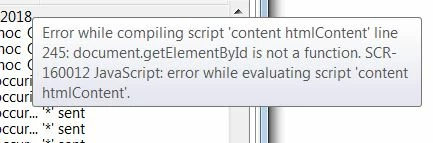
Is there an alternative Adobe Campaign method that would work the same way?

Thanks!

This post is no longer active and is closed to new replies. Need help? Start a new post to ask your question.
Best answer by Marcel_Szimonisz

Hello, if  are you trying to change email content before personalization you can use regular expressions  eg.

var html = delivery.content.html.source;

var regex = new RegExp("</body></html>","ig");

var regex2 = newRegExp("<div id=\"your_id\">(.*?)<\/div>","ig");

html.replace(regex,'add_your_html');

html.replace(regex2,'add_your_html');

delivery.content.html.source = html;

OR you can try to amend html with  XML  E4X extension look it up in jsapi (have not tried).

Marcel

3 replies

Kapil_Sharma_
Adobe Employee
Adobe Employee
April 26, 2018

Hi,


Can you please elaborate a little bit about the issue, and what exactly you are trying to achieve ?

Marcel_Szimonisz
Community Advisor
Marcel_SzimoniszCommunity AdvisorAccepted solution
Community Advisor
April 27, 2018

Hello, if  are you trying to change email content before personalization you can use regular expressions  eg.

var html = delivery.content.html.source;

var regex = new RegExp("</body></html>","ig");

var regex2 = newRegExp("<div id=\"your_id\">(.*?)<\/div>","ig");

html.replace(regex,'add_your_html');

html.replace(regex2,'add_your_html');

delivery.content.html.source = html;

OR you can try to amend html with  XML  E4X extension look it up in jsapi (have not tried).

Marcel

Level 2
May 7, 2018

Many thanks, I ended up following a very similar approach