prabhakaranv572
Jun 14, 2017 10:53 AM UTC
Solved

Facebook sync on adobe campaign not working

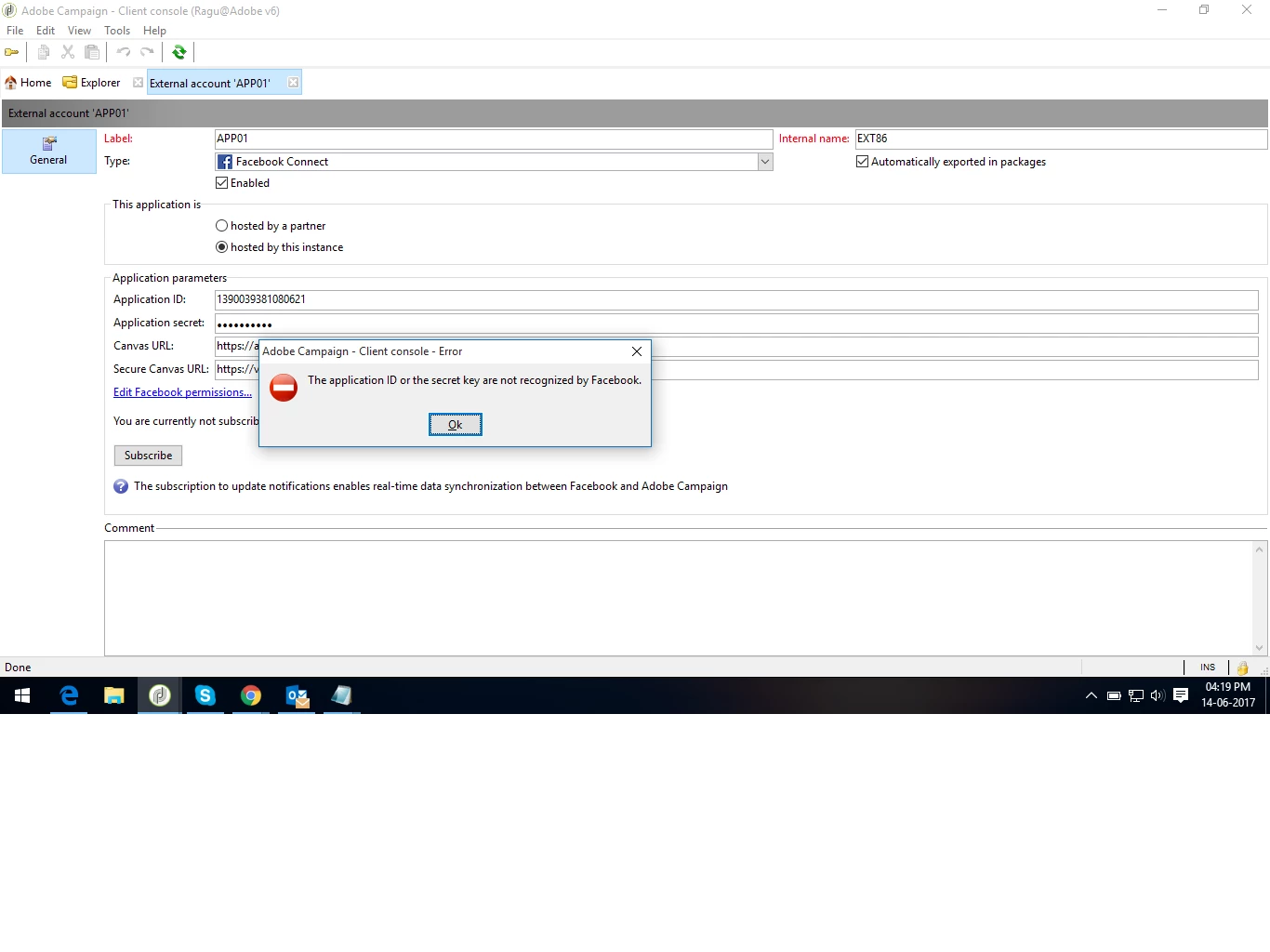
When i create the facebook external account on adobe campaign it showing the error like "Application id or secret key are not recognized by facebook".but my application id and secret key is copied from facebook only.What i did wrong please help me.Please refer the attachment for your reference

This post is no longer active and is closed to new replies. Need help? Start a new post to ask your question.
florentlb
florentlbAccepted solution
Level 10
Jun 16, 2017 5:40 PM UTC

Ok, so it seems your build is pretty old and does not reflect the current way Facebook's API works.

You can have a look at the Campaign release notes here: Adobe Campaign Release Notes

By searching for "social", you will see that some builds more recent than yours contain fixes related to Facebook's API evolution.

I would recommend upgrading to a more recent build, by reaching out to your IT department if you are on-prem or to Campaign support team if you are hosted.

Hope this helps,

Florent.

6 replies

florentlb
Level 10
Jun 15, 2017 3:50 PM UTC

Hi,

Which build are you using? I know that there were some fixes made to the facebook connector in recent builds (since mid-2016).

Have you checked the documentation? Screenshots may not be up to date regarding latest Facebook changes but the overall configuration should be still pretty the same: Creating a Facebook application

Let me know,

Florent.

Translate
prabhakaranv572
Jun 16, 2017 5:00 AM UTC

Hi florentlb,

Thanks for your reply. I have used the following build and version of adobe campaign

Version 6.1.1 build 8665 of 07/10/2015

(Application server : version 6.1.1 build 8653)

And I have also followed the your mentioned Creating a Facebook application document only.

Regards,

Prabhakaran.v

Translate
florentlb
florentlbAccepted solution
Level 10
Jun 16, 2017 5:40 PM UTC

Ok, so it seems your build is pretty old and does not reflect the current way Facebook's API works.

You can have a look at the Campaign release notes here: Adobe Campaign Release Notes

By searching for "social", you will see that some builds more recent than yours contain fixes related to Facebook's API evolution.

I would recommend upgrading to a more recent build, by reaching out to your IT department if you are on-prem or to Campaign support team if you are hosted.

Hope this helps,

Florent.

Translate
prabhakaranv572
Jun 20, 2017 4:26 AM UTC

Thank you florenttlb.

May I know which adobe campaign build and server version onwards support latest facebook API.

Regards,

Prabhakaran.v

Translate
florentlb
Level 10
Jun 20, 2017 9:11 AM UTC

Hi,

I'd suggest at least 8770, considering that the release notes don't mention any specific fix related to Facebook from this build.

In any case, the latest build is often the most up to date when it comes to third party support.

Hope this helps,

Florent.

Translate
florentlb
Level 10
Jun 27, 2017 10:57 AM UTC

Hi,

Were you able to upgrade and try with a more recent build?

Let me know,

Florent.

Translate