Error on Workflow to import data from a csv file | Community
Skip to main content
February 24, 2021
Solved

Error on Workflow to import data from a csv file

  • February 24, 2021
  • 2 replies
  • 2542 views

Hi everyone,

I need some help with a workflow I want to use to import/update profiles in the database from a csv file. The issue is that when I start the workflow, the 2 recipients from the csv file (which are not in the database before upload) are added in the Complement, instead of Segment 2 where they should be  Updated as Profiles in the database. 
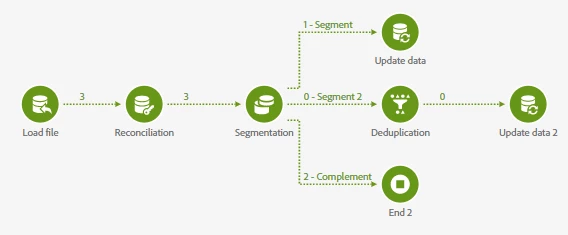
I suppose the issue comes from the criteria used in the Segmentation activity, but I don't know how to change that. 

Criteria for Segment 1:  profile’s CRM ID is not equal to 0

Criteria for Segment 2: 
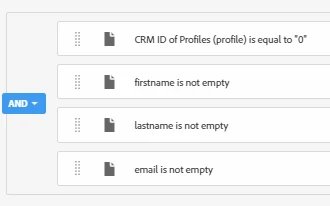
I used the steps mentioned in this example: https://experienceleague.adobe.com/docs/campaign-standard/using/managing-processes-and-data/importing-and-exporting-data/creating-import-workflow-templates.html?lang=en#managing-processes-and-data

1. Load file activity (csv file with column headers firstname;lastname;birthdate;email;city;crmID). The file includes 3 profiles: 1 currently existing in Campaign database and 2 new. 

2. Reconciliation activity by CrmID

3. Segmentation with 2 segments and a complement. Segment 1 retrieves reconciled recipients and for them I have an Update data activity with Operation type just Update. Segment 2 with recipients that were not reconciled and I want to use them to create new recipient entries in the database. And then a Complement with the remaining data (recipients that don't have enough data to be added in the database)

Thank you in advance for your help!
This post is no longer active and is closed to new replies. Need help? Start a new post to ask your question.
Best answer by ParthaSarathy

Hi @user93811 ,

yes, Criteria specified in Segment 2 is incorrect.

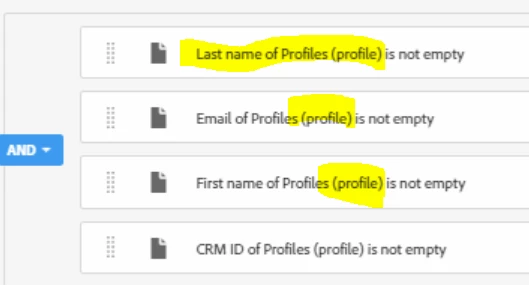
Basically the records coming in Segment 2 are those who are not in the database right. But in your filtering condition you are checking again with profiles database.


Criteria you used is checking profile resource again:


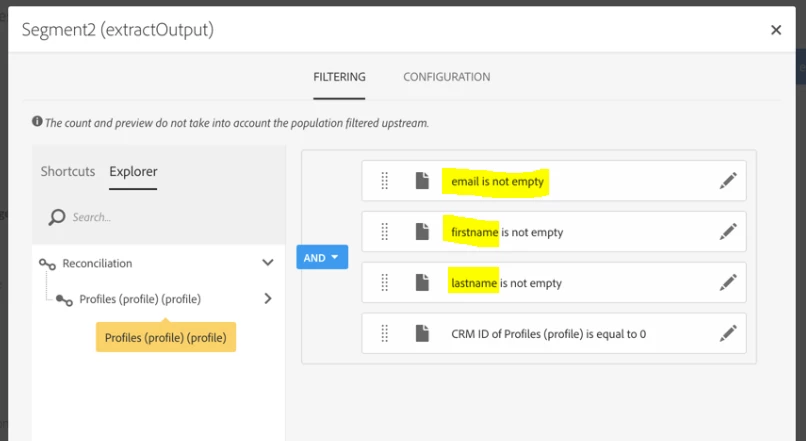
But You need to filter by using the column in file.

Like,


Regards,

ParthaSarathy

2 replies

ParthaSarathy
Community Advisor
ParthaSarathyCommunity AdvisorAccepted solution
Community Advisor
February 24, 2021

Hi @user93811 ,

yes, Criteria specified in Segment 2 is incorrect.

Basically the records coming in Segment 2 are those who are not in the database right. But in your filtering condition you are checking again with profiles database.


Criteria you used is checking profile resource again:


But You need to filter by using the column in file.

Like,


Regards,

ParthaSarathy

~  ParthaSarathy S~  Click here to join ADOBE CAMPAIGN USER GROUP for Quarterly In-person | Hybrid | Virtual Meetups
ParthaSarathy
Community Advisor
Community Advisor
February 25, 2021

Hi @user93811 ,

Yes your edited configuration in Segment 2 is correct. You need to get the 2 records in segment 2 transition. If not, follow the below troubleshooting steps.

check your test data manually. Is everything matching your segment-2 criteria or not.

If it is correct, please check your Load file and Reconciliation configuration as per document - Click here for documentation


And you can also check 'Crmid of profile (profile)' in transition arrow between reconciliation activity and segmentation activity by selecting interim results (to enable interim result go to workflow property > execution > check 'keep the interim results')

There see what is the crmid of profiles (profile) for that 2 records.


regards,

ParthaSarathy

~  ParthaSarathy S~  Click here to join ADOBE CAMPAIGN USER GROUP for Quarterly In-person | Hybrid | Virtual Meetups
user93811Author
February 24, 2021

Hello @parthasarathy ! Thank you for your reply. I tried your suggestion, you are right with the way I should filter for Segm 2, but it's still not working. 


The 2 contacts that are not in the database go to Complement, instead of Segment 2.