Delivery execution without drops | Community
Skip to main content
C_Canada
November 29, 2017
Solved

Delivery execution without drops

  • November 29, 2017
  • 13 replies
  • 4873 views

I need to be able to execute a delivery for direct mail and/or Phone where the delivery just executes ALL rows, regardless of whether the recipient record has a terrestrial address or phone number on it.  The file is being appended externally with address and/or phone number elements that are (or may be) different than what is on the recipient record.  Unfortunately, I cannot find a way to force any delivery to NOT drop records for incomplete address or phone number. 

This post is no longer active and is closed to new replies. Need help? Start a new post to ask your question.
Best answer by Adhiyan

Hello ,

Yes this can be achieved if you do the following :

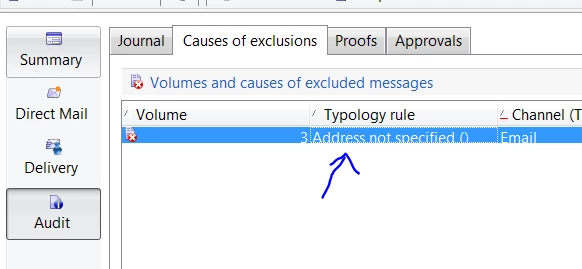
1>. Check the audit tab of the delivery to see which rules are excluding targets : Keep a note of the names to use in step3

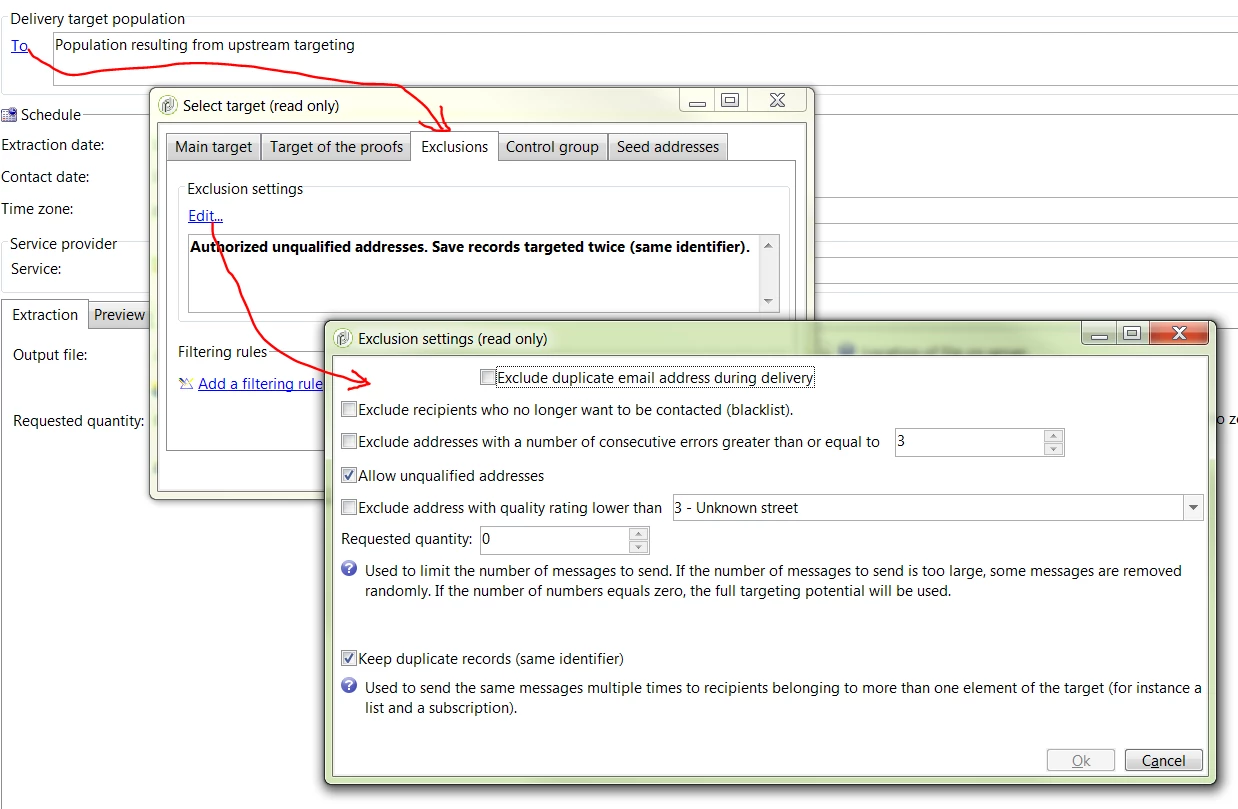
2>. Click on "To" in the delivery editor and uncheck all the exclusion settings :

You may want to do this change at the delivery template instead of the delivery to avoid recurrent work.

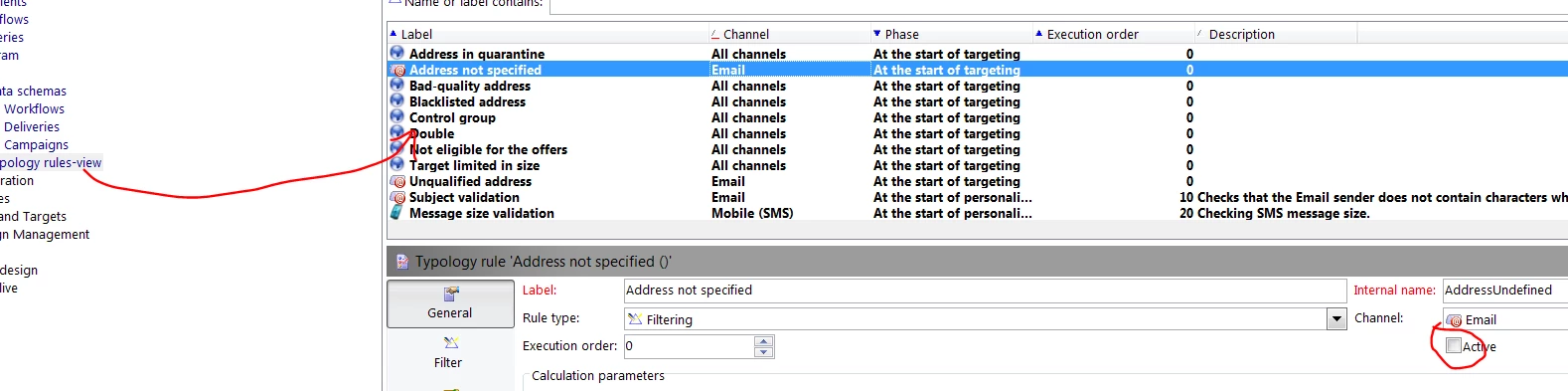
3>. Create a typology view folder and check the name of the rules which excludes the recipients from the delivery from step 1 .

Uncheck the active button from the rule and that rule will not be applied to the delivery after this.

One word of caution : Disabling these typology rules will have an impact on the whole platform and all deliveries, so you need to exercise caution while disabling these rules.

Regards,
Adhiyan

13 replies

cbeattie1992
August 7, 2018

Hi Adhijyan,

I too have the same scenario as C Canada that the address for DM csutomers is not held within Adobe campaign but appeneded after the list is export externally.

However you can not update the address specified field (addrDefined) as this is an OOTB calculated field based on the following fields:

location/@zipCode], [../location/@city], [../@lastName]

Therefore in order to change the Address Specified field from 0 to a 1(Yes) you must update all of these field to contain a value.

I have found this to be the only work around given the information above.

I have implemented this within the workflows before the delivery:

This is the work around i have found works best for now. But of course not ideal as there is now an additioanl step within all DM workflows.

I will be interested to hear of any other work arounds or if there is any updates on Adobe Campaign side as this appears to be a bug.

Thanks a lot

Connor

Adhiyan
Adobe Employee
Adobe Employee
August 7, 2018

Hi Connor,

Yes that is right. Updating the zipcode ,city and last name would update the addrDefined field automatically. I mentioned that this is a calculated field in my last update but yes in the workflow you need to update all the attributes to have a value updated.

But honestly , this is not a bug . Because this attribute is meant to be used only for Direct mail deliveries and for direct mail we need a valid postal address and these 3 fields determine if we have a Valid address or not.

Regards,
Adhiyan

cbeattie1992
August 7, 2018

Hi Adhiyan,

Thanks for getting back to me.

I appericate the reason for the exclusion of customers with no address however then the TO exclusion is rather misleading .

As the you said:

The logging is not proper and hence the exclusion gets mapped against a wrong typology name. To resolve this in the current version , you need to update the addrDefined attribute to 1 or True in the contact information part of recipient form.

The TO exclusion criteria does not impact the exclusion criteria for a DM. therefore we have to update the date as a work around.

Thanks

Connor