Delivery Error - PGS-220000 PostgreSQL : permission denied for relation nmssuppressionaddress | Community
Skip to main content
Level 2
March 22, 2018
Solved

Delivery Error - PGS-220000 PostgreSQL : permission denied for relation nmssuppressionaddress

  • March 22, 2018
  • 7 replies
  • 6673 views

Hi,

I try to create a delivery and I get this error:

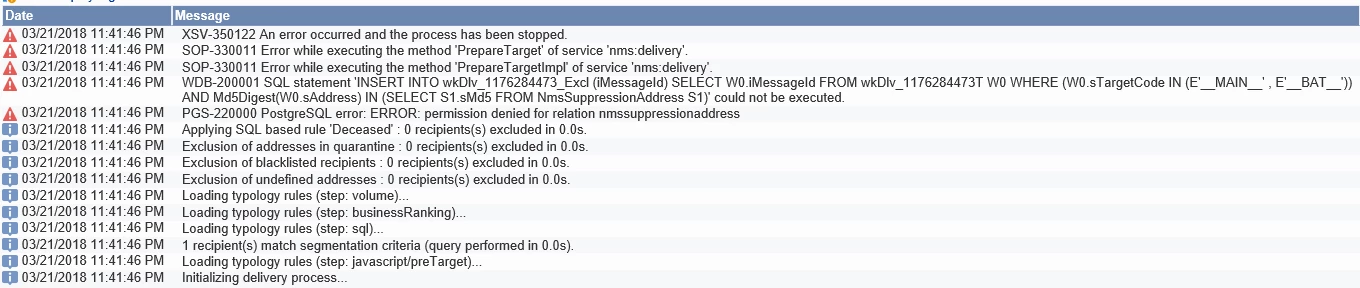
"PGS-220000 PostgreSQL error: ERROR: permission denied for relation nmssuppressionaddress"
I try searching the forums but no clue. Please help.

Thank you,

Rumm

This post is no longer active and is closed to new replies. Need help? Start a new post to ask your question.
Best answer by ShrawanSaxena-1

Hi Rumm,

Are you on- premise setup or it is hosted by Adobe.

As per the error in screenshot, it seems that the delivery is failing due to the missing Md5Digest   installed on your Postgres database.

Usually occurs when extension "pgcrypto" not installed. This Extension have to be created once per database. And the pgcrypto extension is special as it can only be created by the database superuser (normally postgres).

If you are on on premise setup , I would suggest you to please ask DBA at your end to further look into this concern/Error.

You also might find below links helpful :

https://www.postgresql.org/docs/9.1/static/sql-createextension.html

https://www.postgresql.org/docs/9.4/static/pgcrypto.html

If environment is hosted by Adobe , You can raise a support ticket with Adobe Campaign Support.

Hope this helps in resolving the issue
7 replies

Kapil_Sharma_
Adobe Employee
Adobe Employee
March 22, 2018

Hi Rumn,

Please check the Validations in the Schema Definition of nmssuppressionaddress schema.

I am not sure but it may be the reason that the User by which you have logged in AC, and trying to send the delivery, doesn't have rights to access to the given schema.

Level 2
March 23, 2018

Hi kapilsharma0101,

The user is the administration user. And the schema definition is like this (see picture below). The delivery used to working fine. I did not change or create any extension from this schema.

Kapil_Sharma_
Adobe Employee
Adobe Employee
March 23, 2018

In that case please try removing the "Exlude Domains" rule from the Typology selected in the Delivery and try to send the delivery again.This may work as you are facing issue with this schema only.

Level 2
March 26, 2018

Thank you kapilsharma0101. I tried deactivating the rule but the error is still the same...

ShrawanSaxena-1
Adobe Employee
ShrawanSaxena-1Adobe EmployeeAccepted solution
Adobe Employee
March 26, 2018

Hi Rumm,

Are you on- premise setup or it is hosted by Adobe.

As per the error in screenshot, it seems that the delivery is failing due to the missing Md5Digest   installed on your Postgres database.

Usually occurs when extension "pgcrypto" not installed. This Extension have to be created once per database. And the pgcrypto extension is special as it can only be created by the database superuser (normally postgres).

If you are on on premise setup , I would suggest you to please ask DBA at your end to further look into this concern/Error.

You also might find below links helpful :

https://www.postgresql.org/docs/9.1/static/sql-createextension.html

https://www.postgresql.org/docs/9.4/static/pgcrypto.html

If environment is hosted by Adobe , You can raise a support ticket with Adobe Campaign Support.

Hope this helps in resolving the issue
Level 2
March 27, 2018

Hi shrawans3150030,

Thank you for your suggestion. This is hosted by Adobe so I have requested for a support ticket. Will update the result soon.

Level 2
March 28, 2018

They have provided the permission so now it works. Thank you everyone.

Rumm