Delete an Extended Schema | Community
Skip to main content
July 12, 2018
Solved

Delete an Extended Schema

  • July 12, 2018
  • 4 replies
  • 3974 views

Hi,

How can we delete an extended schema in Adobe Campaign.

For example, I extended the nms:Recipient schema in my own namespace and added a custom attribute to it. Now I don't need the custom attribute. How can I delete it?

Thanks,

Sadaf

This post is no longer active and is closed to new replies. Need help? Start a new post to ask your question.
Best answer by kuthiala_ananya

Hello sadafali

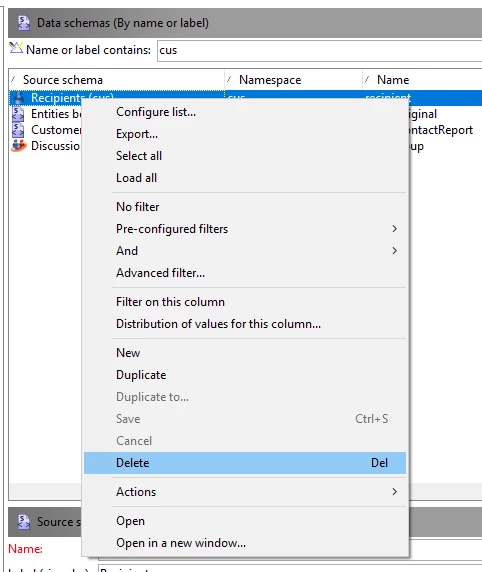
Incase you do not require the extended schema , Simply right click on the schema and click on delete. Below is the screenshot for the same

I Hope this helps !!!

Regards,

Ananya Kuthiala

4 replies

kuthiala_ananya
Adobe Employee
kuthiala_ananyaAdobe EmployeeAccepted solution
Adobe Employee
July 12, 2018

Hello sadafali

Incase you do not require the extended schema , Simply right click on the schema and click on delete. Below is the screenshot for the same

I Hope this helps !!!

Regards,

Ananya Kuthiala

July 12, 2018

Thanks for your response Ananya.

The extended schema has a new attribute so will just deleting it not affect the nms:Recipient schema?

Also, after deleting it do I need to update the database structure? Or just deleting it would be fine?

Regards,

Sadaf

kuthiala_ananya
Adobe Employee
Adobe Employee
July 12, 2018

Hi sadafali

If you are deleting the extended schema only then it would not change anything on the original schema. Post deleting the extended one if you will review the structure of nms:recipient then you will no longer see the filed which was mentioned in extended one. Updating the database structure would not be required.

Regards,

Ananya Kuthiala

ShrawanSaxena-1
Adobe Employee
Adobe Employee
July 12, 2018

Deleting should be fine.

You can check after that if any pending updates are there