Data loading (file) custom date formatting | Community
Skip to main content
Level 3
March 21, 2018
Solved

Data loading (file) custom date formatting

  • March 21, 2018
  • 3 replies
  • 3058 views

Hi folks,

I'm sure I'm not the first one to ask this question but I don't see any information on the documentation nor the forum with regard to custom date formats for this workflow step. As per the screenshot, the format field is a drop down and I need to parse in a strangely formatted UTC timestamp with. Does campaign have the ability to parse out only the relevant bits I'm after or do I have to tell the ETL guys to follow campaign's formatting?
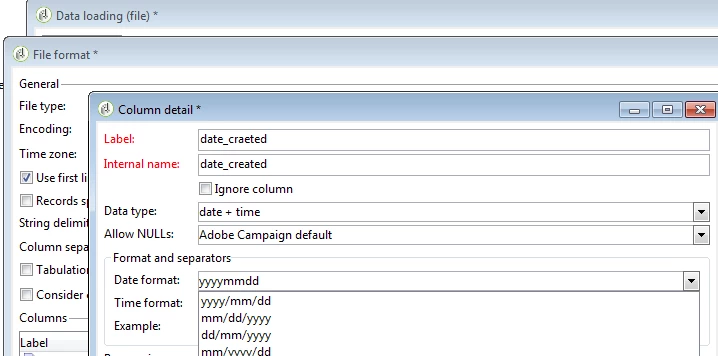
Thanks,

--Erik

This post is no longer active and is closed to new replies. Need help? Start a new post to ask your question.
Best answer by Kapil_Sharma_

Hi Erik,

Explanation:

It is not possible to change the Date Format from this Drop Down.

This is a part of Enumeration Named # dateFormat which is a part of Schema # xtk:dataTransfer.

As this is the Out Of The Box Schema, this can't be changed.

But, there is a workaround to change the date format to the one you want.

Solution:

After the DataLoading Activity, use one JavaScript Activity, and write the below code to change the Date Format.

//Select The Date Coming From The DataLoading Activity

var query = xtk.queryDef.create

   (

      <queryDef schema={vars.targetSchema} operation="select">

        <select>

          <node expr="@Date"/>  // Name Of Your Date Column In DataLoading Activity

        </select>

      </queryDef>

    );

var res = query.ExecuteQuery();

var date; // Variable To Capture New Date After Format Change

for each (var w in res)

logInfo("Date Before Changing The Format : "+w.@Date);

{

date = formatDate(w.@Date,"%4Y-%2M-%2D"); //Put The Desired Date Format You Want. (Ex. %4Y-%2M or %2D-%2M)

logInfo("Date After Changing The Date Format: "+date);

}

3 replies

Kapil_Sharma_
Adobe Employee
Kapil_Sharma_Adobe EmployeeAccepted solution
Adobe Employee
March 21, 2018

Hi Erik,

Explanation:

It is not possible to change the Date Format from this Drop Down.

This is a part of Enumeration Named # dateFormat which is a part of Schema # xtk:dataTransfer.

As this is the Out Of The Box Schema, this can't be changed.

But, there is a workaround to change the date format to the one you want.

Solution:

After the DataLoading Activity, use one JavaScript Activity, and write the below code to change the Date Format.

//Select The Date Coming From The DataLoading Activity

var query = xtk.queryDef.create

   (

      <queryDef schema={vars.targetSchema} operation="select">

        <select>

          <node expr="@Date"/>  // Name Of Your Date Column In DataLoading Activity

        </select>

      </queryDef>

    );

var res = query.ExecuteQuery();

var date; // Variable To Capture New Date After Format Change

for each (var w in res)

logInfo("Date Before Changing The Format : "+w.@Date);

{

date = formatDate(w.@Date,"%4Y-%2M-%2D"); //Put The Desired Date Format You Want. (Ex. %4Y-%2M or %2D-%2M)

logInfo("Date After Changing The Date Format: "+date);

}

Level 3
March 23, 2018

Thanks for the info kapilsharma0101. I reckoned it would come down to a javascript step. I assume updating the enumeration (even if it wasn't dangerous) wouldn't let parse it properly would it?

Kapil_Sharma_
Adobe Employee
Adobe Employee
March 23, 2018

No, I tried it by extending the xtk:dataTransfer schema.

I added my custom date format there. It was coming in the Drop Down in the Data Loading Activity, but it was not working. Because the definition of that custom date format is not known to the Adobe Campaign and we can't define that as adobe won't let us dip that deep into the application (Out Of The Box Functionality).