Configure scheduler to run the last day of the month in ACS | Community
Skip to main content
Level 3
September 24, 2018
Solved

Configure scheduler to run the last day of the month in ACS

  • September 24, 2018
  • 5 replies
  • 3967 views

Hi,

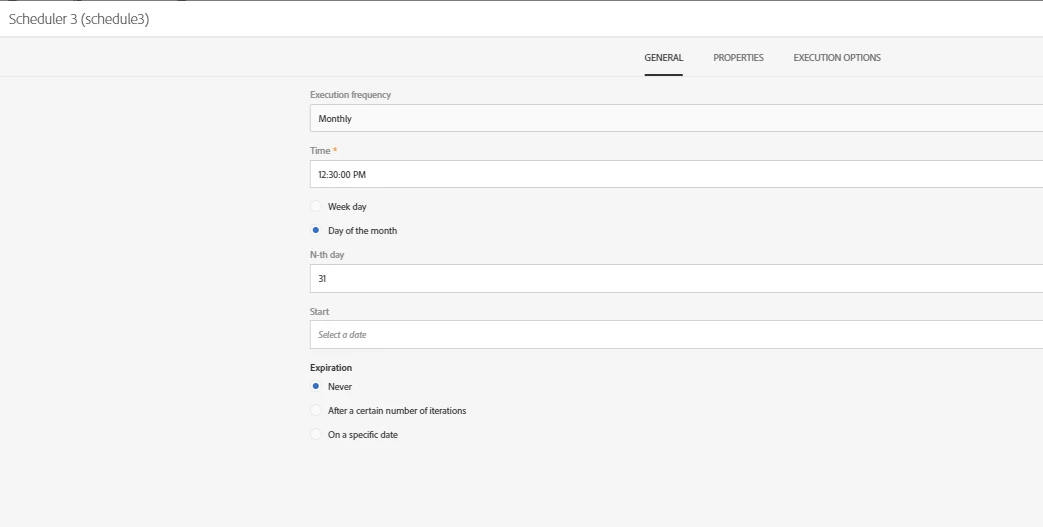
How should I configure my scheduler to make sure it's runing the last day of every month, whether it's 30/31 days or 28/29 in February.

Will 31 as an N-th day do the job ?

Thank you.
This post is no longer active and is closed to new replies. Need help? Start a new post to ask your question.
Best answer by Amit_Kumar

Hi,

ACS doesn't 't support the last day of the month in the schedule.

all you can do is

1. Run/schedule your scheduler every 28th day of the month

2. Use enrichment to get the lastday of the month as additional data

i.e. SubMinutes(AddMonths(YearAndMonth(GetDate()), 1), 1)

3. Check >In split if your lastdaydate is equal to today's date yes? proceeds to your main task else go for one day wait in wait activity and check again next day in same split.

Regards,

Amit

5 replies

Garima_Gakhar
Adobe Employee
Adobe Employee
September 24, 2018

Hi anasso83525035

This is not available within ACS. We can check on this further with the Product Team on our side.

In ACC this is allowed as per the "Last day of the month" option:

Level 2
November 25, 2020
This is now available in ACS as well
Level 3
September 24, 2018

Thanks for your answer, but what will happen then if i keep the 31st day configuration ?

Will it run on the 30th of september for example ?

Garima_Gakhar
Adobe Employee
Adobe Employee
September 24, 2018

Hi anasso83525035

In case of ACC, you need not worry about the value. It automatically calculates the Last day of the month, you will notice this when you click on Next after the step highlighted above.

In case of ACS, I am not sure if keeping a value of 31 would help in case of months having last day as 30/February.

You could try that once and see if it works.

Amit_Kumar
Amit_KumarAccepted solution
Level 10
September 25, 2018

Hi,

ACS doesn't 't support the last day of the month in the schedule.

all you can do is

1. Run/schedule your scheduler every 28th day of the month

2. Use enrichment to get the lastday of the month as additional data

i.e. SubMinutes(AddMonths(YearAndMonth(GetDate()), 1), 1)

3. Check >In split if your lastdaydate is equal to today's date yes? proceeds to your main task else go for one day wait in wait activity and check again next day in same split.

Regards,

Amit

Level 3
September 30, 2018

Hi Amit_Kumar

Much thanks for your help.

Your answer helped me achieve the following solution for my need :

1. 4 Schedulers that will run monthly on the 28/29/30/31 days of the month.

2. Used my main query to add lastday of the month as an additional data :

@LastDayOfMonth = DateOnly(SubMinutes(AddMonths(YearAndMonth(GetDate()), 1), 1))

3. Check >In split if @LastDayOfMonth = DateOnly(GetDate()) yes? proceeds to send my delivery else end workflow