
Client console - Error: The error is due to a malformed input token... | Community
Skip to main content
marcinkacz
Level 3
November 8, 2017
Solved

Client console - Error: The error is due to a malformed input token...

  • November 8, 2017
  • 4 replies
  • 4506 views

Hi All,

We have set new instance of Adobe Campaign (v7). I downloaded and installed v7 console on my laptop. I was able to finish installation process although I don't have admin rights. Unfortunately something is wrong. I saw error message below, when I was trying to log in.
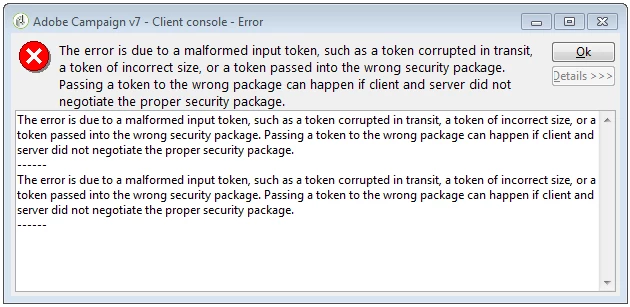
Have you ever seen this error? Maybe you know the solution?

Thank you,

Marcin

This post is no longer active and is closed to new replies. Need help? Start a new post to ask your question.
Best answer by ShrawanSaxena-1

This error usually comes when there is any issue while building a security context between the client application and a remote peer.

http://msdn.microsoft.com/en-us/library/windows/desktop/aa375505(v=vs.85).aspx)

You can check on below points to see if that helps

1- Check if IP through which you are accessing is white-listed

2- Clear the local cache(IE etc) and try again

3- Check with you network security team if there is any rule(proxy or other) which is resulting to error

4- Uninstall and install the console again

4 replies

ShrawanSaxena-1
Adobe Employee
ShrawanSaxena-1Adobe EmployeeAccepted solution
Adobe Employee
November 12, 2017

This error usually comes when there is any issue while building a security context between the client application and a remote peer.

http://msdn.microsoft.com/en-us/library/windows/desktop/aa375505(v=vs.85).aspx)

You can check on below points to see if that helps

1- Check if IP through which you are accessing is white-listed

2- Clear the local cache(IE etc) and try again

3- Check with you network security team if there is any rule(proxy or other) which is resulting to error

4- Uninstall and install the console again

ShrawanSaxena-1
Adobe Employee
Adobe Employee
November 17, 2017

Hi Marcin,

Any update on this ? Did you manage to resolve the issue ?

Thanks

Shrawan

marcinkacz
Level 3
November 20, 2017

Yes, I did. It was my company's firewall issue.

Thank you very much for your advices, Shrawan.

ShrawanSaxena-1
Adobe Employee
Adobe Employee
November 20, 2017

Hi Marcin,

Good to hear that issue is resolved now . I would request you to mark as helpful/correct answer, if your query has been answered, so that others can benefit.