Change in recipient #s | Community
Skip to main content
MLinett
April 17, 2018
Solved

Change in recipient #s

  • April 17, 2018
  • 5 replies
  • 2061 views

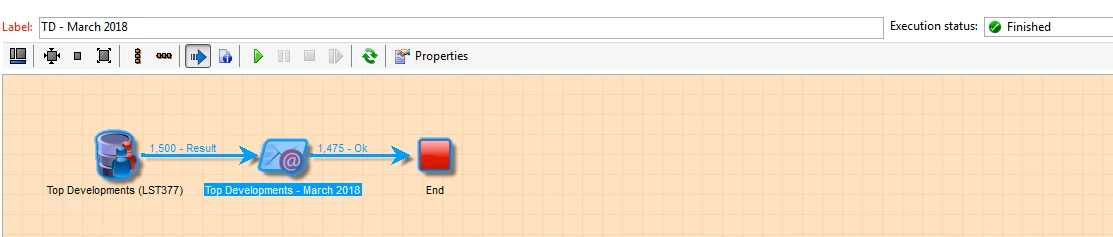
Typically when I send a delivery I start my workflow with a "read list" query. Last week I sent an email with 1500 people on my list but immediately Campaign only sends to 1475 and I am unsure why 25 were left off. What is the reason that campaign knocks people off the distribution at the start?

Doesn't look like an email was even attempted for those folks. There are no duplicates on my list. Not sure what else it could be.

This post is no longer active and is closed to new replies. Need help? Start a new post to ask your question.
Best answer by Jean-Serge_Biro

Hi Mlinett,

Please you should check the follow-up tab of your delivery (as synthesis), and in the delivery broadlogs tab, the Exclusion tabs (as detailed view).

You will probably find out either exclusion for quarantine, for fatigue pressure rules, emails in duplicates in the same delivery (it is not the same that deduplicating contacts), and so forth.

Regards.
J-Serge

5 replies

ShrawanSaxena-1
Adobe Employee
Adobe Employee
April 17, 2018

Hello,

It looks like 25 records were not processed due to some errors. You can review the delivery logs for the same.

O.K transition only shows successful processed records not errored one.

You can also generate the outbound transition for  error records  by checking the "process errors" checkbox at delivery property

arrow after an email delivery

MLinett
MLinettAuthor
April 17, 2018

Thank you! And how do I review what the errors on those 25 were? I'm looking through the "delivery" tab when I double click the email delivery but it only shows me the status of the 1475 that were processed, not the 25 excluded.

Jean-Serge_Biro
Jean-Serge_BiroAccepted solution
Level 10
April 17, 2018

Hi Mlinett,

Please you should check the follow-up tab of your delivery (as synthesis), and in the delivery broadlogs tab, the Exclusion tabs (as detailed view).

You will probably find out either exclusion for quarantine, for fatigue pressure rules, emails in duplicates in the same delivery (it is not the same that deduplicating contacts), and so forth.

Regards.
J-Serge

MLinett
MLinettAuthor
April 17, 2018

Also, just sent a test email to 2 recipients (1 email address was good and the other invalid) and included an outbound transition to process errors. The email sent to one but the errors line doesn't show anything. Did I do this incorrectly?

MLinett
MLinettAuthor
April 17, 2018

Thank you so much!